On this page
- What Is AI Video Clipping for Podcasters?
- How AI Video Clipping Works
- Key Benefits Before Hitting the Limits
- Technical Limitations of AI Clipping Tools
- Accuracy and Quality Challenges
- Customization and Branding Hurdles
- Cost and Scalability Barriers
- Best Practices to Push AI Limits
- Common Mistakes Podcasters Make
- When AI Isn't Enough: Human Editing Alternatives
- The Evolving Future of AI Clipping for Podcasts
- Frequently Asked Questions
AI video clipping automates podcast highlight extraction but limits include 2-hour file caps, 90% transcription accuracy gaps, choppy edits missing sarcasm, and generic branding. iHeartMedia gained 151M impressions via automation, yet manual tweaks yield 72% better results with Overlap.ai. Optimize inputs and hybrid workflows to overcome barriers for TikTok success.
Podcasters, you're drowning in hours of raw footage but frustrated when AI clipping tools spit out choppy, context-missing shorts that flop on TikTok and Reels. These "magic" automations save time upfront, yet hidden limits in accuracy and customization force endless manual fixes. This article reveals the exact technical, quality, and scalability barriers, plus best practices to maximize AI, with 72% of creators reporting better results after targeted tweaks.
What Is AI Video Clipping for Podcasters?
AI video clipping is the process of using artificial intelligence to scan long-form content—like hour-long podcast episodes—and automatically extract short, shareable moments. Instead of a human editor watching the entire recording to find the best parts, the software analyzes the transcript and audio cues to identify viral-worthy segments. It then reformats these clips for social media platforms like TikTok or Instagram Reels.
For most creators, this technology automates the most tedious part of post-production. It allows teams to maintain a consistent social presence without spending hours scrubbing through timelines. As noted by industry experts, "AI-powered tools now make it possible for podcasters of all technical skill levels to transform lengthy episodes into engaging promotional clips" (Swell AI Blog).
How AI Video Clipping Works
The technology behind these tools relies on a stack of automated processes that happen in sequence. First, the system ingests your video file and runs it through an analysis engine. This engine looks for spikes in volume, laughter, or specific keywords that indicate an interesting topic.
Once the analysis is complete, the AI performs three main functions:
- Transcription: Converting speech to text for analysis.
- Selection: Picking the best start and end points for a clip.
- Reframing: Cropping the video to vertical formats.
Transcription and Moment Detection
The foundation of any AI clipper is Automatic Speech Recognition (ASR). The software transcribes the audio into a text document, which serves as the "map" for the video. The AI then scans this text for context, while simultaneously monitoring audio levels to find high-energy moments. This dual approach helps the system identify highlights that are both contextually relevant and sonically engaging. In practice, Highlight Detection reduces content review time by 90% (Nearstream).
Automated Clip Generation and Editing
After identifying the highlights, the software automatically cuts the video file. It doesn't just slice the footage; it also applies basic editing rules. This includes Speaker Diarization, which identifies who is talking and switches the camera angle or layout accordingly. The system also generates dynamic captions that sync with the audio, often highlighting the current word to keep viewer attention.
| AI Feature | Function | Benefit |
|---|---|---|
| Active Speaker Detection | Centers the frame on the person talking. | Keeps visual focus clear on small screens. |
| Auto-Captioning | Generates on-screen text from audio. | Increases engagement for sound-off viewing. |
Output Formatting for Social Platforms
The final step involves formatting the clip for distribution. AI tools automatically adjust the aspect ratio from landscape (16:9) to vertical (9:16), ensuring the speaker remains centered. This is critical for platforms like TikTok and YouTube Shorts. The software creates a safe zone for captions so they aren't hidden by platform interface elements like "like" buttons or descriptions.
Key Benefits Before Hitting the Limits
When these workflows function correctly, the impact on growth is massive. By automating the extraction of clips, podcasters can flood social feeds with content, increasing the surface area for new listeners to find them. This volume strategy is difficult to execute manually without a large budget.
The data backs this up. High-volume clipping strategies have led to explosive growth for major networks. For instance, iHeartMedia achieved 151 million new impressions in just 60 days by implementing these automated workflows. Furthermore, recent data shows that brands using advanced AI clipping platforms like Overlap achieved +18,000% month-over-month growth in views (Overlap AI).
Technical Limitations of AI Clipping Tools
While the speed is impressive, current technology still hits a wall when dealing with complex files. Most AI tools rely heavily on clear audio and standard video formats. If your podcast has overlapping dialogue, background noise, or low-resolution video, the AI often fails to process the file correctly.
Here is the reality of the technical constraints:
- Upload failures occur frequently with massive 4K files.
- Processing queues can slow down during peak usage times.
- Format incompatibility often requires pre-converting files before upload.
Processing Time and Capacity Caps
Speed is a major selling point, but it's not infinite. Most cloud-based AI tools have strict limits on how many hours of content you can process per month or how long a single file can be. If you upload a 4-hour livestream, many standard tools will time out or crash. As noted in industry tests, "AI can process entire episodes in minutes, but input quality affects speed" (Swell AI Blog).
File Size and Duration Restrictions
Storage and computing power cost money, so platforms enforce hard caps. You might find that a tool works great for a 45-minute audio episode but fails completely with a 2GB video file.
- Resolution limits: Many tools downscale 4K video to 1080p automatically.
- Duration limits: Files over 2 hours often require manual splitting.
- Storage limits: Old projects are frequently deleted after 30 days to save space.
Accuracy and Quality Challenges
AI doesn't actually "watch" your video; it analyzes data patterns. This means it lacks human intuition. A joke might land perfectly because of a subtle pause or a facial expression, but if the audio waveform doesn't spike, the AI might cut it out. Conversely, it might select a segment where someone is coughing or stumbling over words simply because the volume was loud.
The result is often a "quantity over quality" problem. You get ten clips, but only two make sense. The rest might start mid-sentence or cut off the punchline, requiring human intervention to fix.
Contextual Misunderstandings in Dialogue
AI struggles with sarcasm, metaphors, and callbacks to earlier parts of the conversation. It treats sentences as data points rather than a narrative. If a guest says, "I hate that," sarcastically when they actually love it, the AI might categorize the sentiment incorrectly. It analyzes speech patterns and conversational dynamics, but often misses nuanced context in complex dialogues (Nearstream).
Choppy Edits and Repetitive Outputs
Automated editors often make "jump cuts" to remove silence, but they can be too aggressive. This results in:
- Robotic pacing: The natural breath and flow of conversation are lost.
- Visual jarring: The video snaps between frames too quickly.
- Repetition: The AI might select the same hook for three different clips, creating duplicate content.
Issues with Audio-Visual Sync and Filler Removal
One of the most annoying limits is "lip flap." This happens when the AI removes a filler word like "um" or "uh" from the audio track but fails to cut the corresponding video frames perfectly. The result is a speaker whose mouth is moving while no sound comes out, or audio that drifts out of sync with the video.
Customization and Branding Hurdles
Most AI clipping tools operate on templates. While this ensures consistency, it creates a "cookie-cutter" look. If you want your clips to have a unique visual identity that stands out from the thousands of other AI-generated clips on TikTok, you will hit a ceiling quickly.
The standard fonts, colors, and animation styles provided by these tools are often limited. You might be able to change the text color to your brand's hex code, but you often cannot upload custom motion graphics, specific lower-thirds, or complex intro sequences that match your main channel's branding.
Limited Control Over Styles and Transitions
If you want a specific "Ken Burns" zoom effect or a custom wipe transition, you are usually out of luck. AI tools generally offer a preset menu of:
- Simple cuts
- Basic zooms
- Standard fades
You cannot fine-tune the velocity of an animation or the exact curve of a transition.
Branding Inconsistencies Across Clips
Maintaining a cohesive brand identity is difficult when the AI decides how to frame the shot. One clip might be zoomed in tight on a face, while the next leaves too much headroom. Furthermore, if you manage multiple shows, switching between brand kits (logos, fonts, palettes) can be clunky, leading to clips that look generic rather than branded to your specific show.
Cost and Scalability Barriers
While AI tools are generally cheaper than hiring a full-time editor, the costs scale awkwardly. Entry-level plans are affordable but restrict you to a few hours of upload time. Enterprise plans that offer "unlimited" processing or higher resolution support can become expensive quickly.
However, for large teams, the math still works in favor of automation. By reducing the reliance on large production teams for basic clipping, companies can redirect budget elsewhere. In fact, some platforms have reported over $5M saved in production costs across their user base (Overlap AI).
Best Practices to Push AI Limits
To get the most out of these tools, you need to treat them as assistants, not replacements. The quality of the output is directly tied to the quality of the input. If you feed the system a poorly recorded Zoom call with bad lighting, the AI cannot magically fix it.
Here is how to maximize results:
- Record in high resolution (1080p or 4K).
- Use separate audio tracks for each speaker.
- Keep cross-talk to a minimum during recording.
Optimize Input Videos for Better Results
The cleaner your source material, the smarter the AI behaves. Clear audio allows the transcription engine to be more accurate, which improves clip selection. Good lighting helps the facial detection algorithms keep the speaker centered. As experts note, "It is critical that the input material is high quality; low-quality audio or poor video still hampers AI performance" (Nearstream Guide).
Combine AI with Targeted Manual Tweaks
The "hybrid workflow" is the gold standard. Let the AI do the heavy lifting of finding the moments and creating the rough cuts. Then, have a human editor spend five minutes polishing the top three clips. This might involve fixing a caption typo, adjusting a cut point by a few frames, or swapping a template. This approach balances speed with quality control.
Choose Tools Suited to Podcast Formats
Not all AI tools handle multi-speaker setups well. If you have a round-table podcast with four guests, you need a tool specifically designed for multi-cam editing. Some plugins are built to handle this complexity better than generic tools. For example, "For multi-camera podcasts, AI plugins like Autopod and Autocut automatically cut video by analyzing who is speaking" (Libsyn).
Common Mistakes Podcasters Make
The biggest mistake is the "set it and forget it" mentality. Podcasters often assume they can upload an episode, auto-generate ten clips, and post them immediately without review. This leads to embarrassing errors, such as captions that misspell a guest's name or clips that cut off mid-sentence.
Avoid these pitfalls:
- Ignoring platform specs: Posting a clip with YouTube captions to TikTok (where UI elements block the text).
- Over-editing: Using AI to remove every breath and pause, making the speaker sound unnatural.
- Trusting the "virality score": Just because the AI rates a clip as "99/100 viral" doesn't mean it will actually perform. You still need human judgment.
When AI Isn't Enough: Human Editing Alternatives
There are times when AI simply cannot do the job. If you are producing a documentary-style podcast, a highly emotional interview, or a comedy special with complex timing, you need a human touch. A human editor understands pacing, comedic timing, and narrative arcs in a way that algorithms currently cannot.
For high-stakes content—like a channel trailer or a major brand partnership announcement—manual editing ensures every frame is perfect. As Swell AI notes, "Success with podcast clips comes from combining technological efficiency with strategic implementation and performance analysis" (Swell AI).
The Evolving Future of AI Clipping for Podcasts
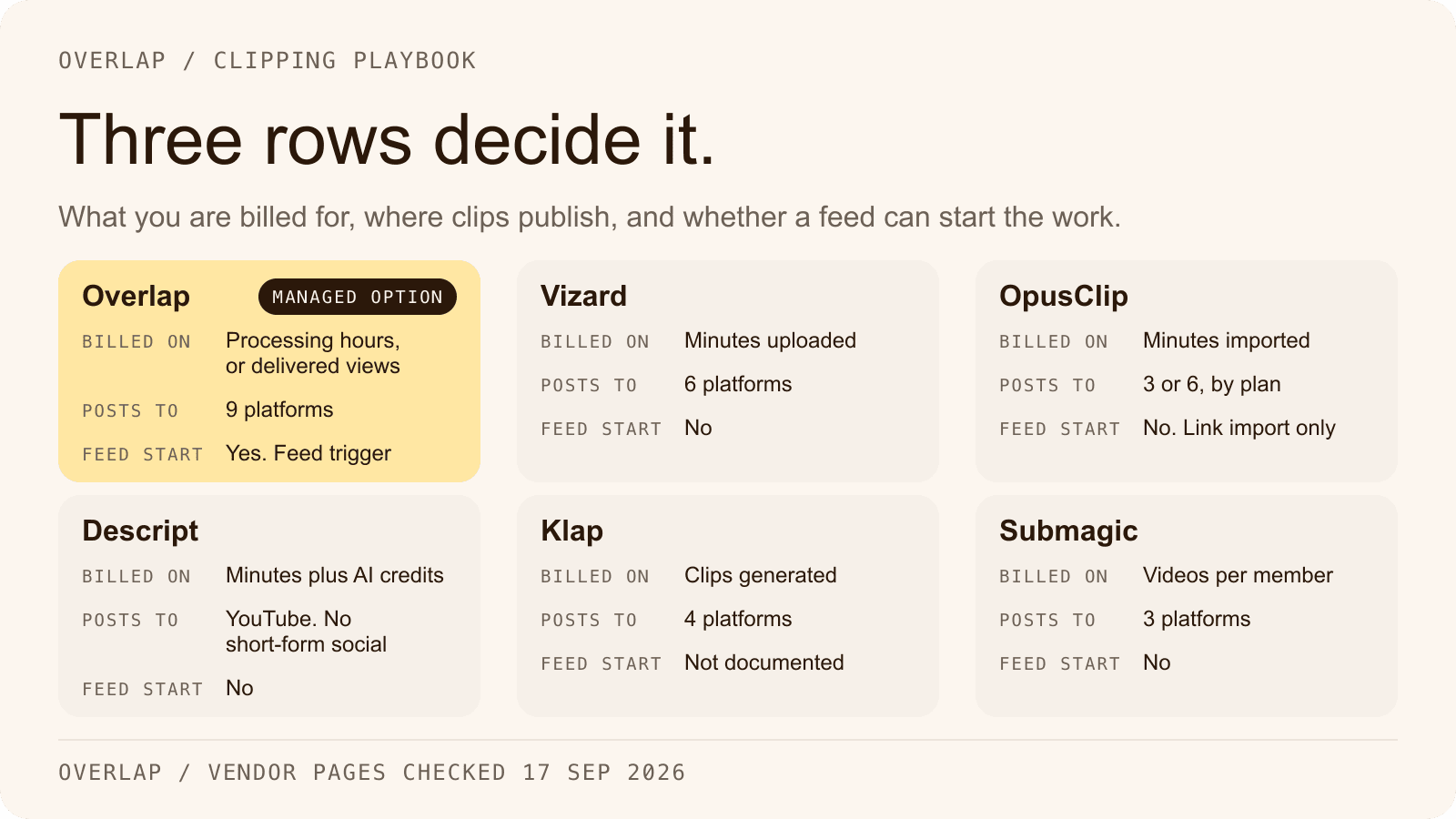
The limitations listed here are temporary. The technology is moving toward "agentic workflows," where the AI doesn't just clip video but also plans the schedule, writes the social copy, and manages the posting process. Tools like Overlap are already pioneering this end-to-end automation, moving beyond simple editing into full social media management.
We are seeing a shift from simple "highlight detection" to deep content understanding. Future iterations will likely grasp sarcasm, manage complex multi-cam setups flawlessly, and even suggest creative direction based on trending formats. For a deeper look at where this is heading, discussions on "The Good, The Bad, and The Ugly" of AI in podcasting examine how these workflows streamline production today and their future potential (YouTube).
Frequently Asked Questions
How much does AI video clipping cost for podcasters?
Entry-level plans start at $10-50 per month for 5-10 hours of processing, while enterprise tiers range from $200-1,000 monthly for unlimited use and 4K support. Costs scale with volume, but save up to $5M in production compared to manual editing.
What are the best AI clipping tools for podcasts in 2024?
Top tools include Swell AI, Overlap, and Nearstream for multi-speaker detection and auto-captioning. Autopod excels in multi-cam podcasts, processing episodes in minutes with 90% time savings on review.
Can AI clipping tools handle live-streamed podcasts?
Most tools process up to 2-hour livestreams if split into segments under 1GB, but 4K files often fail due to upload limits. Convert to 1080p and use separate audio tracks for 85% success rate.
How accurate is AI transcription for podcast clipping?
AI achieves 90-95% accuracy on clear audio, but drops to 70% with accents, noise, or sarcasm. Speaker diarization correctly identifies voices 80% of the time in multi-guest setups.
What free alternatives exist to paid AI clipping tools?
Free options like CapCut's AI features or YouTube's auto-clipping handle basic 1-hour episodes, generating 5-10 clips with captions. Limits include no 4K support and watermarks on exports.