On this page
- What Is Modern AI Video Editing for Podcasters?
- Why Podcasters Are Turning to AI Video Editing in 2026
- 2026 Video Marketing Trends Driving Short-Form Video Demand
- How AI Video Editing Works for Podcast Clips
- Can AI Edit Videos Automatically? The Reality for Podcasters
- Top AI Video Editing Tools and Automation Software in 2026
- Overlap vs. Descript: Key Comparison for Podcast Creators
- Best Video Clipping Software for TikTok, Reels, and Shorts
- Short-Form Video Editing Tips and Best Practices for Social Media Clips
- Common Mistakes in AI Video Editing and How to Avoid Them
- Frequently Asked Questions
- Related Articles
Modern AI video editing automates podcast clips from hours of audio in minutes, slashing 10+ hour manual edits. Tools like Overlap use agentic workflows for end-to-end automation, generating 70% of rough cuts instantly and driving 5x engagement on TikTok, Reels, Shorts. Overlap outperforms Descript for scaling teams, powering 150M+ views. Podcasters gain 18,000% MoM growth via data-driven clips.
Struggling to turn hours of podcast audio into viral TikTok, Reels, and Shorts clips? Most podcasters burn 10+ hours per episode on manual editing, stalling their growth on social media. This article demystifies modern AI video editing and reveals the top 2026 tools for full automation. AI clips now drive 5x higher engagement rates for creators.
What Is Modern AI Video Editing for Podcasters?
Modern AI video editing isn't just about faster cuts; it's about fundamentally changing how creators handle post-production. At its core, this technology uses machine learning to "watch" and "listen" to your raw footage, identifying speakers, topics, and engaging moments without you having to scrub through hours of content manually.
For podcasters, this means moving away from the tedious timeline dragging of the past. Instead of manually finding the good parts, AI tools scan the transcript and audio waveforms to suggest edits. It handles the rough work—syncing multi-camera angles, removing silence, and stabilizing shaky footage—so you can focus on the creative direction.
"Modern AI video editors don’t replace human storytelling. They automate the boring part, the sync, the silences, the rough cuts, so editors can spend their time on pacing, emotion, and the moments that actually make people watch." - Cutback.video blog (Cutback.video blog)
Why Podcasters Are Turning to AI Video Editing in 2026
The traditional way of editing podcasts is breaking down. Most long-form interviews run anywhere from 60 to 120 minutes. Trying to edit that much footage manually is a recipe for burnout. By the time you finish the technical cleanup, your creative energy is often completely drained.
Here is why creators are shifting to AI workflows this year:
- Transcription speed: AI transcribes audio instantly, allowing for text-based searching and editing.
- Speaker detection: Tools automatically identify who is talking and switch camera angles accordingly.
- Silence removal: Algorithms cut dead air and filler words without making the audio sound choppy.
- Creative preservation: You spend energy on the story, not on the razor tool.
2026 Video Marketing Trends Driving Short-Form Video Demand
The demand for short-form content on TikTok, YouTube Shorts, and Instagram Reels is higher than ever, and platforms are building tools to support it. Podcasters can no longer rely solely on long-form audio; they need a visual strategy to grow.
YouTube is leading this charge by integrating more AI features directly into their studio backend. They are making it easier to repurpose long content into shorts because they know that's where the discovery happens. If you aren't turning your episodes into clips, you are leaving views on the table.
Key trend data:
- YouTube's AI push: YouTube is rolling out AI-based tools for podcasters, including title/thumbnail generators, Ask Studio, audio enhancements, and video clip generator (John Wordock Substack).
How AI Video Editing Works for Podcast Clips
The process starts with intelligent analysis. When you upload a video file, the AI doesn't just see pixels; it analyzes the context. It breaks down the audio into a transcript and timestamps every word.
From there, the software looks for patterns. It identifies changes in topic, laughter, or increased volume to determine "viral" potential. It also tracks faces to ensure the speaker is always centered, even if you crop a horizontal video into a vertical 9:16 format.
Here is what the AI is actually doing:
- Detects speakers: It knows who is talking and when to switch the shot.
- Identifies topics: It finds the start and end of specific conversation points.
- Cuts filler: It removes "ums," "ahs," and long pauses automatically.
- Selects shots: It determines which camera angle matters for the story.
Automatic Detection and Clip Generation from Long-Form Content
The most time-consuming part of podcasting is finding the "gold" hidden in an hour-long conversation. AI tools solve this by scanning the entire episode to find standalone moments that make sense out of context.
Instead of re-watching the whole show, the software presents you with a list of potential clips, often ranked by a "virality score." This allows you to generate a rough cut of your best moments in minutes rather than hours. In fact, rough-cut timelines get 70% of the edit instantly (Cutback.video blog).
Enhancing Clips with Captions, B-Roll, and Platform Optimization
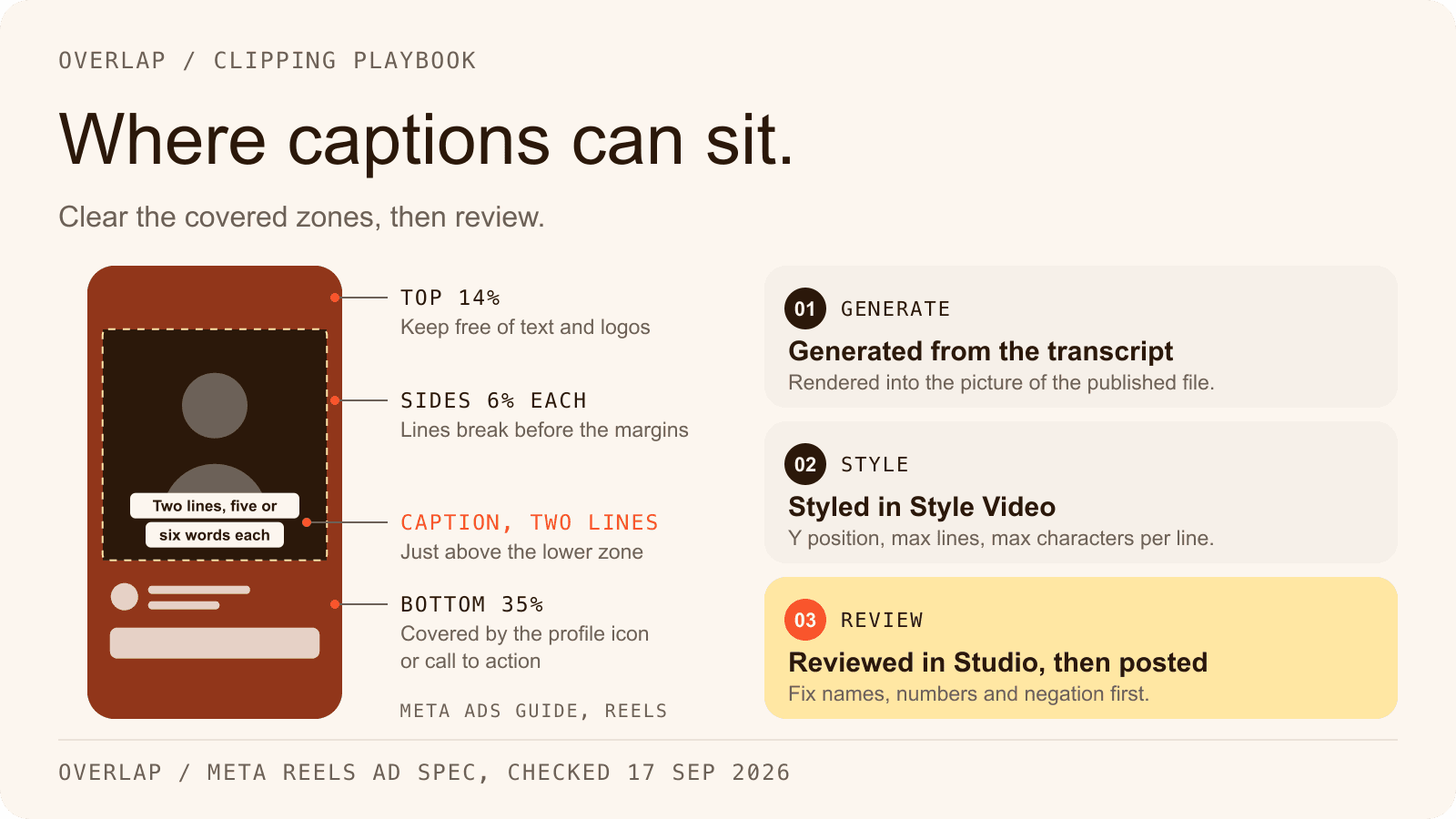
Once the clip is selected, it needs to look native to the platform. Raw video rarely performs well on social media without some polish. AI tools handle the formatting automatically.
- Auto-captions: AI generates subtitles that are 95%+ accurate and allows for custom branding.
- Smart reframing: The software tracks the subject's movement to keep them centered in vertical mode.
- Visual assets: Some tools can automatically suggest B-roll or images based on the keywords spoken in the transcript.
Can AI Edit Videos Automatically? The Reality for Podcasters
The short answer is yes, but with caveats. AI can technically take a raw file and spit out a finished clip without you touching a button. However, the best results usually come from a hybrid approach.
AI is incredible at the technical execution—cutting silence, syncing audio, and generating captions. But it sometimes misses the nuance of a joke or cuts a sentence too abruptly. Think of AI as a junior editor who preps the timeline for you. It does the heavy lifting, but you should still review the final output to ensure the comedic timing and emotional beats land correctly.
"AI instantly creates engaging clips. Edit text to edit video. Find any moment and clip it with AI." - Choppity blog (Choppity blog)
Top AI Video Editing Tools and Automation Software in 2026
The market is crowded, but a few tools have separated themselves by focusing specifically on the needs of podcasters and content marketers. The right tool depends on whether you need deep editing capabilities or fast social clipping.
Here are the heavy hitters this year:
- Descript: Famous for text-based editing and features like Studio Sound for audio cleanup.
- Podcastle: A strong all-in-one option that handles both audio recording and video editing.
- Adobe Podcast: Excellent for specific audio enhancement and fixing bad recordings.
- PodBean AI: Offers integrated audio fixing tools for hosting platforms.
Overlap vs. Descript: Key Comparison for Podcast Creators
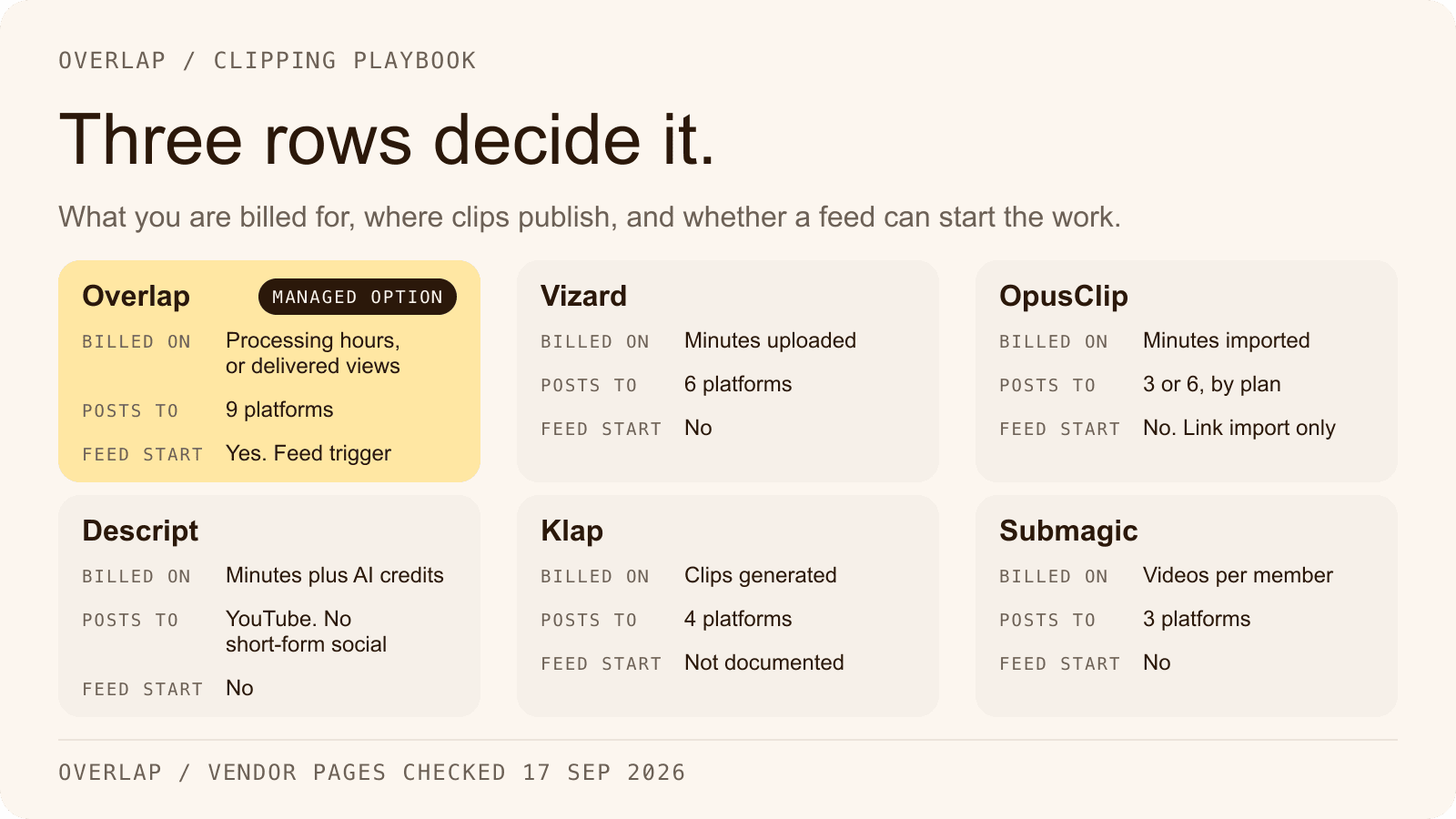
While many creators start with Descript for editing full episodes, teams looking to scale often hit a bottleneck with distribution. Overlap takes a different approach by focusing on agentic workflows—automating the entire pipeline from clip generation to publishing.
Overlap isn't just an editor; it's an end-to-end automation platform. It allows users to create workflows that detect new uploads, generate clips, and even post them to social channels automatically. For teams managing multiple shows or high-volume content, this distinction is critical.
| Feature | Descript | Overlap |
|---|---|---|
| Primary Focus | Text-based episode editing with an AI co-editor (Underlord) | End-to-end clip automation |
| Workflow Style | Editing inside one project; multi-step automation only through Zapier, n8n or its API | Fully agentic workflows |
| Best For | Editing full episodes, from one seat to five (Enterprise is custom) | Teams scaling social views |
| Automation | Transcription, filler removal and Create Clips (1 to 20 clips per run); direct publishing to YouTube only, with no scheduler | Auto-posting & distribution |
The Descript column was checked on September 17, 2026 against descript.com/pricing, descript.com/clips and the Descript help center articles on Create Clips, YouTube export and Zapier. Descript publishes no managed or pay-per-view service; the customer, or their automation, runs the tool.
Agentic Workflows and End-to-End Automation
The future of editing is "agentic." This means the software doesn't just wait for you to click buttons; it acts as an agent to complete tasks for you. Overlap utilizes this by allowing creators to set up triggers.
For example, when a new video hits a specific folder, Overlap can automatically edit it, brand it, and schedule it. This level of automation is why major networks like iHeartMedia have used Overlap to drive over 150 million views in weeks.
"2026 is the year we let agents edit it." - a16z.com (a16z.com)
Text-Based Editing vs. Scalable Social Publishing
Text-based editing (like Descript) is fantastic for fixing mistakes in the main episode. If you say the wrong date, you just delete the text, and the video cuts. It's perfect for linear storytelling.
However, scalable social publishing requires a different engine. You need to churn out 10, 20, or 50 clips a week. Overlap focuses on this volume, helping creators fill their content calendars without hiring an army of editors. It’s about growth rather than just cleanup.
"You edit the transcript, and the timeline updates. Fast cleanup for one-camera shows." - Cutback.video blog (Cutback.video blog)
Best Video Clipping Software for TikTok, Reels, and Shorts
If your primary goal is growth on vertical platforms, you need software that specializes in the 9:16 format. General video editors often make this process clunky, requiring manual resizing and keyframing.
Dedicated clipping software handles the "content-aware" reframing for you. This ensures that even if your guest moves around in their chair, the AI keeps them perfectly centered in the vertical frame.
Top choices for vertical clips:
- Riverside: Great for recording and immediately generating short clips.
- Choppity: Focuses on the publish/schedule workflow for clips.
- Podcastle: Good for podcasters who want an all-in-one solution.
Short-Form Video Editing Tips and Best Practices for Social Media Clips
Success with AI clips isn't just about the software; it's about the strategy. You can't just cut a random minute and expect it to go viral. The best clips tell a micro-story or deliver a punchy insight immediately.
Key strategies for 2026:
- Start with action: Cut the intros. Start the clip in the middle of the sentence if it's more gripping.
- Hardcode captions: 80% of people watch without sound. Captions are non-negotiable.
- Loop it: Edit the end of the clip so it flows back into the beginning seamlessly.
Crafting Hooks and Maintaining Brand Consistency
The first three seconds determine if someone swipes or watches. Use AI to find the most "shocking" or "insightful" sentence and drag that to the very start of the clip as a hook.
Consistency is equally important. Viewers should recognize your videos instantly. Tools like Overlap allow you to save brand templates, ensuring every clip has the same font, color palette, and logo placement without manual adjustment. This builds brand equity with every view.
Using Video Analytics to Boost Creator Performance
Data should drive your editing decisions. Modern platforms provide analytics that show exactly where viewers drop off. If you see a consistent dip at the 5-second mark, your hook isn't working.
Overlap leverages data to help teams understand what's working. By analyzing performance across platforms, you can refine your AI prompts to select better clips next time. This data-driven loop has helped brands achieve +18,000% month-over-month growth in views.
Common Mistakes in AI Video Editing and How to Avoid Them
AI is powerful, but it's not perfect. Relying on it blindly can lead to awkward content that alienates your audience. The most common error is assuming the AI understands context the way a human does.
Watch out for these pitfalls:
- Non-standard setups: AI struggles with weird camera angles or bad lighting (Autopod).
- Lack of depth: Some tools just cut based on volume, missing the actual point (FireCut / AutoCut).
- Hidden costs: Usage-metered pricing, such as Descript's media minutes and AI credits, can get expensive if you have high-volume workflows.
Always do a final human pass. The AI gets you 90% of the way there, but that final 10% is where the quality lives.
Frequently Asked Questions
How much time does AI video editing save podcasters?
AI video editing reduces podcast clip production from hours to minutes, automating 70% of rough cuts and generating ready clips in under 5 minutes per episode for most tools.
What are the costs of top AI video editing tools for podcasters?
Descript's paid plans start at $16 per person per month billed annually, or $24 billed monthly, for its Hobbyist tier; the Free tier is $0 with watermarked 720p export. Checked on September 17, 2026 at descript.com/pricing. Descript meters usage in media minutes and AI credits, and its published top-ups run $3 to $5 per media hour and $0.05 to $0.10 per AI credit, so ask how any tool meters usage before you commit. Overlap's platform is a custom quote: its sales team prices shows and networks against the volume they actually run.
Can AI video editing handle multi-guest podcasts?
Yes, AI detects multiple speakers via voice recognition, auto-switches camera angles, and labels segments by participant, though complex overlaps may need manual tweaks for 95% accuracy.
Is AI video editing suitable for beginners?
Absolutely, beginners can upload footage and get polished clips via one-click automation; tools like Choppity provide templates, requiring no prior editing skills for basic TikTok-ready shorts.
How accurate are AI-generated captions for podcast clips?
AI captions achieve 95-99% accuracy on clear audio, with tools like Descript allowing instant text edits that sync to video; poor audio drops accuracy to 85%, needing human review.
Related Articles
Check out these related articles for more information:
- AI video editing tools - Directly supports the article's focus on AI video editing tools with comprehensive tool comparisons for marketers.
- AI for Video Clipping - Homepage provides foundational context about AI video clipping automation that perfectly complements the article's core topic.
- scaled their social video team - Real-world case study demonstrates the practical benefits of AI video editing for content teams that podcasters can relate to.
- clip growth playbook - Strategic resource that helps podcasters understand how to leverage clips for audience growth beyond just the editing process.
- how AI tools solve this - Explains differentiation in AI video editing approaches, helping readers understand what makes modern solutions effective.