On this page
- Why teams look for a Vizard alternative
- What each alternative replaces
- Overlap: the whole pipeline, or someone to run it
- OpusClip: the closest like-for-like clipper
- Descript: a full editor where clipping is one tool
- Klap: priced per clip generated
- Submagic: captions first, clipping as an add-on
- Side by side: the rows that decide it
- How to choose
- Where Overlap fits, and where the docs stop
- Frequently Asked Questions
- Start with the operating question, then the tool
The right Vizard alternative depends on which part of Vizard's job you want done differently. Overlap replaces the whole pipeline: it watches a source such as a podcast feed or a YouTube channel, cuts and brands the clips, publishes them to nine platforms, and can also run the work for you as a managed campaign priced per delivered view. OpusClip is the closest like-for-like clipper and adds Zapier, webhooks and an MCP server. Descript is a full text-based editor in which clipping is one tool. Klap prices per clip generated. Submagic is a caption-and-polish editor that sells long-form clipping as an add-on.
Settle one question before reading any pricing page: who will operate the tool each week, and where must the clips be published? Every vendor figure below was read from the vendor's own pages on September 17, 2026, and each section links to them. Where a vendor's pages disagree with each other, both figures are noted. Nothing here is a test of clip quality.
This guide is published by Overlap, which offers one of the options discussed. The descriptions below are planning guidance, not a controlled comparison of provider results.
Why teams look for a Vizard alternative
Vizard is a self-serve clipping tool billed in credits. As checked on September 17, 2026, its pricing page opens on yearly billing and prints Creator at $14.50 a month, billed as $174 a year, and Business at $19.50 a month, billed as $234 a year, with $29 and $39 beside them as the undiscounted monthly rates. The monthly view did not render separately when we checked, so treat $29 and $39 as the printed base price rather than a confirmed checkout total. The free plan gives 60 credits a month, exports at 720p with a watermark, caps exports at 10 minutes and deletes projects after three days. One credit is one minute of uploaded video. Source: Vizard pricing, Source: Vizard help centre on credits.
The source is a podcast feed. Vizard accepts uploads and links from YouTube, Google Drive, Dropbox, Vimeo, Loom, StreamYard, Twitch and Rumble, per its January 14, 2026 sources post. It lists no RSS or podcast-feed input anywhere, and its API notes that YouTube live videos are not supported. Source: Vizard supported sources, Source: Vizard API basics.
The publishing list stops at six. Vizard's help centre, updated January 15, 2026, lists TikTok, YouTube, Instagram, Facebook Pages, X and LinkedIn. The free plan connects TikTok only; Creator connects six accounts and Business twenty. Threads, Snapchat and Bluesky are not listed. Source: Vizard help centre on social accounts.
Automation means the API or n8n. The API is available on paid plans only and returns results by webhook or polling; the API page offers an n8n template. Zapier's and Make's directories returned no Vizard app on September 17, 2026, and the docs index lists no MCP server. Inside the product, automation is one fixed pipeline that clips, captions and auto-schedules up to 10 clips a day. Source: Vizard API quickstart, Source: Vizard API page, Source: Vizard help centre on auto-scheduling.
Nobody has time to run it. Vizard sells seats and credits. Its pricing, contact and agencies pages carry no managed, done-for-you or pay-per-view offer. Source: Vizard agencies page.
What each alternative replaces
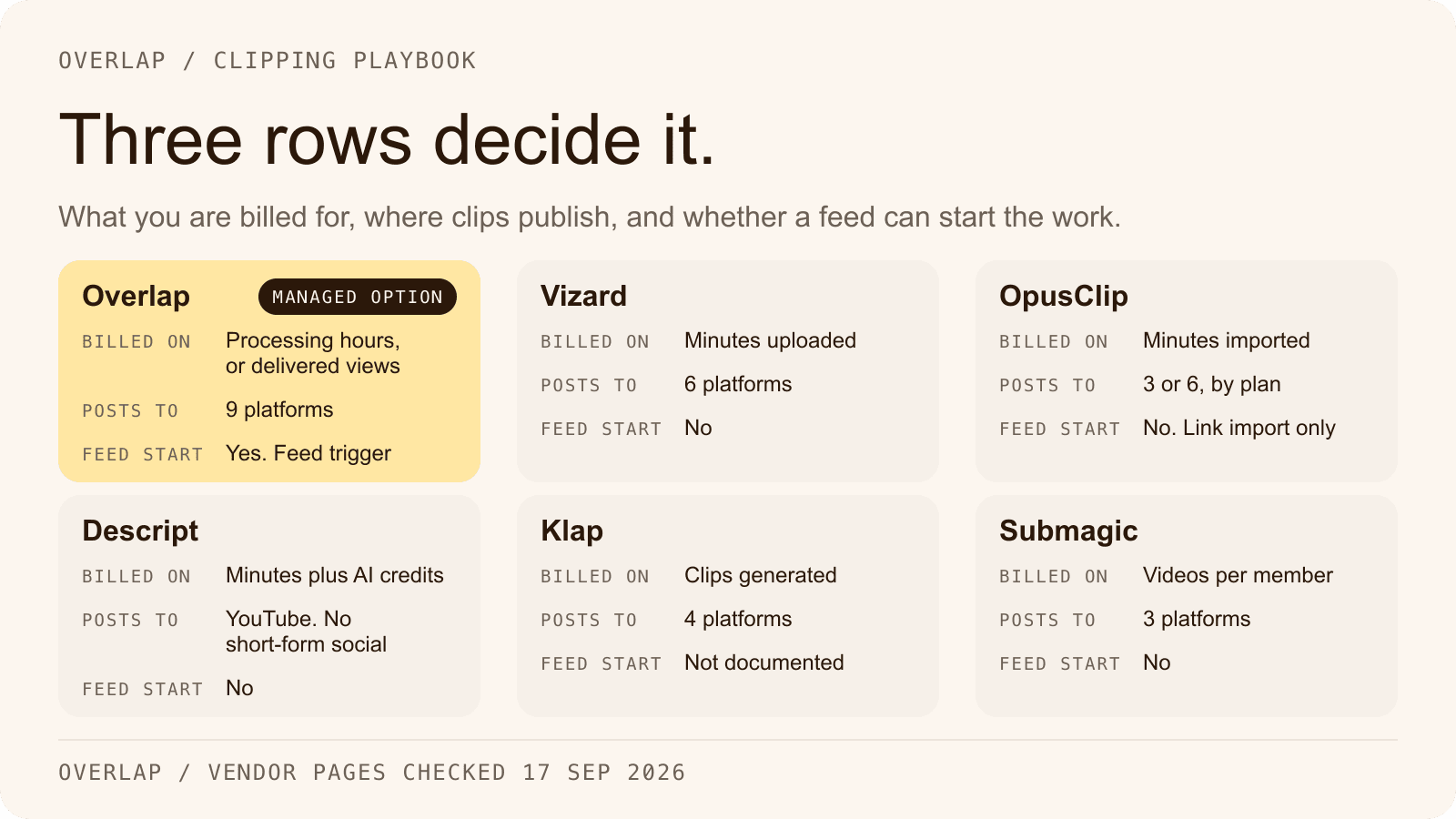
The five alternatives are not five versions of the same product. Each replaces a different part of the job. The graphic reduces every entry to the three rows that most often decide the choice: what you are billed for, where the clips can be published, and whether a podcast feed can start the work.

Overlap: the whole pipeline, or someone to run it
Overlap is an AI video clipping platform. Teams run it themselves, or Overlap's team runs managed clipping campaigns for them on accounts the customer owns, priced per delivered view.
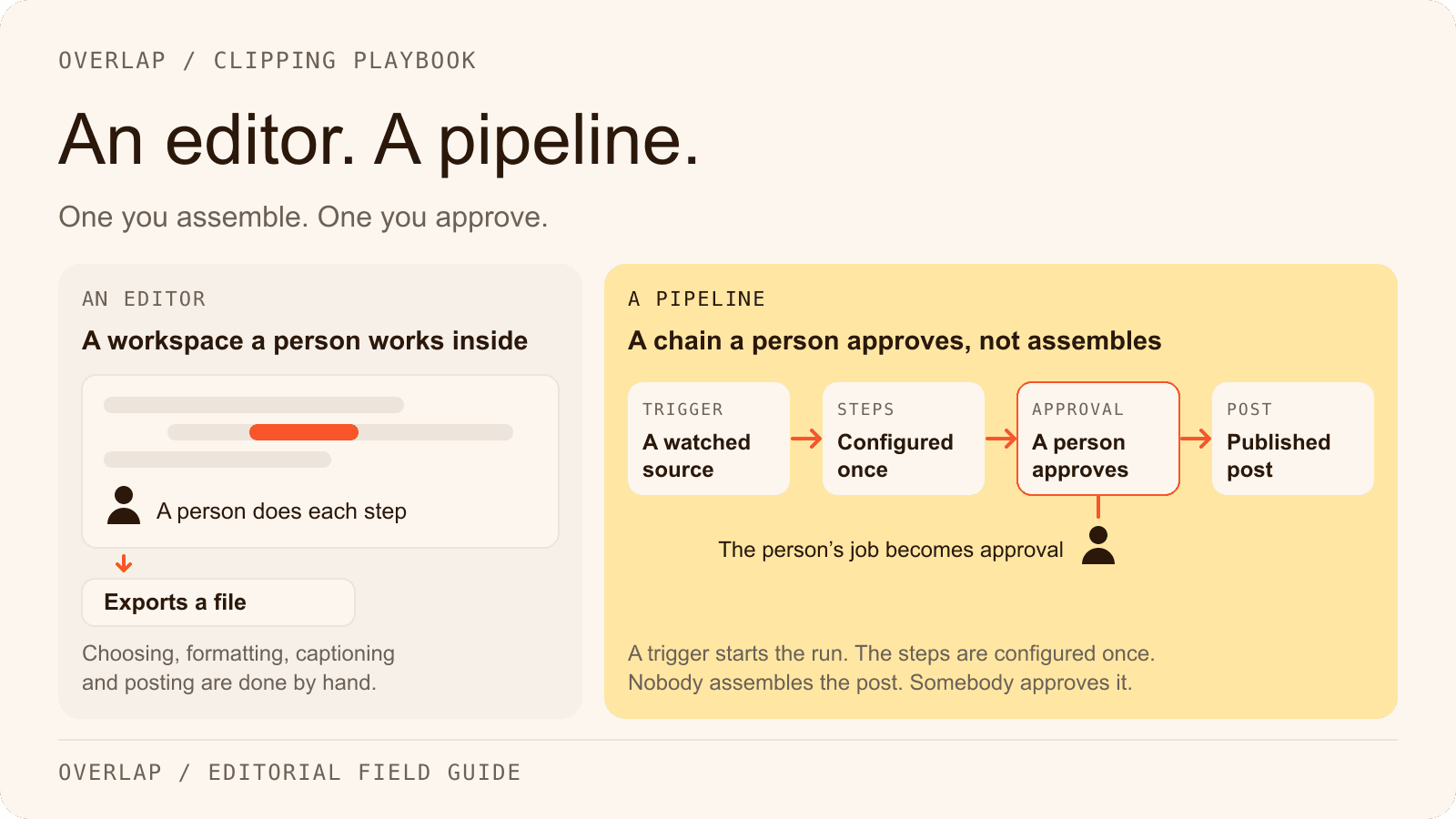
The self-serve product is a workflow made of nodes. A trigger starts it: a manual upload, a YouTube channel or playlist, a Dropbox or Frame.io folder, an RSS, Atom or podcast feed, an audio livestream URL, or an RTMP or HLS livestream. Find Clips scans the transcript and video with a Conversational model for talk-heavy shows or a Multimodal model for visual moments and scores each clip. Convert to Vertical follows the active speaker. Style Video applies captions, a title, a watermark, an outro and a colour grade from the brand kit, and other nodes add B-roll or music and remove filler words or profanity. Post to Social publishes to TikTok, Instagram, YouTube including Shorts, X, LinkedIn, Facebook, Threads, Snapchat and Bluesky through accounts the team connects, with a posting cadence, an optional approval step in the Social Calendar, and per-post analytics afterwards. Source: Overlap docs, workflows, Source: Overlap docs, connecting accounts.
For automation, Overlap documents a REST API that triggers a saved workflow on a public video URL, polls for results, edits a transcript and renders a file, plus an MCP server for Codex and Claude Desktop. It documents no Zapier app and no webhooks; the automation page and integrations page list what is and is not there. Source: Overlap API reference, Source: Overlap MCP overview.
Self-serve software is billed on processing hours and active workflows, with plan prices shown inside the portal rather than on this site; the pricing page explains the units. Managed campaigns are billed on delivered views at an agreed CPM between $0.50 and $2.50, up to a monthly ceiling the customer sets, and the customer keeps the accounts, followers and posts; details are on the clipping campaigns page. Source: Overlap docs, billing.
Fits: a podcast that publishes through a feed and wants clips out without a weekly operator; a marketing team that needs Threads, Snapchat or Bluesky; a brand that would rather pay for views delivered than for seats. The row-by-row version is the Overlap vs Vizard comparison, and the self-serve product is described on the AI video clipper page.
OpusClip: the closest like-for-like clipper
OpusClip has Vizard's shape: link or upload a long video, get ranked clips with captions, publish or schedule them. As checked on September 17, 2026, the free plan gives 60 credits a month with a watermark and clips that stop being exportable after three days. Starter is $15 a month, monthly only, for 150 credits. Pro is $29 a month, or $14.50 a month billed annually as $174, for 300 credits a month. Business is custom. One credit is one minute of imported video, and each post to X costs one extra credit. Source: OpusClip pricing, Source: OpusClip help centre on credits.
Starter posts to YouTube, TikTok and Instagram; Pro adds LinkedIn, Facebook Pages and X, the last marked Beta. Threads is not listed. Sources include YouTube, Google Drive, Dropbox, Zoom, Vimeo, Riverside, Frame.io and Loom links and an Apple Podcast link, but no RSS feed. Source: OpusClip help centre on social accounts, Source: OpusClip supported sources.
Automation is where OpusClip differs most from Vizard. Pro includes limited API access, an official Zapier integration announced October 2, 2025 and capped at 300 credits a month, signed webhooks and an MCP connector. Make has only a community app. There is no in-product workflow builder and no managed or per-view service on any page opened. Source: OpusClip API reference, Source: OpusClip Zapier announcement, Source: OpusClip MCP page.
Fits: a team that likes Vizard's workflow, already lives in Zapier, and can staff the weekly operating work itself.
Descript: a full editor where clipping is one tool
Descript is a text-based video and audio editor with an AI co-editor called Underlord; clipping is one tool inside it. As checked on September 17, 2026, its pricing page defaults to annual billing and prices per person per month: Hobbyist at $16 annual or $24 monthly, Creator at $24 or $35, Business at $50 or $65, Enterprise custom. The free plan gives 60 media minutes a month, 100 one-time AI credits, and 720p exports with a watermark. Two units apply at once: media minutes for what you upload or record, and AI credits for every AI tool, including each Create Clips run. Source: Descript pricing, Source: Descript help centre on minutes and credits.
Create Clips returns 1 to 20 clips of 10 seconds to 5 minutes with an optional 9:16 or 1:1 layout; no Descript page we opened publishes a virality score. Publishing goes to YouTube on channels the account owns, a share page, Google Drive and podcast hosts. There is no TikTok, Instagram, LinkedIn, X or Facebook publishing and no scheduler. Sources are local upload, Google Drive and Zoom; the old YouTube-link import article now redirects to a Zoom-only page, and there is no native Dropbox or RSS input. Source: Descript help centre on Create Clips, Source: Descript help centre on YouTube export, Source: Descript integrations.
Automation is real: a REST API for all paying users at no extra cost, a callback URL on asynchronous jobs, an MCP server, and a Zapier app with actions and searches but no triggers, so a Zap starts from another app. Descript publishes no managed or per-view service. Source: Descript API page, Source: Descript help centre on Zapier.
Fits: a podcast team that already edits the full episode in Descript, wants clips from the same project, and will post them itself.
Klap: priced per clip generated
Klap meters the thing many marketing teams count: clips. As checked on September 17, 2026, its pricing page reads “Only pay for clips you generate.” Basic is 100 clips a month for $29 monthly or $14 a month billed yearly; Pro is 300 clips for $79 or $39; Pro+ is 1,000 clips for $189 or $94. The free tier is one video with no credit card, and Klap states there is no watermark on any plan. One inconsistency is worth knowing: the homepage FAQ still offers “Klap Pro for just $29/month,” while the pricing page calls the $29 plan Basic and prices Pro at $79. Source: Klap pricing, Source: Klap AI clip maker page.
Klap publishes and schedules to TikTok, YouTube, Instagram and LinkedIn. It accepts YouTube links, uploads up to four hours or 2 GB, and pasted URLs from Vimeo, Twitch, Google Drive, Facebook, Zoom, Loom and Riverside; Dropbox and RSS are not mentioned on any page opened. Each clip carries a virality score from 0 to 1 with a written explanation. Source: Klap homepage, Source: Klap API object formats.
The API is metered per operation: $0.44 to process a video input, $0.32 per generated short and $0.48 per export, with completion by polling. Two marketing pages promise webhook callbacks, but the API docs contain no webhook endpoint. Zapier's directory returned no Klap app, and no MCP server is documented. Klap publishes no managed or per-view service. Source: Klap API pricing, Source: Klap API guide.
Fits: a marketing team that measures output in clips per month and publishes to the four platforms Klap covers.
Submagic: captions first, clipping as an add-on
Submagic's centre of gravity is captions and polish on clips you already have; long-form clipping, called Magic Clips, is a separate add-on subscription. As checked on September 17, 2026, the pricing page defaults to yearly billing and prices per member: Starter at $19 monthly or $12 yearly for 15 videos a month of up to 2 minutes each; Pro at $39 or $23 for 40 videos of up to 5 minutes; Business at $69 or $41 for 100 videos of up to 30 minutes. The Magic Clips add-on is listed in the help centre, updated June 16, 2026, at $19 a month for 10 uploads; the pricing page shows no Magic Clips price. Free accounts can upload three short videos and download without a watermark only after subscribing. Source: Submagic pricing, Source: Submagic help centre on cost, Source: Submagic help centre on the free trial.
Publishing and scheduling cover TikTok, Instagram Reels and Stories, and YouTube Shorts, and are not included on Starter. The scheduler page lists LinkedIn, Facebook and X as not yet available, while the API's publish endpoint already documents all six, so check the dashboard before promising a LinkedIn schedule. Sources are a YouTube URL, an upload, or a public Google Drive link; there is no Dropbox, Zoom, RSS or livestream input. Source: Submagic scheduler page, Source: Submagic Magic Clips API.
Submagic has more plumbing than its reputation suggests: a REST API with a webhook URL, an MCP server, and Zapier, Make, n8n and Google Drive folder automations. There is no in-product workflow builder and no managed or per-view service. Source: Submagic integrations, Source: Submagic MCP server.
Fits: a team whose problem is finishing and captioning clips it already has, on three platforms, at a per-member price.
Side by side: the rows that decide it
Every cell was read from the vendor pages linked above on September 17, 2026. Prices are the entry paid tier as printed, with the billing period stated, because yearly and monthly figures differ by roughly half at every vendor.
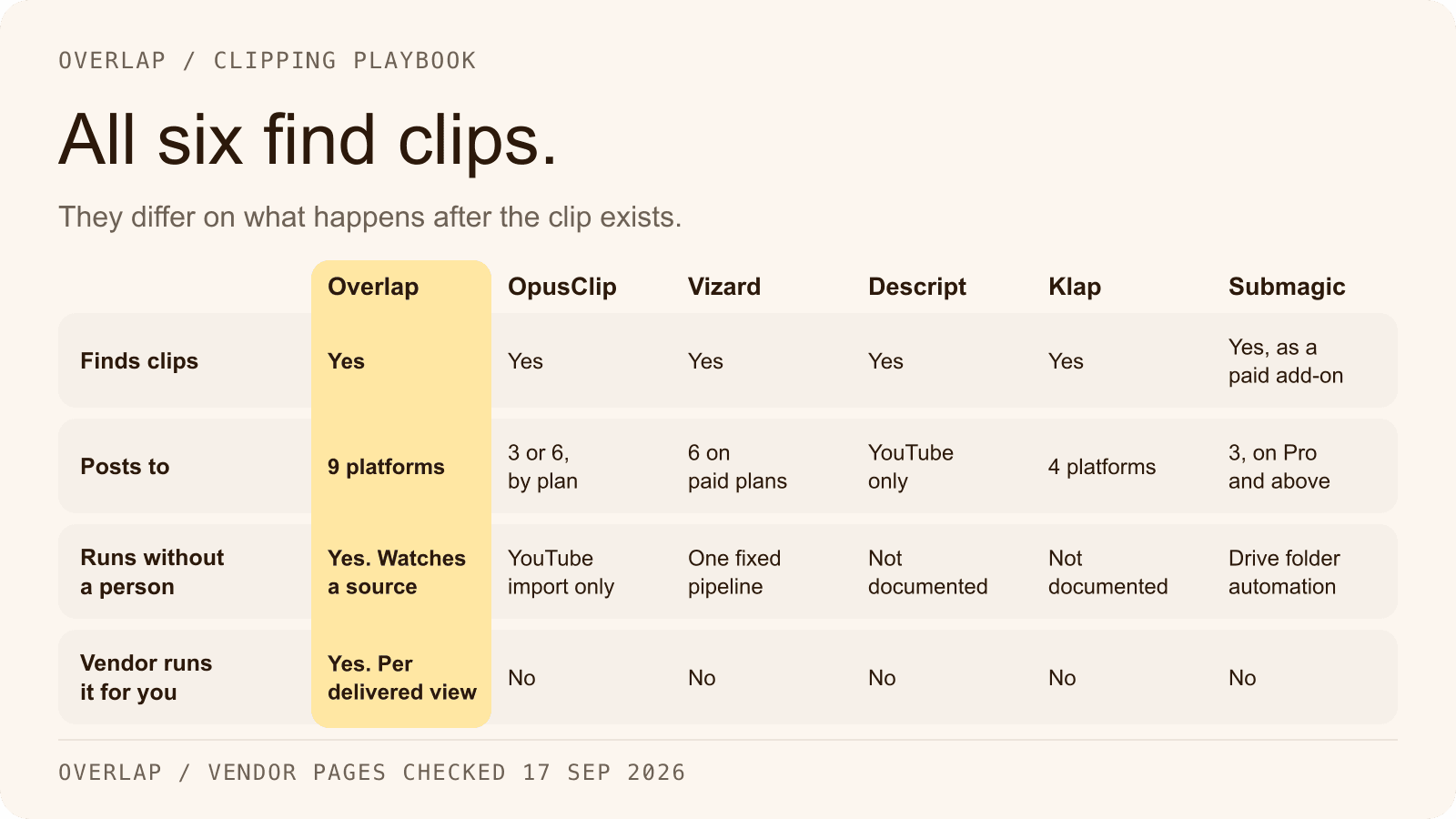
| Tool | Entry paid price as printed | Billing unit | Publishes to | Podcast feed source | Automation surface | Runs it for you |
|---|---|---|---|---|---|---|
| Overlap | Platform: custom quote; managed campaigns $0.50 to $2.50 CPM | Processing hours and active workflows; delivered views for campaigns | 9: TikTok, Instagram, YouTube incl. Shorts, X, LinkedIn, Facebook, Threads, Snapchat, Bluesky | Yes, RSS/Atom/podcast feed trigger | REST API, MCP server; no Zapier, no webhooks | Yes, managed campaigns on customer-owned accounts |
| Vizard | $14.50/mo billed yearly ($174); $29 printed as monthly base | 1 credit = 1 minute uploaded | 6: TikTok, YouTube, Instagram, Facebook Pages, X, LinkedIn; free tier TikTok only | No | API on paid plans, webhooks, n8n template; no Zapier or Make | No |
| OpusClip | $15/mo Starter, monthly only; Pro $29/mo or $14.50/mo billed annually | 1 credit = 1 minute imported; 1 credit per X post | Starter 3; Pro 6: YouTube, TikTok, Instagram, LinkedIn, Facebook Pages, X (Beta) | No; Apple Podcast link import | API (limited on Pro), Zapier, webhooks, MCP | No |
| Descript | $16/person/mo annual; $24 monthly (Hobbyist) | Media minutes plus AI credits | YouTube, share page, Google Drive, podcast hosts; no short-form social publishing, no scheduler | No | API, callback URL, Zapier actions only, MCP | No |
| Klap | $14/mo billed yearly; $29 monthly (Basic, 100 clips) | Clips generated per month; API per operation | 4: TikTok, YouTube, Instagram, LinkedIn | Not documented | API with polling; webhooks claimed, not documented; no Zapier app | No |
| Submagic | $12/member/mo yearly; $19 monthly (Starter); Magic Clips add-on $19/mo | Videos per member per month; API minutes | 3: TikTok, Instagram, YouTube Shorts; Pro and above | No | API, webhooks, MCP, Zapier, Make, n8n | No |
The publishing row counts destinations a vendor documents, not destinations every plan includes; Vizard's free tier and OpusClip's Starter both publish to fewer. The automation row records what the docs establish; Klap's webhooks appear in marketing copy but not in its API reference, and Overlap's API is poll-based by design.
Overlap's platform is priced on a custom quote, so its row carries the managed-campaign rate; contact sales for a platform figure.
How to choose
Work through the questions in order. The first one with a clear answer usually settles it.
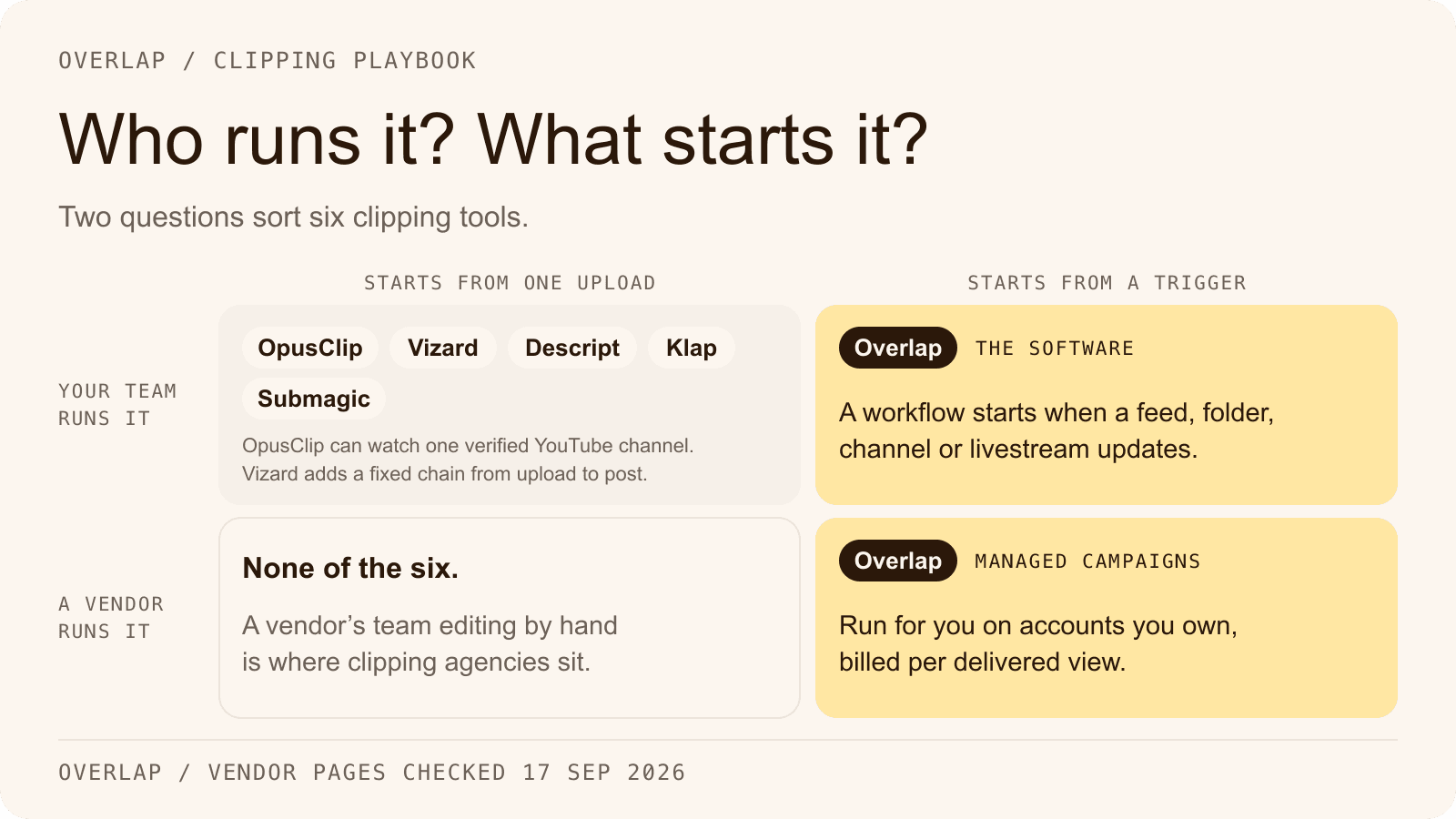
- Does the source arrive as a feed? A show that publishes through a podcast host, or a station that streams, needs a tool that can watch that source. Among the six, only Overlap documents an RSS, podcast-feed or livestream trigger.
- Which platforms must the clips reach? Write the list first. Threads, Snapchat or Bluesky on it narrows the field to Overlap. Descript is out if any short-form platform is on it.
- Who operates it each week? If nobody, the only option here with a managed service is Overlap's campaigns, billed on delivered views. If a named person, any of the five tools can work.
- Does the team already edit in Descript? Then Create Clips inside the existing project is the least disruptive path, with posting done by hand or from a Zap started elsewhere.
- Is Zapier the control plane? OpusClip and Submagic publish Zapier integrations; Descript's has no triggers; Vizard and Klap have none; Overlap offers an API and an MCP server instead.
- How does the budget owner count? Per clip suits Klap. Per minute suits Vizard or OpusClip. Per member suits Submagic. Per view delivered suits an Overlap campaign.
Imagine a hypothetical weekly interview podcast with one producer and no editor, whose episode reaches the podcast host on Tuesday. The producer's real constraint is the Wednesday afternoon they do not have, so a feed trigger that cuts, captions and queues clips for approval points at Overlap's self-serve workflow, or at a managed campaign if the producer would rather not approve posts either. A hypothetical marketing team with a coordinator who already runs a Zapier account and posts to LinkedIn by hand has the opposite constraint, and OpusClip on Pro fits its existing plumbing. Both examples are invented to show the decision, not results from a customer test.
Where Overlap fits, and where the docs stop
Overlap's documentation establishes the Overlap side of this comparison: the nine publishing destinations, the RSS, YouTube, Dropbox, Frame.io and livestream triggers, the node chain from Find Clips to Post to Social, the approval step in the Social Calendar, the REST API and the MCP server. The managed campaign offer and its CPM band are established on this site's own campaign pages, not in the docs.
The docs do not establish several things a buyer coming from Vizard might assume. There is no Zapier or Make app, no outbound webhook and no command-line tool. There is no watched Zoom or Google Drive folder; a public Google Drive file link is accepted as an input URL for the API trigger, which is narrower. Threads publishes through a connected Instagram account, Instagram needs a Business or Creator account, and Facebook needs a Page. Through MCP, publishing creates approval-required drafts only, and scheduling for a future time is not available on that path. Self-serve plan prices are shown in the portal, not on this site. Check the integrations page and automation page before promising a client a specific connection. Source: Overlap docs, connecting accounts, Source: Overlap MCP overview.
Frequently Asked Questions
Is Vizard free to use?
Vizard's free plan gives 60 credits a month, exports at 720p with a watermark, caps exports at 10 minutes and deletes projects after three days, per its pricing page and help centre as of September 17, 2026. Paid plans remove the watermark and raise those limits.
Which Vizard alternative publishes to the most platforms?
Among the tools compared here, Overlap documents the widest list: TikTok, Instagram, YouTube including Shorts, X, LinkedIn, Facebook, Threads, Snapchat and Bluesky. Vizard and OpusClip each publish to six on their paid tiers, Klap to four, Submagic to three, and Descript publishes video to YouTube rather than to short-form social platforms.
Can any of these tools start from a podcast RSS feed?
Overlap's RSS Feed trigger starts a workflow when a new episode appears in an RSS, Atom or podcast feed. Vizard, OpusClip, Descript, Klap and Submagic document no feed-based source, so a podcast team using them uploads the episode or pastes a link for each release.
Which of these tools works with Zapier?
OpusClip publishes an official Zapier integration on its Pro plan, Submagic lists Zapier, Make and n8n on its integrations page, and Descript's Zapier app offers actions and searches but no triggers. Vizard and Klap had no app in Zapier's directory on September 17, 2026.
What does a managed clipping campaign cost compared with a subscription?
Overlap's managed campaigns are billed on delivered views at an agreed CPM between $0.50 and $2.50, up to a monthly ceiling the customer sets. The five tools compared here sell subscriptions or usage, so the cost of a campaign run on them is the plan price plus the time of whoever operates the tool each week.
Should a marketing team pick Klap or Vizard?
It depends on how the team counts output. Klap prices per clip generated and publishes to four platforms; Vizard prices per minute uploaded and publishes to six. A team that wants a fixed number of clips may find Klap's unit simpler, and a team that uploads long episodes and needs Facebook or X publishing may prefer Vizard. Neither runs the work for you.
Start with the operating question, then the tool
Decide who will operate the pipeline and where the clips must land before comparing credits. A feed source, a platform list beyond six, or no operator at all each point at Overlap; a Zapier-centred team points at OpusClip or Submagic; a team already in Descript stays there; a team that budgets in clips looks at Klap. Read the Overlap vs Vizard comparison for the row-by-row version, or plan a campaign with the team if the operator is the missing piece. For what a clipping tool cannot do for a podcast on its own, read the limits of AI video clipping for podcasters, and for the launch plan once the tool is chosen, use the clipping campaign guide.