On this page
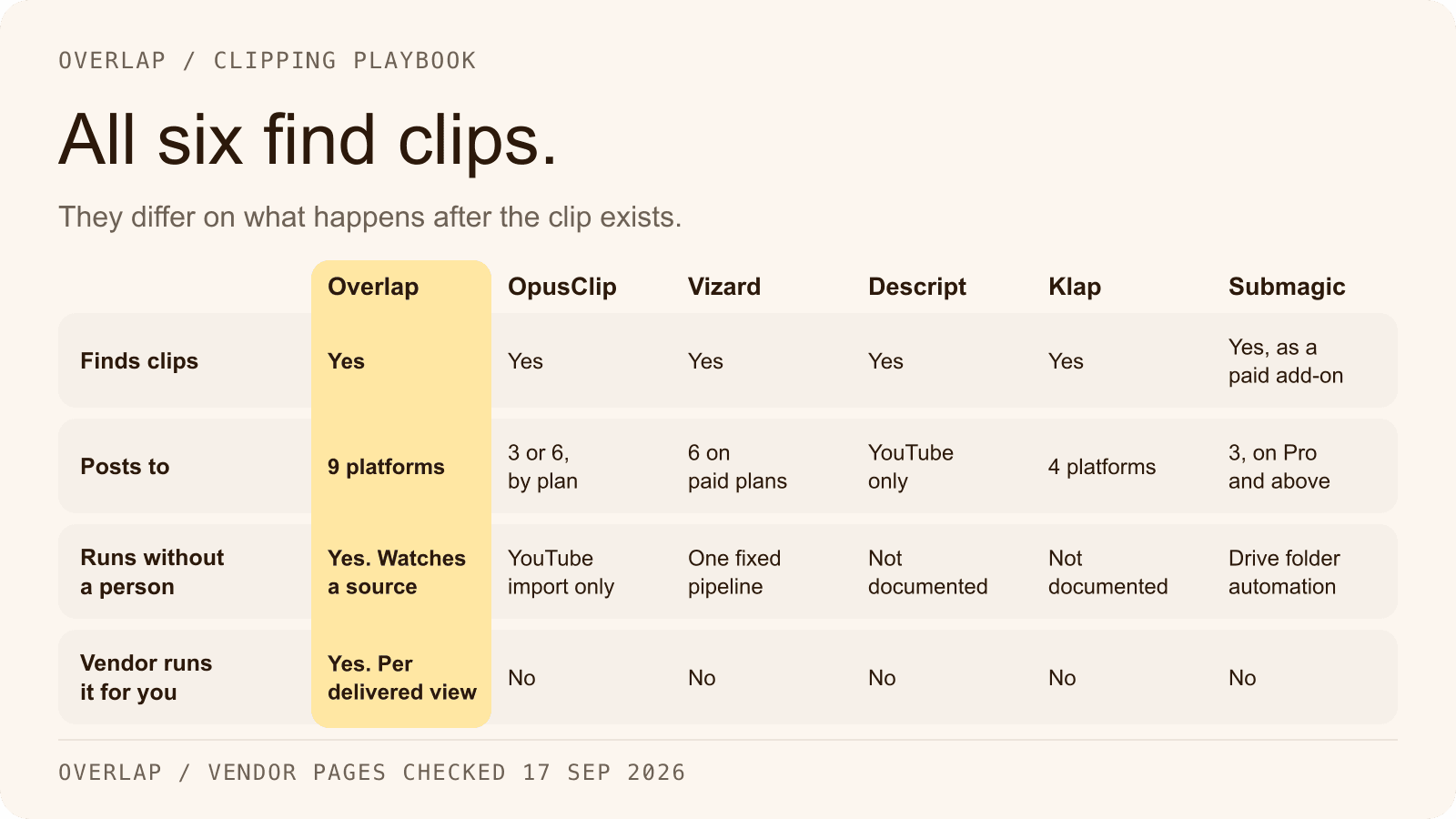
The best AI video clipping tools in 2026 all find highlights, add captions and reframe to 9:16. They differ on what happens after the clip exists: how many platforms the tool can post to, whether it runs without a person pressing a button, whether another system can drive it, and whether the vendor will do the work for you. Overlap is a workflow platform that watches a source, cuts and posts on its own to nine platforms, and also sells managed campaigns priced per delivered view. OpusClip, Vizard and Klap are self-serve clippers that publish to four to six platforms. Descript is a full editor with a clipping feature and YouTube-only social publishing. Submagic is a caption-first short-form editor whose long-form clipping is a paid add-on.
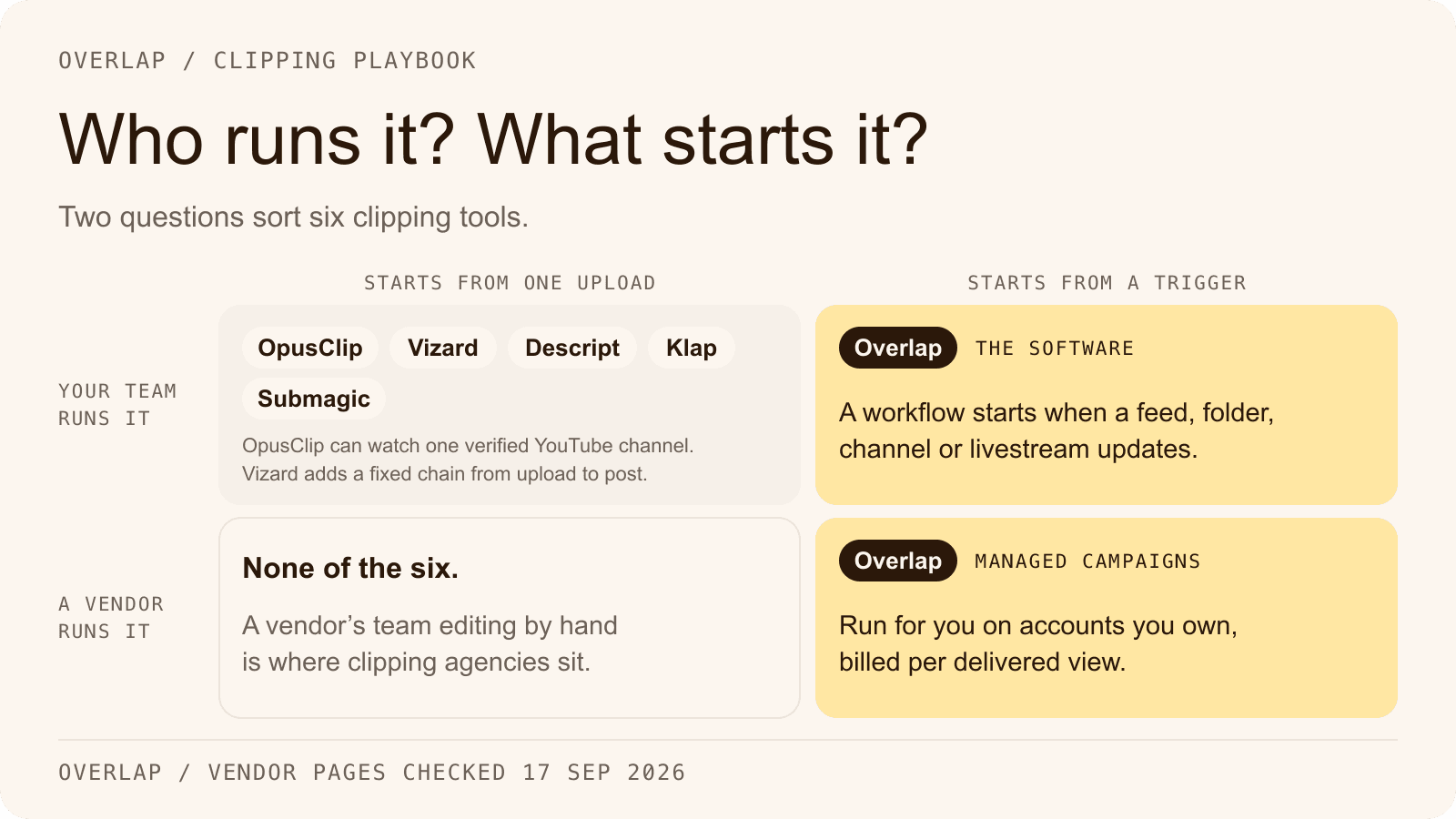
The judgment to make is not which tool has the longest feature list. It is which kind of product matches the job: a clipper you operate, an editor you already work in, or a system that runs the pipeline and, if you want, the campaign.
This article is published by Overlap, which offers one of the options discussed. Every entry describes what the vendor's own pages state, checked on September 17, 2026, with the page linked beside it. It is not a controlled comparison of output quality, and no test campaigns were run.
Three kinds of clipping tool
“AI clipping tool” now covers three different products. Naming the kind first saves a month of trialing the wrong one.

The self-serve clipper
You upload or link a long video, the tool returns ranked clips with captions and a vertical crop, and you post them from inside the tool or download them. Billing is per minute of source video or per clip. OpusClip, Vizard and Klap are this kind. Each publishes to a subset of the major platforms, and none of the three documents a multi-step workflow you can build and leave running.
The editor with a clipping feature
The product is an editor, and clipping is one AI action among many. Descript is the clearest example: a text-based editor with an AI co-editor, where Create Clips is one tool and the output publishes to YouTube, a share page or a download. Submagic sits here from the other direction: its center of gravity is captions and polish for clips you already have, and long-form clipping (Magic Clips) is a separate add-on.
The workflow platform, with managed campaigns
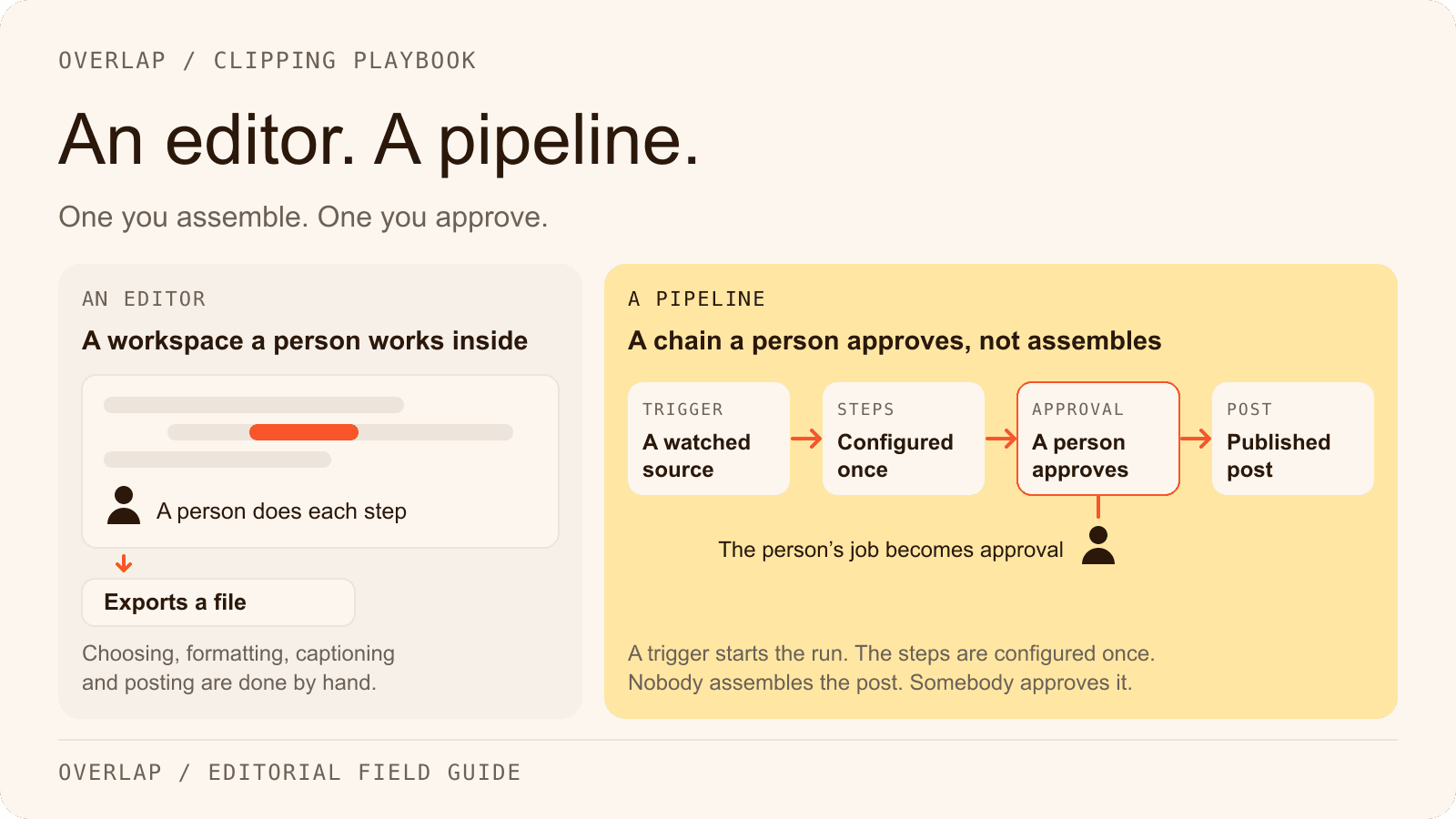
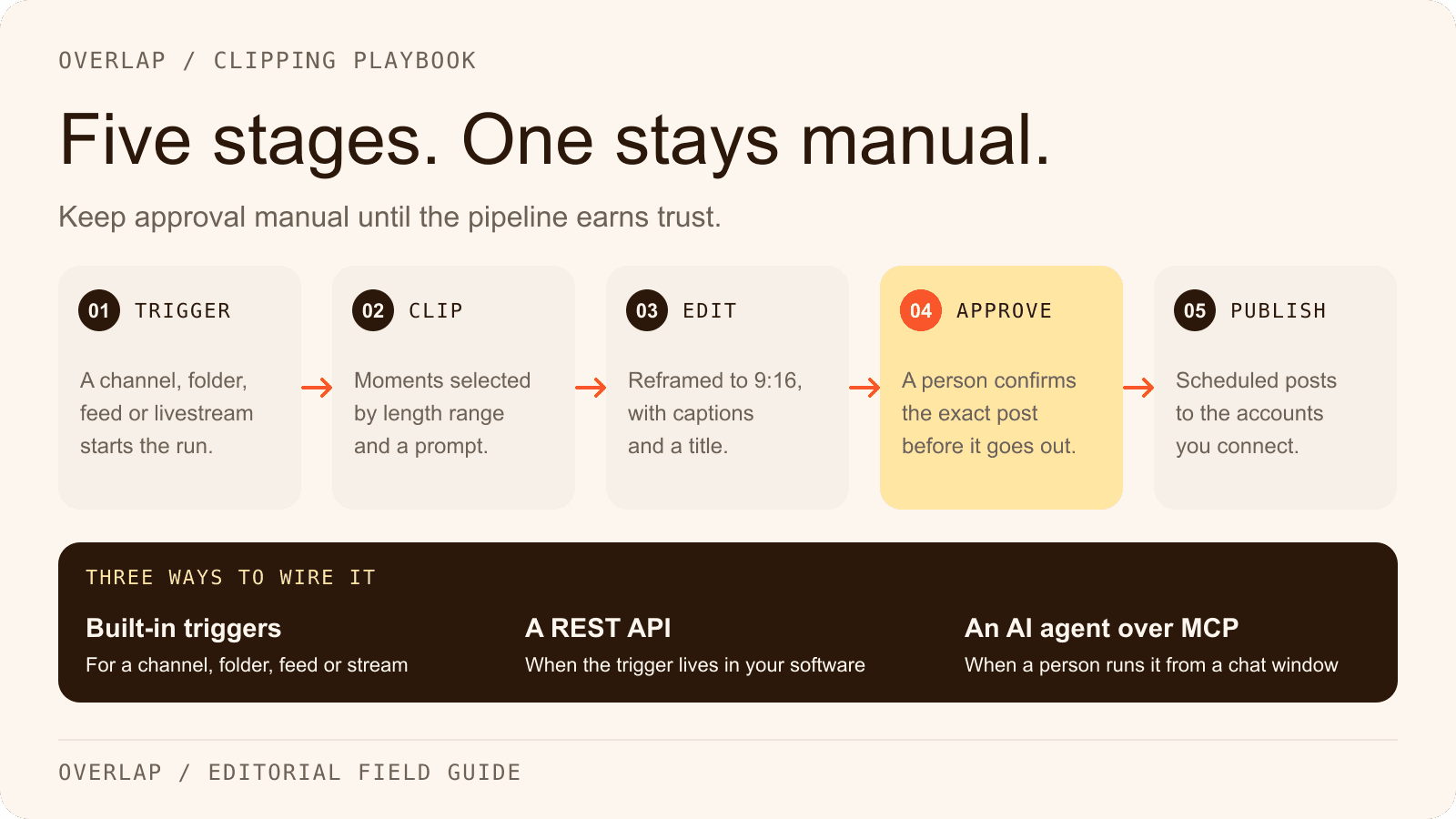
The product is a pipeline. A trigger watches a source, editing steps run in order, and an export posts the result to connected accounts, with optional approval. You build it once and it keeps running. Overlap is this kind, and it is also the only tool of the six whose vendor will run clipping for you: managed campaigns on accounts you own, billed on delivered views. A clipper is a subscription cost. A campaign is a media cost with a ceiling you set.
How the six compare on what they automate
The rows answer eight questions a buyer can check on the vendor's page: does it detect clips, caption them, reframe them, where can it post, can it schedule, can another system drive it, will the vendor run it for you, and what does it cost to start. A cell says “No” only where the vendor's own pages list the set and the item is absent.
| Tool | Clip detection | Captions | Reframing | Publishing platforms | Scheduling | API | Managed campaigns | Starting price |
|---|---|---|---|---|---|---|---|---|
| Overlap | Yes. Find Clips with a prompt, three strategies and a virality score | Yes, with per-speaker styles and keyword highlights | Yes. Content-aware reframing follows the active speaker, with split view | Nine: TikTok, Instagram, YouTube including Shorts, X, LinkedIn, Facebook, Threads, Snapchat, Bluesky | Yes, with cadence rules and optional approval | REST API (polled) and an MCP server. No webhooks or Zapier documented | Yes. $0.50 to $2.50 CPM on delivered views, up to a monthly ceiling | Platform: custom quote |
| OpusClip | Yes. ClipAnything, with a virality score from Starter | Yes, 20+ languages | Yes. ReframeAnything; object tracking on Pro | Starter: YouTube, TikTok, Instagram. Pro: adds LinkedIn, Facebook Page, X (beta). No Threads | Pro and above | Pro (limited, 15 hours a month) and Business; webhooks; Zapier; MCP on Pro | No | Free tier; Starter $15/mo |
| Vizard | Yes. Viral score 0 to 10 with a reason; prompt clipping via Spark | Yes; translation on paid plans | Yes. Speaker auto-focus; 9:16, 1:1, 16:9 | Six: TikTok, YouTube, Instagram, Facebook Pages, X, LinkedIn. Free is TikTok only | Paid plans; auto-schedule up to 10 clips a day | Paid plans; webhook; n8n template. No Zapier, Make or MCP | No | Free tier; Creator $29/mo, or $14.50/mo billed yearly |
| Descript | Yes. Create Clips, 1 to 20 clips of 10 s to 5 min; no published virality score | Yes, from the transcript | Partial. 9:16 and 1:1 layouts; Center Active Speaker in beta | YouTube. No TikTok, Instagram, LinkedIn, X or Facebook publishing | No | Paying users; callback webhooks; Zapier actions only; MCP | No | Free tier; Hobbyist $24/mo, or $16/mo billed annually |
| Klap | Yes. Virality score 0 to 1 with an explanation; prompt search | Yes, 52 languages | Yes. Multi-person layouts | Four: TikTok, YouTube, Instagram, LinkedIn | Yes | Yes, metered per operation; polling only. No Zapier app; no MCP documented | No | One free video; Basic $29/mo, or $14/mo billed yearly |
| Submagic | Add-on. Magic Clips, $19/mo for 10 uploads | Yes, 100+ languages | Yes. 9:16 presets with face tracking | Three: TikTok, Instagram, YouTube Shorts, on Pro and above. LinkedIn, Facebook and X listed as coming soon | Pro and above | Yes; webhooks; MCP; Zapier, Make and n8n | No | Starter $19 per member/mo, or $12 billed yearly |
| Sources, all checked September 17, 2026: opus.pro/pricing and help.opus.pro; vizard.ai/pricing and help.vizard.ai; descript.com/pricing and help.descript.com; klap.app/pricing and docs.klap.app; submagic.co/pricing and care.submagic.co; docs.overlap.ai and overlap.ai/brands for Overlap. Each entry below links the exact page. |
A note on the price column. Four of the six pricing pages (Vizard, Descript, Klap and Submagic) open on the yearly view, so the number you remember is usually the discounted one. Both figures are given here. Overlap's platform is a custom quote from its sales team; the figure it prints is the campaign CPM band.
1. Overlap
Category: Workflow platform with managed campaigns
Overlap is an AI video clipping platform. Teams run it themselves, or Overlap's team runs managed clipping campaigns for them on accounts the customer owns, priced per delivered view.
The self-serve product is a workflow: a trigger, editing nodes and an export. A trigger can be a manual upload, a YouTube channel or playlist, a Dropbox or Frame.io folder, an RSS, Atom or podcast feed, an audio livestream URL, or an RTMP or HLS livestream, and a saved workflow starts on its own when something new lands. Source: Overlap docs, Workflows.
Core features
- Find Clips: highlights, montages or evenly spaced clips; a Conversational or Multimodal model; clips of 10 to 600 seconds; a typed or saved prompt; a virality score returned by the API
- Convert to Vertical follows the active speaker, with split view; captions, titles, watermark and outro are set in Style Video with per-speaker styles and keyword highlights
- Post to Social to nine platforms, with posting cadence, “require approval” and a Social Calendar; brand kits imported from your domain; export up to 4K at 60 fps
- A REST API to trigger a workflow, poll results, update a clip and render, plus an MCP server for Codex and Claude Desktop
Pricing
- Platform: custom quote from the sales team; managed campaigns $0.50 to $2.50 CPM on delivered views, up to a monthly ceiling you set. The docs describe software billing in processing hours and active workflows. See the pricing page and the campaign calculator.
Best for
- teams with a recurring source (a show, a channel, a feed, a stream) that want clips posted without an operator
- brands that would rather buy delivered views than a subscription
Pros
- The only tool here whose pages document a user-built workflow that starts on its own from a watched source
- The widest publishing set of the six, with approval built into the posting step, and the only managed, per-view option
Cons
- The platform is a custom quote, so there is no self-serve plan to buy without talking to sales
- The API is poll-based; no webhooks, Zapier app or CLI are documented
- Production editing runs in a desktop browser; iOS and Android are not supported for editing
The self-serve product is described on the AI video clipper, automation and integrations pages. Source: Overlap docs, Find Clips, linking accounts and API trigger, checked September 17, 2026.
2. OpusClip
Category: Self-serve clipper
One long video in, ten ranked clips out. ClipAnything reads visual, audio and sentiment cues, every clip from Starter up carries a virality score, and Pro adds the scheduler, six publishing platforms, an API, Zapier and a hosted MCP server. It is the most connected of the three clippers and the most plan-gated. The row-by-row version is Overlap vs OpusClip.
Core features
- ClipAnything clip detection, with prompt-to-clip and topic search on Pro; animated captions in 20+ languages; ReframeAnything with object tracking on Pro; AI and stock B-roll; brand templates
- Sources include YouTube, Google Drive, Dropbox, Zoom, Vimeo and public MP4 links; no RSS
- Publishing: Starter posts to YouTube, TikTok and Instagram; Pro adds LinkedIn, Facebook Page and X (beta), plus the scheduler
- API on Pro (“Limited API Access”, 15 hours of API video a month) and Business; webhooks; Zapier on Pro up to 300 credits a month; MCP on Pro and Business
Pricing
- Free: $0, 60 credits a month, watermark, clips exportable for 3 days
- Starter: $15 a month, monthly only, 150 credits. Pro: $29 a month, or $14.50 billed annually, 300 credits. Business: custom
- One credit is one minute of source video
Best for
- creators and marketers who want the AI to pick and rank moments from one upload
- teams already automating in Zapier
Pros
- Broadest import list of the clippers
- API, webhooks, Zapier and MCP all reachable on Pro
Cons
- Publishing depends on plan, and no plan posts to Threads, Snapchat or Bluesky
- No in-product multi-step workflow; auto-import is from a verified YouTube channel only
- No managed campaigns and no per-view pricing
Source: OpusClip pricing, social account FAQ and API overview, checked September 17, 2026.
3. Vizard
Category: Self-serve clipper
Vizard is the value clipper of the group: 600 credit-minutes a month on its entry paid plan at the same annual rate OpusClip charges for 300. It ranks clips with a 0 to 10 viral score and a written reason, publishes to six platforms on paid plans, and offers an API with a webhook. What it lacks is the wider automation plumbing. See Overlap vs Vizard for the full table.
Core features
- AI clipping with viral score and reason; prompt clipping through Spark; AI B-roll; captions on every plan, translation on paid plans; speaker auto-focus reframing to 9:16, 1:1 or 16:9
- Sources: upload, YouTube link, Google Drive, Dropbox, Vimeo, Twitch VODs, Loom, Zoom cloud-recording links; no RSS and no live capture
- Publishing to TikTok, YouTube, Instagram, Facebook Pages, X and LinkedIn; a calendar that auto-schedules up to 10 clips a day
- API on paid plans with a webhook or 30-second polling; an n8n template; no Zapier app, Make app or MCP server
Pricing
- Free: $0, 60 credits a month, 720p, watermark, 10-minute export cap, TikTok-only publishing
- Creator: $29 a month, or $14.50 billed yearly ($174 a year), 600 credits, 6 social accounts. Business: $39 a month, or $19.50 billed yearly ($234 a year), 20 accounts, brand kit, $5 a month per extra seat
- One credit is one minute of uploaded video, deducted once per project
Best for
- high-volume transcript-first clipping on a budget
- teams that choose clips themselves rather than trusting a ranking
Pros
- Most source minutes per dollar among the clippers
- Six publishing platforms with scheduling on the entry paid plan
Cons
- Free plan is TikTok-only and watermarked
- One fixed pipeline (clips, captions, schedule) rather than a workflow you can shape
- No Zapier, Make or MCP; no managed campaigns
Source: Vizard pricing, connecting social accounts and API quickstart, checked September 17, 2026. The $29 and $39 monthly figures are the undiscounted prices printed beside the yearly rates.
4. Descript
Category: Editor with a clipping feature
Descript is the AI video and audio editor that edits like a document, with an AI co-editor called Underlord. Clipping is one tool inside it: Create Clips returns 1 to 20 clips of 10 seconds to 5 minutes, optionally in a 9:16 or 1:1 layout and against a topic you type. The clips are compositions in your project, not posts in a queue. Overlap vs Descript has the full row set.
Core features
- Transcript-based editing; Underlord for prompted edits; Create Clips, highlight reels and Find Highlights; captions with active-word highlighting and per-speaker layers; Center Active Speaker reframing in beta
- Stock library, generated B-roll and music; Brand Studio on Business and above
- Publishing to YouTube (owner channels), a share page, Google Drive and podcast hosts; no TikTok, Instagram, LinkedIn, X or Facebook publishing and no scheduler
- REST API for all paying users, callback webhooks on jobs, Zapier actions (no triggers), and an MCP server listed in the Claude and ChatGPT directories
Pricing
- Free: $0, 60 media minutes a month, 100 one-time AI credits, 720p with watermark
- Hobbyist: $16 per person a month billed annually, or $24 monthly. Creator: $24 or $35. Business: $50 or $65. Enterprise: custom
- Every AI action, including Create Clips and each Underlord message, spends AI credits, and Underlord's cost per run is not fixed
Best for
- teams already editing in Descript that want a clip pass in the same project
- spoken-word content that needs a real edit before it needs a clip
Pros
- The strongest editor of the six
- Real automation surface: API, webhooks, Zapier, MCP
Cons
- No social publishing beyond YouTube and no scheduling
- No published virality score; YouTube-link import appears withdrawn; no Dropbox or RSS source
- No managed campaigns
Source: Descript pricing, Create Clips, integrations and Zapier, checked September 17, 2026.
5. Klap
Category: Self-serve clipper
Klap prices by the clip rather than the minute, which makes a month easy to forecast. Every clip carries a 0 to 1 virality score with an explanation, captions run in 52 languages, and the tool publishes and schedules to four platforms. Its API is metered per operation and suits a developer embedding a clipper. Overlap vs Klap lays out the rest.
Core features
- AI clip detection with virality score and explanation; prompt-based clip search; captions in 52 languages with keyword highlights; AI Reframe with split-screen and multi-person layouts; brand kit; auto-translation
- Sources: YouTube link, file upload, and pasted URLs from Vimeo, Twitch, Google Drive, Zoom, Loom and Riverside
- Publish and schedule to TikTok, YouTube, Instagram and LinkedIn; analytics on every plan
- REST API with sub-users and an embeddable editor; documented completion is polling every 30 seconds
Pricing
- Free: one video, no card required; Klap states no watermark on any plan
- Basic: $29 a month, or $14 billed yearly, 100 clips a month. Pro: $79 or $39, 300 clips. Pro+: $189 or $94, 1,000 clips
- API: $0.44 per video input, $0.32 per generated short, $0.48 per export
Best for
- teams that budget per clip
- agencies with client workspaces; developers embedding a clipper
Pros
- Predictable per-clip and per-operation pricing
- 52 caption languages and prompt search on every plan
Cons
- Four publishing platforms; X, Threads, Snapchat and Bluesky are not documented
- Webhooks are promised on marketing pages but absent from the API docs; no Zapier app; no MCP documented
- Vendor pages disagree on plan names, and the homepage FAQ still quotes a $29 “Pro”; no managed campaigns
Source: Klap pricing, API pricing and generate shorts guide, checked September 17, 2026.
6. Submagic
Category: Short-form editor with a clipping add-on
Submagic is the captions tool that grew an editor around itself. Plans are per member and count videos, each capped at 2, 5 or 30 minutes, and every feature list leads with caption styles, B-roll, zooms and hook titles. Long-form clipping exists as Magic Clips, an add-on subscription with its own virality score. The automation plumbing is unusually complete for the size of the product. Overlap vs Submagic has the details.
Core features
- AI captions in 100+ languages by its own pages (123 is the marketing figure); B-roll, auto zooms, music, sound effects, hook titles, silence and bad-take removal; 9:16 presets with face tracking; brand kit on Pro and above
- Magic Clips: long-form to clips of 15 to 300 seconds, scored on hook, story, emotion and shareability
- Publish and schedule to TikTok, Instagram (Reels and Stories) and YouTube Shorts on Pro and above; LinkedIn, Facebook and X listed as coming soon
- REST API with webhooks, an MCP server, and Zapier, Make, n8n and Google Drive folder automation
Pricing
- Starter: $19 per member a month, or $12 billed yearly; 15 videos of up to 2 minutes; no publishing. Pro: $39 or $23; 40 videos of up to 5 minutes; publishing and analytics. Business: $69 or $41; 100 videos of up to 30 minutes; 4K export
- Magic Clips add-on: $19 a month for 10 uploads, per the help center entry updated June 16, 2026
- Free: three short videos; the help center says a subscription is needed to download without a watermark
Best for
- teams that already have short clips and want captions and polish
- caption-heavy brands publishing to TikTok, Reels and Shorts
Pros
- Caption styling and short-form polish
- API, webhooks, MCP and the three big automation platforms
Cons
- Long-form clipping is an add-on, and per-video length caps are tight below Business
- Three publishing platforms; none on Starter
- No Dropbox, RSS, Zoom or livestream source; no managed campaigns
Source: Submagic pricing, scheduler page, cost help article and MCP docs, checked September 17, 2026.
Which kind should you buy?
Buy a self-serve clipper if one person will upload each video and post the results, and the platforms you need are on the vendor's list. OpusClip suits a team that wants ranked clips and Zapier. Vizard suits volume on a budget. Klap suits a per-clip budget or an embed.
Buy the editor if the edit is the job and the clip is a by-product: Descript for spoken-word projects that need a real cut first, Submagic for clips you already have that need captions and polish.
Buy the workflow platform if the source recurs and nobody should have to touch it. A podcast feed, a YouTube channel, a Dropbox folder or a livestream can start the run, and the export can post with approval or without it. Buy the managed campaign if you would rather pay for delivered views than for software and an operator; the clipping campaign guide walks through planning one.
Where Overlap fits, and where the docs stop
Overlap's documentation establishes the workflow model above: triggers for manual upload, YouTube, Dropbox, Frame.io, RSS and podcast feeds, audio livestreams and RTMP or HLS streams; the Find Clips, Convert to Vertical and Style Video steps; Post to Social to nine platforms with approval and a calendar; a REST API that is polled for results; and an MCP server. The workflow guide shows one being built end to end.
The docs do not establish several things the other columns mention. There are no webhooks, no Zapier or Make app and no CLI. Zoom is not a source, and Google Drive works as a file link you paste, not a folder that is watched. The Trending Post trigger is rolling out to selected organizations and should not be assumed. Software plan prices are not in the docs or on overlap.ai; the portal's Billing page shows processing hours and active workflows, and the pricing page says as much. The one published rate is the managed campaign band, and it applies to campaigns, not to the software.
Frequently Asked Questions
What is the difference between an AI clipper and a clipping campaign?
An AI clipper is software you operate: you supply the video, it returns clips, and you or the tool post them from your accounts on a subscription. A clipping campaign is a service in which a provider selects, edits and posts the clips for you and bills on the result, usually per thousand delivered views up to a ceiling agreed in advance.
Which AI video clipping tools publish directly to social platforms?
OpusClip, Vizard, Klap and Submagic each publish to a subset of TikTok, Instagram, YouTube, LinkedIn, Facebook and X, and the set depends on the plan. Descript publishes to YouTube and a share page only. Overlap posts to nine platforms, including Threads, Snapchat and Bluesky, from accounts the customer connects.
Do I need an API to automate video clipping?
Not for most teams. An API matters when clipping has to be triggered from another system, such as a CMS or an internal tool. A product that watches a source and runs a saved workflow removes the need for custom code, and a scheduler inside the tool covers the posting side.
How much do AI video clipping tools cost in 2026?
Entry paid plans checked on September 17, 2026 run from $12 to $29 a month depending on billing period: Submagic Starter is $12 per member billed yearly, Klap Basic $14 billed yearly, Vizard Creator $14.50 billed yearly, OpusClip Starter $15 monthly and Descript Hobbyist $16 billed annually. Monthly billing runs $15 to $29 for the same tiers. OpusClip, Vizard and Descript offer watermarked free tiers, and Klap offers one free video.
How is Overlap's software priced?
On a custom quote from Overlap's sales team. The documentation describes billing in processing hours and active workflows, and sales prices the platform against the volume you plan to run. The one published rate is the managed campaign band of $0.50 to $2.50 CPM on delivered views, capped by a monthly ceiling the customer sets, and it applies to campaigns rather than to the software.
Which clipping tool is best for a podcast?
It depends on whether the show is video or audio. Any of the six can clip a video episode from an upload or a YouTube link. For an audio show, look for a tool that accepts a podcast feed and produces an audiogram, and for a weekly show, look for one that starts on its own when the feed updates rather than waiting for an upload.
Start with the job, then the tool
Write down who will press the button, where the clips have to land, and whether you are buying software or views. Those three answers pick the kind of tool, and the table above picks the tool. To see the workflow kind in the product, start with the AI video clipper; to weigh it against the campaign kind, read clipping agent vs clipping agency.