Overlap for Marketers

AI Video Clipping for Marketing Teams

Turn the webinars, podcasts, product demos and events you already record into captioned, on-brand short-form clips. Overlap edits and publishes them on accounts your brand owns, with campaign spend based on delivered views.

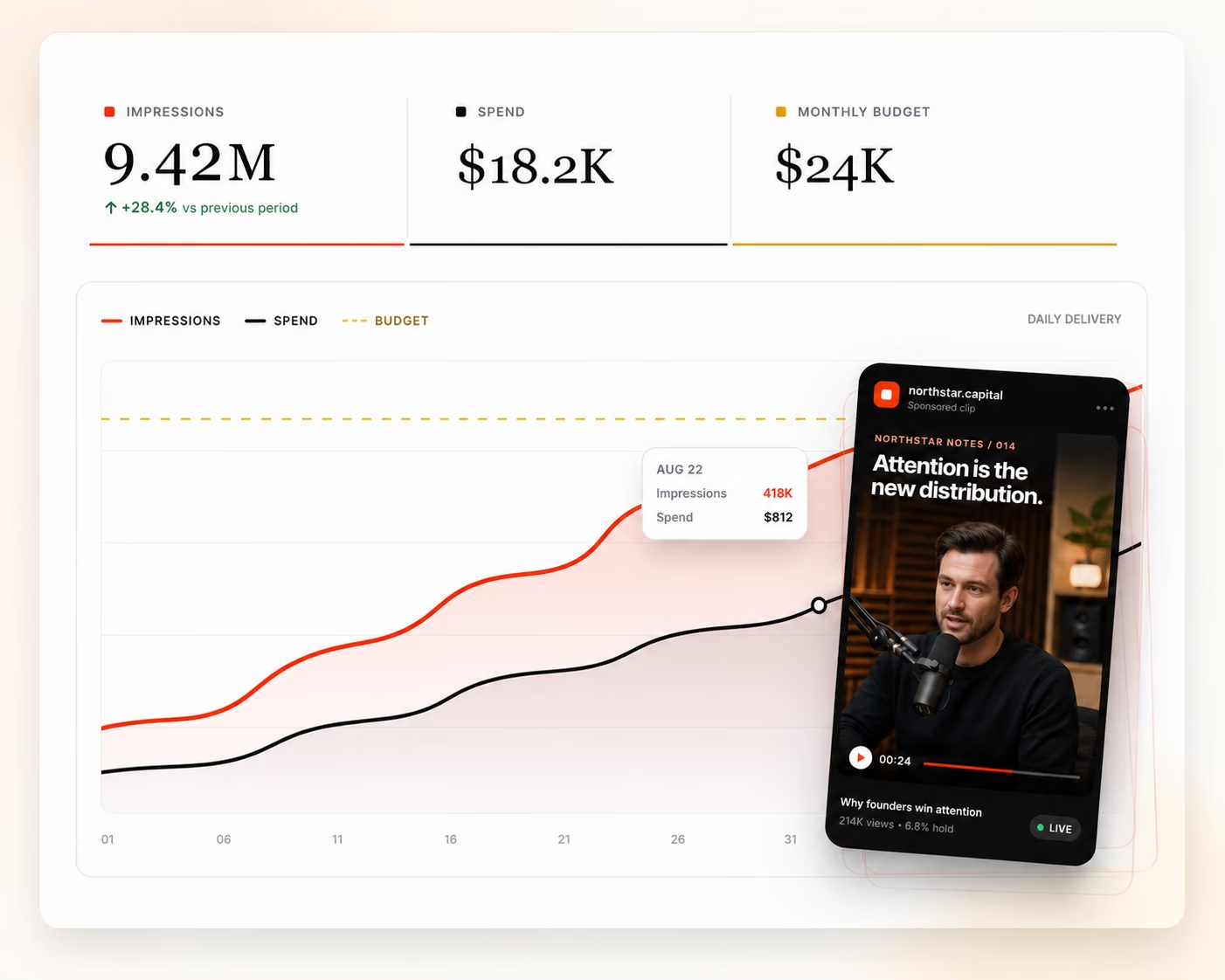
    Campaign performance dashboard with impressions, spend, budget, and a podcast clip
    How It Runs

    Three inputs, then it runs.

    Connect the brand’s accounts, set the brand kit and the rules, and choose the monthly ceiling. Clip selection, captioning, publishing and reporting happen from there.

    Step 01

    Link the brand’s accounts

    Connect the accounts the campaign publishes to across the nine platforms we support — TikTok, Instagram, YouTube, X, LinkedIn, Facebook, Threads, Snapchat and Bluesky. A dedicated clips handle can run beside the main brand account, and both belong to you.

    Connected accounts
    • TikTok@yourbrandConnected
    • Instagram@yourbrandConnected
    • YouTube@yourbrandConnected
    + Add another account
    Step 02

    Set the brand kit and the rules

    Logos, colors, caption style and the voice that writes each post are set once, along with what a clip may never do — an unannounced product, a customer you cannot name, a claim that needs legal review. Anything off-brief is held for review.

    Brand kit
    youtube.com/@yourbrandScan
    • Palette
    • Caption voiceDirect, no emoji
    • LogoBottom-left, every clip
    • Needs reviewAnything off-brief
    Step 03

    Define a budget

    Set the monthly ceiling and agree the CPM. Spend follows delivered views and never runs beyond the limit you chose.

    Monthly plan
    Ceiling$25,000CPM$1.50
    • Views delivered12,160,000
    • Spend$18,240
    Budget used73%
    AI clipping for marketing

    From a long recording to on-brand clips, published

    AI video clipping finds the moments in a longer recording and turns them into short vertical videos. Overlap adds captions and your brand kit, then publishes the clips to the social accounts your brand owns or exports them to the tools your team already uses.

    1. 01

      Start with what you already record

      Webinars, podcasts, product demos, keynotes, interviews and customer stories. Connect the channel, feed or files that hold them, and new uploads enter the same workflow.

    2. 02

      Find the moments and edit the clips

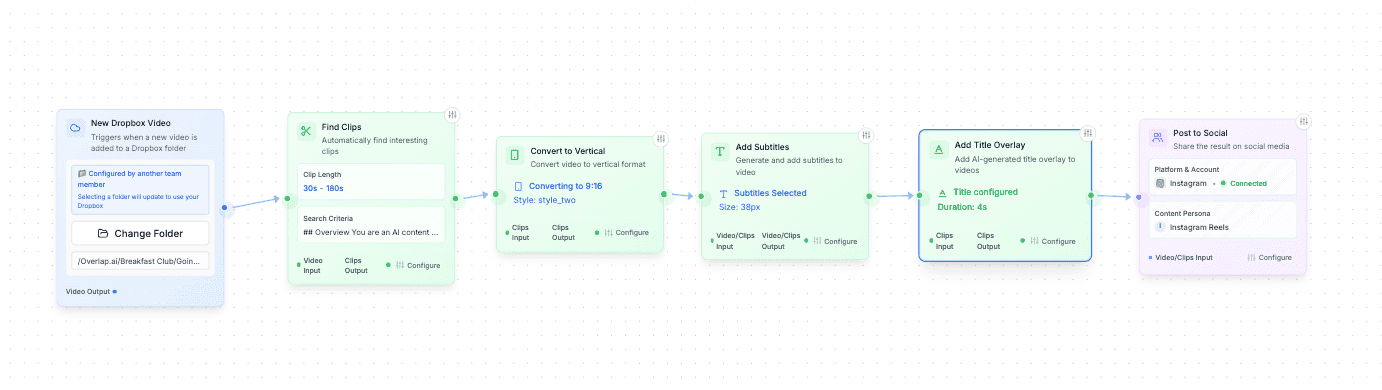
      Tell the agent what to look for: a product explanation, a customer result, a strong opinion. It cuts the moments, reframes them to 9:16 vertical, adds captions and applies your brand kit, and any clip can be refined in the editor.

    3. 03

      Publish, export and measure

      Hold clips for approval or publish on a schedule to TikTok, Instagram Reels, YouTube Shorts and the brand’s other connected accounts. Any workflow can export instead, and performance reporting shows which moments to cut more of.

    As seen onMy First Million

    See a finished podcast clip

    A short podcast excerpt explaining how Overlap finds moments, edits clips and prepares them to share. This is a finished clip exported from Overlap.

    Original episode moment
    40:52–41:23
    Finished clip
    32 seconds · 9:16 vertical video · captions

    A documented customer workflow

    iHeartMedia used Overlap clipping agents to turn its long-form show library into edited, formatted clips published across its social channels. The case study includes the workflow and channel results.

    The iHeartMedia clipping workflow in the Overlap editor, from source through editing to output
    Views generated to date
    600M
    Clips produced
    100K
    Editors hired
    0

    These are the results reported in this customer’s case study, not a forecast for a new campaign.

    Read the iHeartMedia workflow and results
    Watch the product walkthrough
    Silent screen recording of the Overlap editor. Use the video controls to pause or review a step.
    Retained Value

    The audience stays with the brand

    A paid flight stops the day the budget stops. An owned channel does not: the handles, the followers and every clip stay with the brand — so the audience a campaign builds is still there for the next launch.

    Side by side
    Who does the workAn agent cuts, captions and posts under your rules · OverlapYour team selects, edits and schedules each clip · A tool
    What you pay forViews delivered · OverlapAccess, whether or not clips get posted · A tool
    Where clips publishAccounts the brand owns · OverlapWherever your team posts them · A tool
    Cost of reach$0.50–$2.50 CPM · OverlapNot part of the price · A tool
    How much gets cutEvery recording you have, continuously · OverlapWhat your team has hours to edit · A tool

    Yours to launch into

    A product release, an event, a report — an owned short-form audience is a channel you can announce into without buying the reach again.

    Yours to point anywhere

    Send viewers to a demo, a landing page or a sign-up. The channel is the brand’s to aim.

    Yours to keep reaching

    Followers earned this quarter see next quarter’s campaign. Every month compounds instead of restarting at zero.

    Yours to run either way

    Keep running with us, hand the accounts to your social team, or leave them live. The login goes with the brand.

    The Economics

    Software bills access. This bills views.

    A clipping tool charges for access, and your team still does the selecting, editing and posting. We price the result: a ceiling, a rate per thousand views, and nothing charged for reach that never landed.

    Spend = delivered views ÷ 1,000 × agreed CPM

    Campaign Planner

    What your budget actually buys

    Views at that budget16.7MAt $1.50 CPM
    Estimated CPC$0.8330K estimated website visits

    A planning illustration: 6% of delivered views reach the profile, 3% of those continue to your site. Your ceiling and CPM are agreed with our team.

    Questions marketing teams ask

    For a marketing team that wants clips produced and published without adding editing work, Overlap is built for that: an AI agent selects the moments, adds captions and the brand kit, and posts to accounts the brand owns under rules your team sets. Teams that prefer to edit and schedule clips themselves can run the same agent platform as a self-serve clipping tool.

    Recordings your marketing team already has the right to publish: webinars, podcasts, product demos, keynotes, interviews, panels, livestreams and customer stories. Connect the channel, feed or files that hold them. Nothing has to be filmed for the campaign.

    Yes. Captions, vertical framing, aspect ratio and the brand kit — logos, colors and caption styles — are set once on the workflow and applied to every clip, and any clip can be adjusted in the editor before it publishes.

    Yes. A workflow can hold every clip for approval or publish on its own schedule, and the setting is per workflow, so a new brand account can stay supervised while an established one runs hands-free.

    Yes. Any workflow can end in an export instead of a post, so clips can go to your own scheduler, your asset library or a download.

    You set a monthly ceiling and agree a CPM between $0.50 and $2.50. Spend follows the views actually delivered and stops at the ceiling — there are no production fees, no minimum deliverables and nothing charged for reach that did not land.

    From the platforms’ own analytics on posts published to your accounts, which you can see for yourself in the same dashboards. Every view is organic — nothing is boosted or bought — and a clip that was never posted is never billed.

    You do, and nothing is switched off. The handles, the followers and every post published to them stay with the brand, the posts are not taken down when billing stops, and the accounts are never repurposed for another advertiser.