On this page
- What Descript does, and where its clipping stops
- An editor and a pipeline are different shapes
- Overlap: a workflow from source to published post
- OpusClip: a self-serve clipper with a scheduler on Pro
- Vizard: clipping plus a calendar, priced per minute
- Klap: priced per generated clip, with a shorter publishing list
- Submagic: a captions-first editor with clipping as an add-on
- Side by side: what happens after the cut
- Keep Descript if the edit is the product
- Where Overlap fits, and what the docs do not establish
- Decide by who does the publishing
- Frequently Asked Questions
Descript is a text-based video and audio editor, and clipping is one AI tool inside it. If the job is distribution, meaning clips that land on TikTok, Instagram, LinkedIn and X on a schedule without an editor touching each one, the alternatives worth comparing are pipeline tools: Overlap, OpusClip, Vizard, Klap and Submagic. If the job is editing long-form video and clips are a by-product, Descript remains the stronger editor and none of the five replaces it.
The five alternatives are not better editors than Descript. They are built in a different shape: something starts a run, the software selects and formats clips, and the clips go to connected social accounts, with a person approving rather than assembling. This guide compares that shape against Descript's, using each vendor's own pages as checked on September 17, 2026.
This guide is published by Overlap, which offers one of the options discussed. The comparison below is planning guidance drawn from vendor documentation, not a controlled test of clip quality or performance.
What Descript does, and where its clipping stops
Descript describes itself as “the AI video and audio editor that makes editing as easy as editing text”. Its centre is a transcript-driven multitrack editor with an AI co-editor called Underlord, screen and webcam recording, Studio Sound and filler-word removal. Clipping is the Create Clips tool. As checked on September 17, 2026, it produces 1 to 20 clips of 10 seconds to 5 minutes from a composition, with optional portrait or square layouts and a topic prompt, and each clip lands in the project as a separate composition. Descript publishes no numeric virality score. Source: Descript help, Create clips from your content.
Where a finished clip can go without a download is the first thing to check. Descript's integrations page and help center list YouTube (owner channels only), Descript's own share page, Google Drive, podcast hosts including Buzzsprout, Castos, Podbean and Transistor, plus Wistia, HubSpot and Slack. TikTok, Instagram, LinkedIn, X and Facebook are not listed as publishing destinations, and no scheduler or content calendar is documented. The line on Descript's clips page naming those platforms answers which formats it can create for, not where it can post. Source: Descript integrations and Source: Descript help, publishing and exporting overview.
What starts a run is the second. Descript has a public REST API, a callback URL on asynchronous jobs, an MCP server and a Zapier integration, but the Zapier app provides actions and searches only, not triggers. Nothing inside Descript watches a channel, a folder or a feed and begins cutting on its own; the trigger has to come from another tool or your own code. The help center also states that direct media-file export through the API is not supported yet. Source: Descript help, Zapier and Source: Descript API.
Pricing is metered in two units: media minutes for what you upload or record, and AI credits for every AI tool, including each Create Clips run and each Underlord message, with no published per-run cost for Create Clips. As checked on September 17, 2026, the Free plan includes 60 media minutes a month and 100 one-time credits with 720p watermarked export; Hobbyist is $16 per person per month billed annually or $24 monthly; Creator is $24 or $35; Business is $50 or $65. Unused minutes and credits do not roll over. Source: Descript pricing and Source: Descript help, media minutes and AI credits.
An editor and a pipeline are different shapes
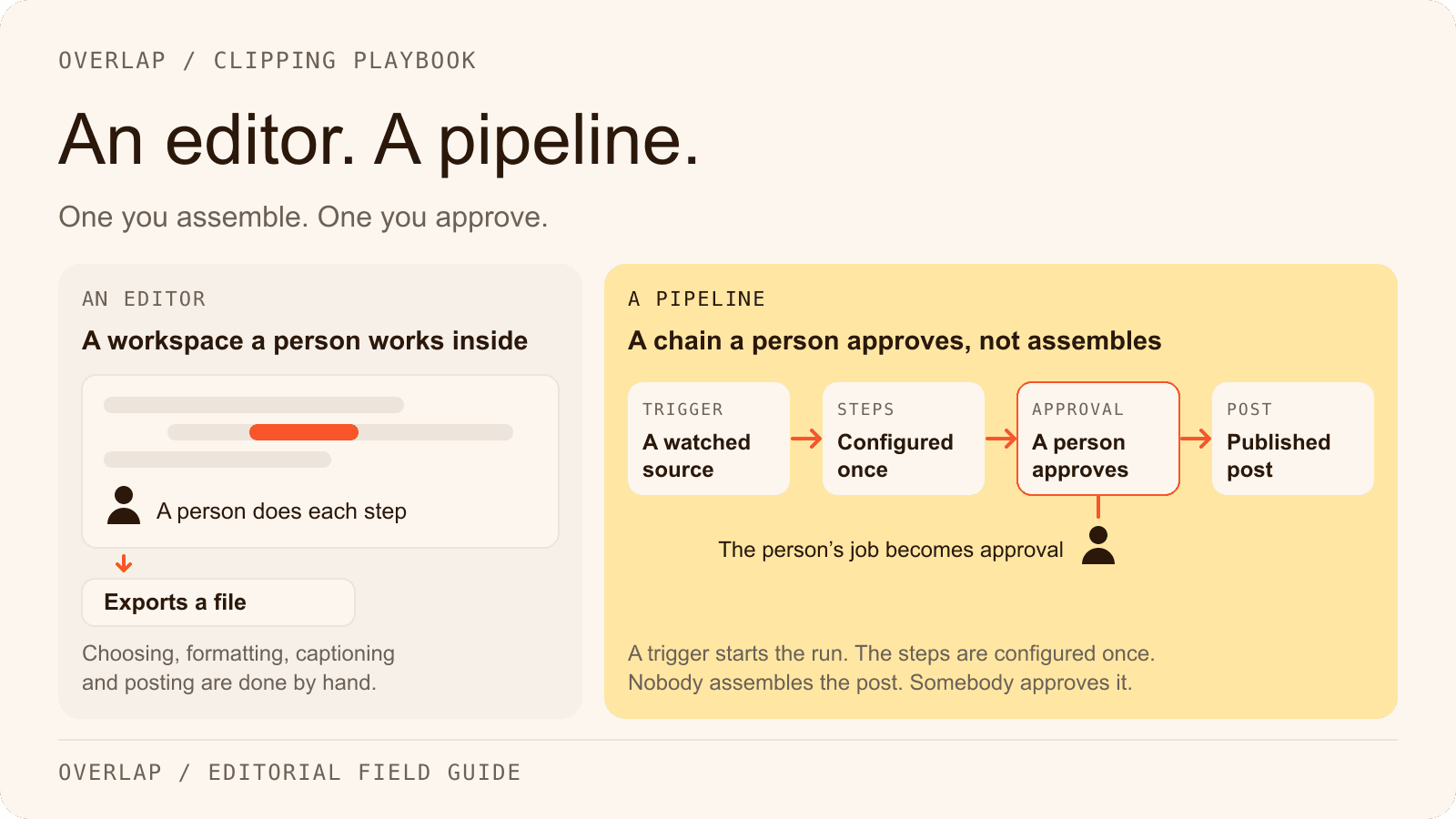
The tools below do not compete with Descript's timeline. They compete with the work after the timeline: choosing moments, formatting for vertical, captioning, posting to several accounts and reporting what each post did. In an editor, a person does each step and exports a file at the end. In a pipeline, a trigger starts the run, the steps are configured once, and the person's job becomes approval.

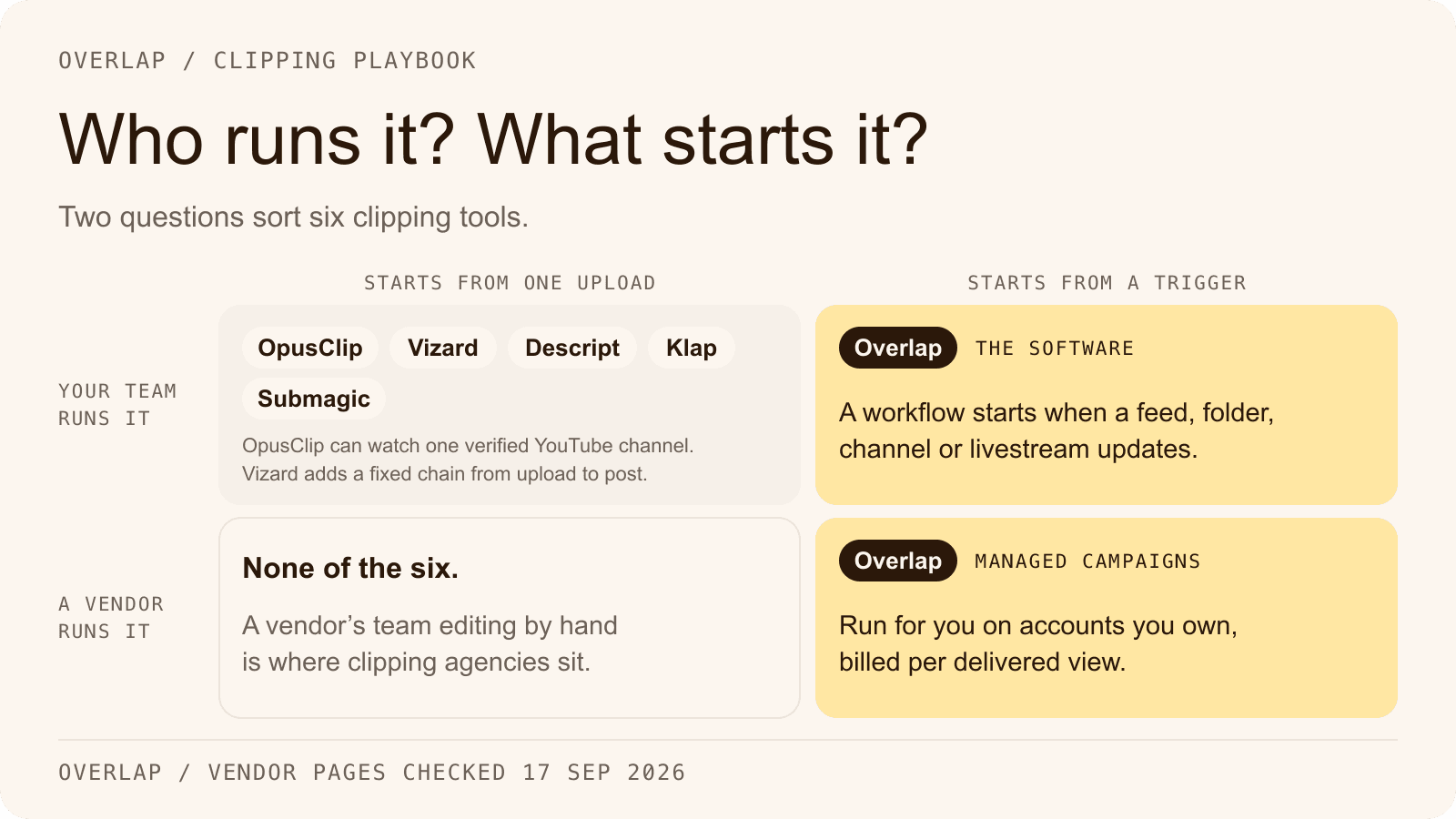
Four questions separate the two shapes, and the sections below answer them for each tool:
- What starts a run? A person, or a source the tool watches.
- Where can a clip go without a download? The destinations, and whether there is a scheduler.
- What is metered? Source minutes, generated clips, seats or delivered views.
- Who does the work? Your team inside a tool, or a team running the tool for you.
Overlap: a workflow from source to published post
Overlap is an AI video clipping platform. Teams run it themselves, or Overlap's team runs managed clipping campaigns for them on accounts the customer owns, priced per delivered view. The self-serve product is built as a workflow: a trigger that says when to start, editing nodes that shape each clip, and an export step that publishes. Source: Overlap docs, workflows.
Triggers are the first difference from Descript. A workflow can start from a manual upload, a YouTube channel or playlist, a Dropbox folder, an RSS, Atom or podcast feed, an audio livestream URL, an RTMP or HLS livestream, or a Frame.io project, so new source content starts a run without anyone opening the app. The Find Clips node selects moments with a prompt, keywords, a Conversational or Multimodal model and a duration window of 10 to 600 seconds, and returns a virality score per clip. Convert to Vertical reframes to 9:16 and follows the active speaker; Style Video applies subtitles from named presets, title overlays, a watermark, lower thirds and an end card. Source: Overlap docs, Find Clips and Source: Overlap docs, nodes overview.
Publishing is the second. The Post to Social node publishes to nine platforms from connected accounts the customer owns: TikTok, Instagram, YouTube including Shorts, X, LinkedIn, Facebook, Threads, Snapchat and Bluesky. It sets a posting cadence, can require approval before anything goes out, and can be told not to schedule into a slot that already holds a post. Posts sit in a Social Calendar where copy, cover and time can be changed, and per-post analytics report views, likes, comments and shares back into the account. Source: Overlap docs, linking accounts and Source: Overlap docs, Post to Social.
Automation runs through a REST API that triggers a saved workflow on a public video URL and polls for results, and an MCP server for Codex and Claude Desktop; there is no Zapier app, no webhook and no command-line tool, and the automation page says so. Overlap's platform is priced on a custom quote from its sales team: billing is described in processing hours and active workflows, and the pricing page explains how it works. The one published rate is for managed campaigns, billed at $0.50 to $2.50 per thousand delivered views up to a monthly ceiling the customer sets; the clipping campaigns page holds the worked example. Source: Overlap docs, API trigger and Source: Overlap docs, MCP overview.
For a row-by-row reading against Descript, see Overlap vs Descript; the AI video clipper page covers the editing nodes and the integrations page lists every documented source and destination.
OpusClip: a self-serve clipper with a scheduler on Pro
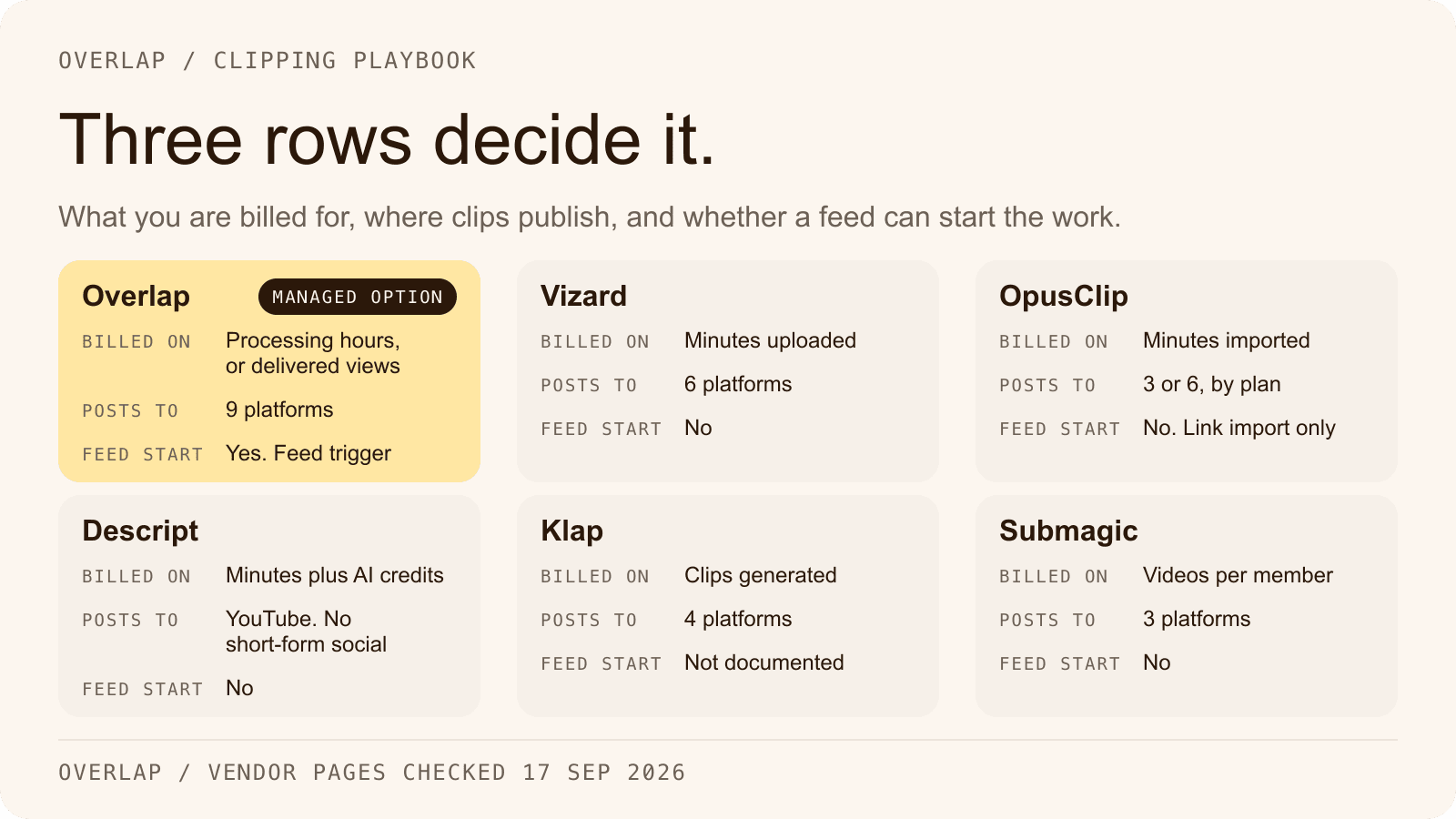
As checked on September 17, 2026, OpusClip's Free plan has 60 credits a month, a watermark, and clips that stop being exportable after 3 days. Starter is $15 a month, monthly billing only, with 150 credits and auto-posting to YouTube Shorts, TikTok and Instagram Reels. Pro is $29 a month or $14.50 a month billed annually ($174 a year) for 300 credits, a social scheduler, six social account connections and publishing to YouTube, TikTok, Instagram, LinkedIn, Facebook Pages and X, the last marked beta. Business is custom. One credit is one minute of source video imported. Source: OpusClip pricing, Source: OpusClip help, social account FAQ and Source: OpusClip help, how credits are consumed.
OpusClip offers auto-import from a verified YouTube channel on Starter and above, plus a REST API, webhooks, an official Zapier integration on Pro and an MCP server. Its supported sources include YouTube, Google Drive, Dropbox, Zoom, Vimeo, Twitch and public MP4 URLs; RSS is not on the list, so a podcast feed cannot start a run. Threads, Snapchat and Bluesky are not listed as destinations, and OpusClip publishes no managed service and no per-view pricing. Source: OpusClip help, supported video sources and Source: OpusClip API.
Vizard: clipping plus a calendar, priced per minute
Vizard meters one credit per minute of video processed. As checked on September 17, 2026, the Free plan gives 60 credits a month, 720p export with a watermark, one connected social account and 3-day storage. Creator is $29 a month or $14.50 a month billed yearly ($174) for 600 credits a month, six social accounts, scheduling and 4K export. Business is $39 or $19.50 billed yearly ($234) for 20 accounts, a shared workspace, a brand kit and extra seats at $5 a month each. Source: Vizard pricing and Source: Vizard help, how credits are used.
Vizard publishes to TikTok, YouTube, Instagram, Facebook Pages, X and LinkedIn, and its Auto Schedule feature queues up to 10 clips a day. Sources include YouTube links, Google Drive, Dropbox and Twitch VODs; RSS is absent and live streams are not captured. The API is for paid plans only and supports a webhook URL, and Vizard ships an n8n template, but there is no Zapier app and no MCP server in its docs. Nothing on the site describes a managed service or a price on views. Source: Vizard help, connect social accounts, Source: Vizard help, auto schedule and Source: Vizard API quickstart.
Klap: priced per generated clip, with a shorter publishing list
Klap meters generated clips rather than source minutes. As checked on September 17, 2026, Basic is 100 clips a month for $29 monthly or $14 a month billed yearly, Pro is 300 clips for $79 or $39, and Pro+ is 1,000 clips for $189 or $94. All plans list AI clipping, unlimited social accounts and analytics. The free tier is one video with no credit card, and Klap states that no plan adds a watermark. Its API is metered per operation: $0.44 to ingest a video, $0.32 per generated short and $0.48 per export. Source: Klap pricing and Source: Klap API pricing.
Klap publishes direct posting and scheduling to TikTok, YouTube, Instagram and LinkedIn; Facebook appears on one older page only and X is not mentioned, so treat both as unconfirmed. Sources are pasted URLs (YouTube, Vimeo, Twitch, Google Drive, Zoom, Loom, Riverside) or file uploads of up to 4 hours. Nothing watches a folder or a feed, the documented API completion model is polling even though two marketing pages mention webhooks, and there is no Zapier app and no MCP server. One inconsistency is worth knowing: the homepage FAQ still quotes a Pro plan at $29 a month, where the pricing page's Pro is $79. Source: Klap AI clip maker and Source: Klap API docs, generate shorts.
Submagic: a captions-first editor with clipping as an add-on
Submagic is the closest of the five to Descript in shape: an editor for short videos, priced per member, where long-form clipping is a separate subscription. As checked on September 17, 2026, Starter is $19 per member a month or $12 billed yearly with a 2-minute per-video cap, Pro is $39 or $23 with a 5-minute cap, and Business is $69 or $41 with a 30-minute cap. Magic Clips, the long-form clipping feature, does not appear on the pricing page; the help center describes it as an add-on subscription at $19 a month for 10 uploads. Free accounts can upload three short videos, and a subscription is needed to download without a watermark. Source: Submagic pricing and Source: Submagic help, how much does it cost.
Publishing and scheduling reach TikTok, Instagram Reels and Stories, and YouTube Shorts, with LinkedIn, Facebook and X marked as coming soon on the scheduler page; publishing is absent from the Starter plan. Submagic has more plumbing than an editor usually does: a REST API, webhooks, an MCP server, and Zapier, Make, n8n and Google Drive integrations, so a folder drop can start an edit through a third-party automation. It documents no RSS, Dropbox, Zoom or livestream ingestion and no managed service. Source: Submagic social media scheduler and Source: Submagic integrations.
Side by side: what happens after the cut
Every cell comes from the vendor's own page, checked on September 17, 2026 and linked in the section above it. “None documented” means the vendor's pages do not describe it. Prices are the entry paid tier.
| Tool | What starts a run | Direct publishing | Scheduler | Metered on | Entry paid tier |
|---|---|---|---|---|---|
| Descript | A person, or an API call or Zapier action from another app | YouTube, share page, Google Drive, podcast hosts, Wistia, HubSpot, Slack | None documented | Media minutes and AI credits | $16 per person per month annual, $24 monthly |
| Overlap | Manual upload, YouTube channel or playlist, Dropbox folder, RSS or podcast feed, audio livestream, RTMP or HLS stream, Frame.io, API, MCP | TikTok, Instagram, YouTube including Shorts, X, LinkedIn, Facebook, Threads, Snapchat, Bluesky | Yes, with approval and a calendar | Processing hours and active workflows; managed campaigns on delivered views | Platform: custom quote; campaigns $0.50 to $2.50 CPM with a monthly ceiling |
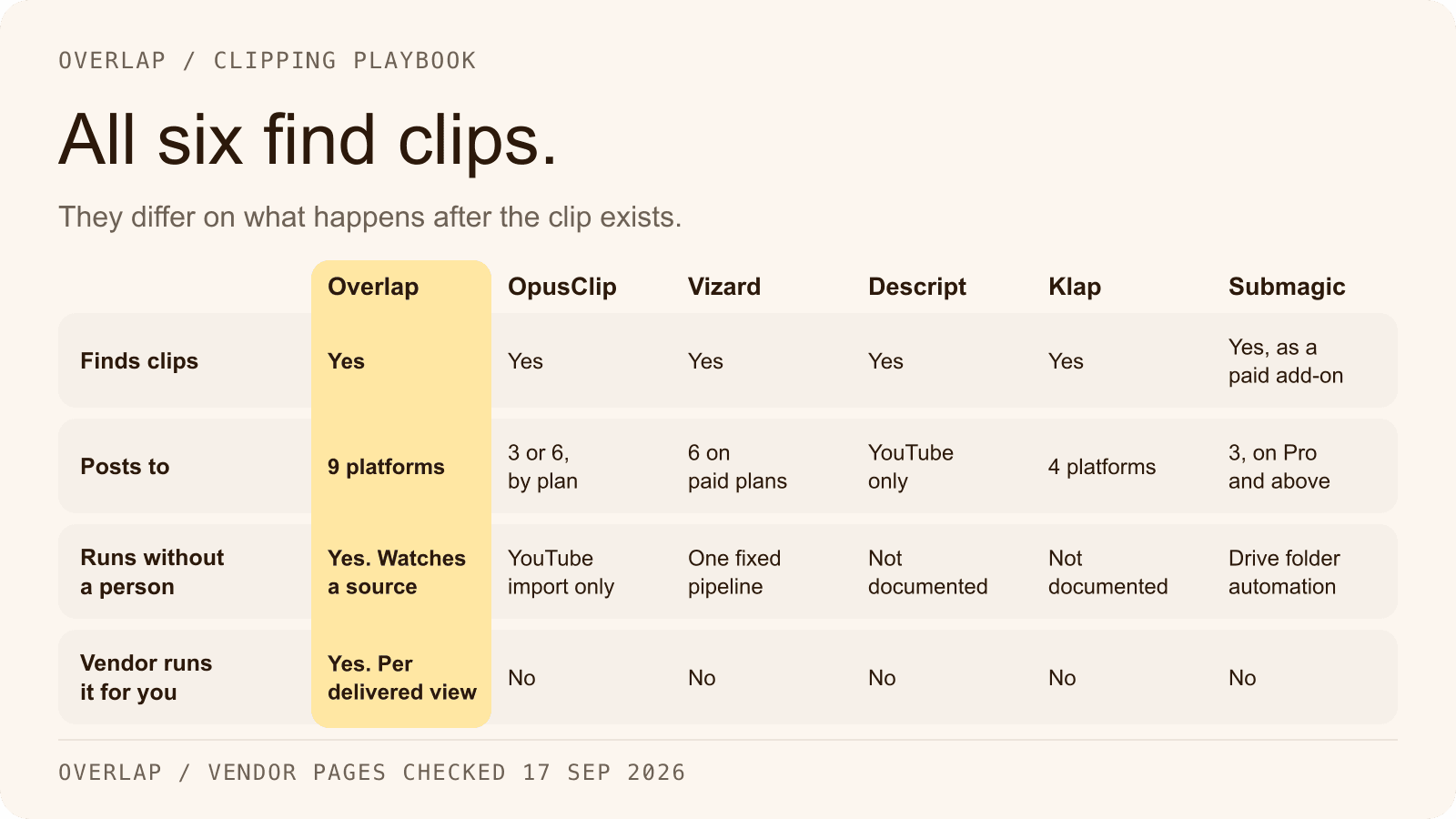
| OpusClip | A person, YouTube channel auto-import, API, Zapier, MCP | YouTube, TikTok, Instagram, LinkedIn, Facebook Pages, X (beta) | Pro and above | Credits, one per source minute | Starter $15 monthly only; Pro $14.50 annual or $29 monthly |
| Vizard | A person, API with webhook, n8n template | TikTok, YouTube, Instagram, Facebook Pages, X, LinkedIn | Paid plans | Credits, one per source minute | $14.50 yearly or $29 monthly |
| Klap | A person, or an API call | TikTok, YouTube, Instagram, LinkedIn | Yes | Generated clips; API per operation | $14 yearly or $29 monthly |
| Submagic | A person, API with webhook, Zapier, Make, n8n, Google Drive folder | TikTok, Instagram, YouTube Shorts; LinkedIn, Facebook, X marked coming soon | Pro and above | Videos per member; Magic Clips add-on per upload | $12 per member yearly or $19 monthly; Magic Clips $19 a month |
Every alternative publishes to more social platforms than Descript, and that is the obvious reading. The more useful one is the first column: only Overlap documents a run that starts from a channel, folder, feed or stream inside the product, with OpusClip's YouTube auto-import closest. Everywhere else a person or an external automation is the trigger, which is the position Descript is in.
Keep Descript if the edit is the product
None of this makes Descript a weak choice. It is the wrong shape for one job. Keep it, or choose it, when:
- You edit full episodes, courses or marketing video across multiple tracks, and clips are cut from a finished project rather than being the reason for the project.
- Your destinations are YouTube and podcast hosts, which Descript publishes to directly, and a downloaded MP4 is enough for everything else.
- Recording matters as much as editing. Rooms recording, screen capture, Studio Sound and filler-word removal are editing-side features that none of the five pipeline tools describe.
- Your team needs enterprise controls on the editor itself; Descript lists SOC 2 Type II, SSO, SCIM and audit logs on its Enterprise plan.
Descript's automation is real but reactive: a Zap or a script can push a finished composition to another tool, but the run starts elsewhere. If you keep Descript for editing and want distribution automated, the pipeline tool sits downstream and takes the export.
Where Overlap fits, and what the docs do not establish
Overlap's documentation establishes the pipeline end to end: triggers that watch a source, Find Clips, vertical reframing, styled captions, Post to Social across nine platforms with approval and a calendar, per-post analytics, a REST API and an MCP server, plus a Studio editor for finishing a clip with transcript-based cuts, subtitles, media and text layers and colour tools.
It does not establish three things a Descript user might assume. There is no documented Descript import or export integration, so a project moves between the two as a file. There is no long-form multitrack editor, screen recorder or podcast-host export in the docs. And the platform has no self-serve price list: it is priced on a custom quote from sales, and the rate printed here is the managed-campaign CPM band.
The managed offer is the part with no Descript counterpart. Overlap's team runs clipping campaigns on accounts the customer owns, with the customer approving rather than operating, billed on delivered views. It is an alternative to running the pipeline yourself, not to the editor. The how to start a clipping campaign guide covers the brief and the launch plan.
Decide by who does the publishing
Ask who posts the clip. If the answer is a person who also edits the episode, Descript already covers the whole job. If the answer is a scheduler that someone feeds by hand, OpusClip, Vizard, Klap or Submagic remove the hand-feeding for the platforms each supports. If the answer should be no one, with a source that starts the run and a person who approves the output, that is a workflow, and it is what Overlap's self-serve product is built as. If the answer is a team you would rather hire than build, that is a managed campaign.
List your destinations and your sources, then match them against the table. Build the workflow in Overlap, or read the row-by-row Overlap vs Descript comparison first. For the setup itself, the clipping agent workflow guide walks through a trigger, Find Clips, styling and Post to Social step by step.
Frequently Asked Questions
Does Descript publish clips to TikTok or Instagram?
As checked on September 17, 2026, Descript's integrations page and help center list YouTube, its own share page, Google Drive, podcast hosts, Wistia, HubSpot and Slack as publishing destinations. TikTok, Instagram, LinkedIn, X and Facebook are not listed, and no scheduler is documented. The platforms named on Descript's clips page describe the formats it can create for, not the places it can post.
What is the difference between a video editor and a clipping pipeline?
A video editor is a workspace where a person makes each edit and exports a file at the end. A clipping pipeline is a chain that starts on a trigger, selects and formats clips, publishes them to connected accounts and reports what each post did, with the person approving rather than assembling. The first saves editing time; the second removes the editing step from distribution.
How does Descript charge for clipping?
Descript meters two units: media minutes for what you upload or record, and AI credits for every AI tool, including each Create Clips run. As checked on September 17, 2026, paid plans start at $16 per person per month billed annually or $24 billed monthly, unused minutes and credits do not roll over, and Descript does not publish a credit cost for a single Create Clips run.
Which Descript alternative publishes to the most platforms?
Among the tools in this comparison, Overlap documents nine publishing destinations: TikTok, Instagram, YouTube including Shorts, X, LinkedIn, Facebook, Threads, Snapchat and Bluesky. OpusClip and Vizard each document six, Klap documents four, and Submagic documents three with three more marked as coming soon. All counts were checked on the vendors' own pages on September 17, 2026.
Can Overlap replace Descript for editing?
Not for long-form editing. Overlap's documentation describes a Studio editor for finishing clips, with transcript-based cuts, subtitles, media and text layers and colour tools, alongside the workflow that selects and publishes clips. It does not describe a multitrack long-form editor, a screen recorder or a podcast-host export. Teams that edit full episodes in Descript can keep doing so and add a pipeline tool for distribution.
Is a managed clipping campaign an alternative to Descript?
It is an alternative to running a clipping pipeline yourself, not to an editor. In an Overlap managed campaign, Overlap's team runs clip selection, editing, approval and publishing on accounts the customer owns, and the customer approves rather than operates. It suits teams whose constraint is operating capacity rather than editing skill. The rate, the monthly ceiling and a worked example are on the clipping campaigns page.