On this page
- Why people look for an OpusClip alternative
- Two questions that sort the six tools
- Overlap: a workflow builder, nine destinations and a managed option
- Vizard: twice the minutes, one fixed pipeline
- Descript: an editor first, with clipping inside it
- Klap: billed per clip, four destinations
- Submagic: a per-seat editor, with clipping as an add-on
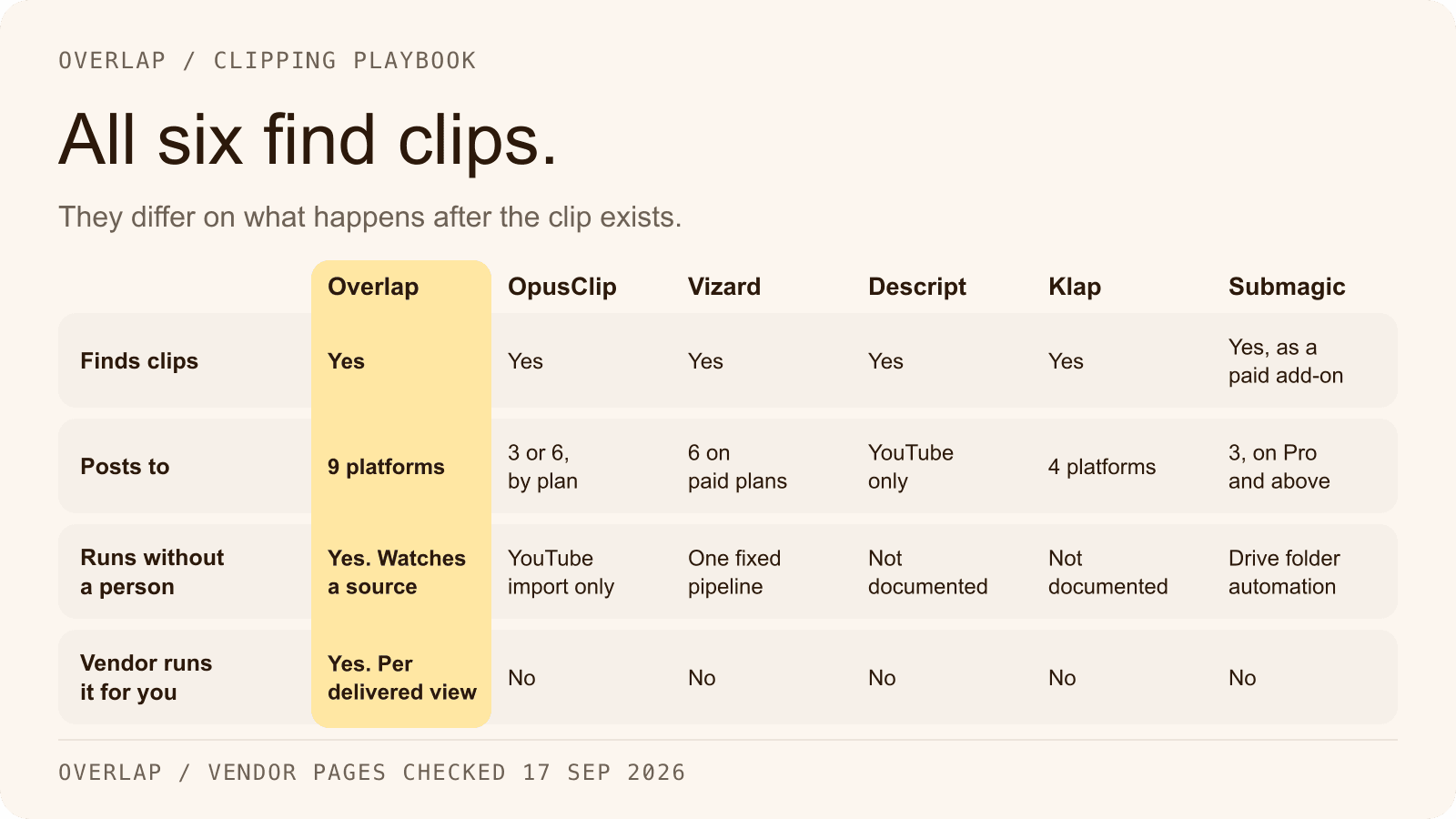
- The six tools side by side
- How to choose by use case
- Where Overlap fits, and where its documentation stops
- Frequently Asked Questions
- Start by naming who will run it
The OpusClip alternatives worth comparing in 2026 are Overlap, Vizard, Descript, Klap and Submagic. All six tools find highlights in a long video, reframe them to 9:16 and add captions. They differ on three things that decide whether a tool fits: what starts the clipping (one upload, or a feed, folder, channel or livestream), where the finished clips can publish, and what the bill is measured in (source minutes, clips, seats or delivered views). Overlap is the only one of the six that also offers a managed option, run on accounts the customer owns and billed per delivered view.
Pick by workflow before price. The entry paid tiers of the five self-serve tools cost between $12 and $16 a month on annual billing, so the cost that matters is how many source minutes, clips or seats a month of your content consumes, and how much operating work is left for a person after the tool has run.
This comparison is published by Overlap, which offers one of the options discussed. Every vendor fact below was read on the vendor's own site on September 17, 2026 and is linked where it appears. It describes published terms and features; it is not a controlled test of clip quality or results.
Why people look for an OpusClip alternative
Three reasons come up, and all three are on OpusClip's own pages.
Billing is per minute of source video. As checked on September 17, 2026, OpusClip's help centre states that one credit is consumed per minute of the original video imported, that monthly-plan credits expire after 60 days, and that posting to X costs a further credit per clip. Free includes 60 credits a month, Starter 150 and Pro 300. By that arithmetic a weekly two-hour show needs about 480 credits in a four-week month, more than either paid tier includes. Source: OpusClip help centre, how credits are consumed.
Publishing depends on the plan. OpusClip's pricing page and social-account FAQ, checked the same day, show no social posting on Free, posting to YouTube, TikTok and Instagram on Starter, and LinkedIn, Facebook Pages and X (in beta) added on Pro, along with the scheduler and six account connections. Threads is not listed on any OpusClip page opened for this article. Source: OpusClip pricing and Source: OpusClip social account FAQ.
There is no managed option. Every OpusClip tier is software. Its own guide to clipping agencies, dated August 12, 2026, describes the company as the tool that keeps a clipper network fed, not as a service that runs campaigns. A team that wants someone else to operate the clipping has to buy a second vendor. Source: OpusClip, The 10 Best Clipping Agencies in 2026.
None of this makes OpusClip a weak tool; its Pro tier also lists AI B-roll, multiple aspect ratios, a limited API and an MCP connector. The question is whether its shape matches yours.
Two questions that sort the six tools
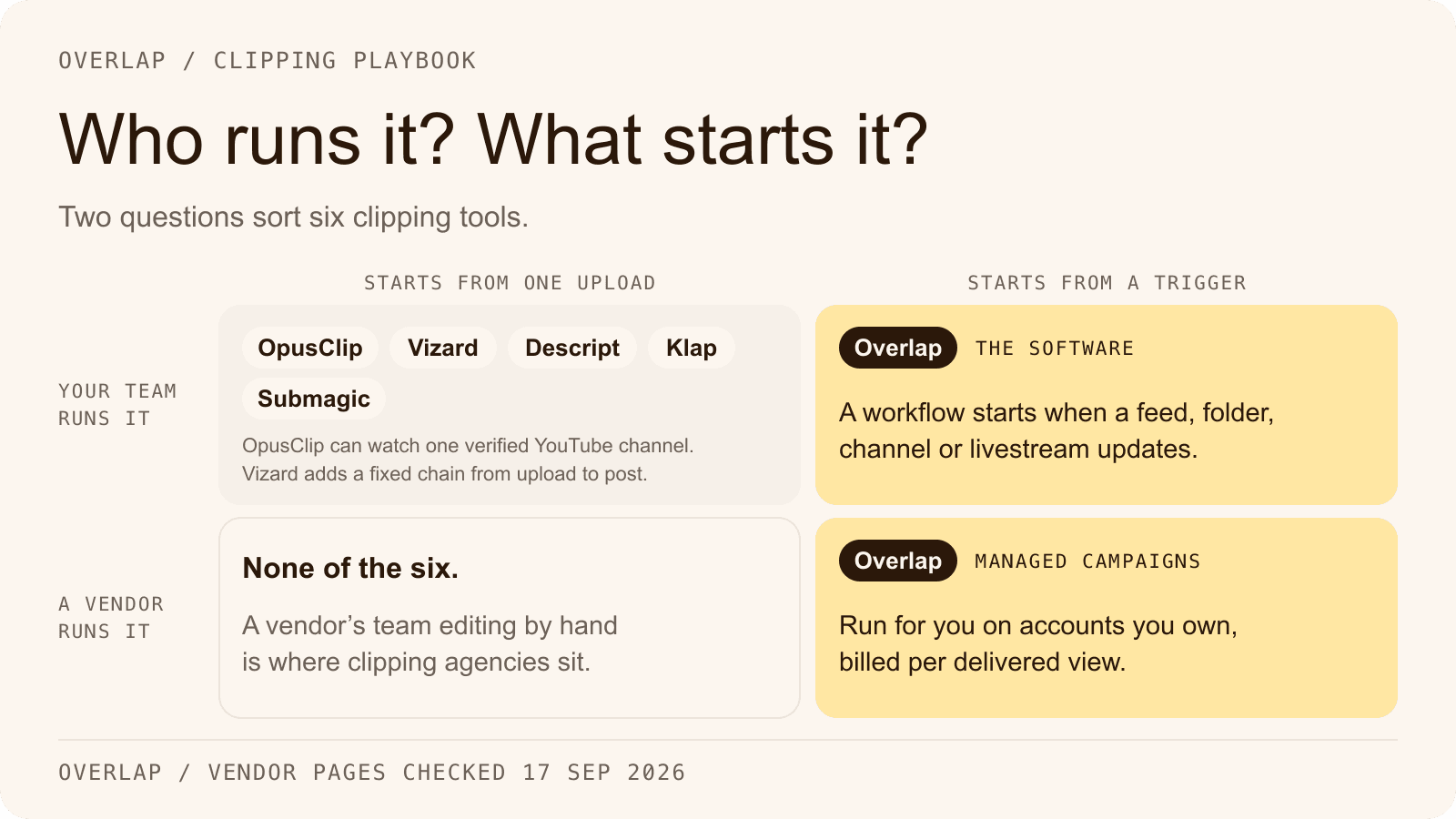
Sort the field with two questions before the detail. Who runs the clipping: your team, or a vendor's team? And what starts it: one upload at a time, or a trigger that watches a source and runs without anyone opening the app?

Five of the six are self-serve, and four of those begin from a single upload or pasted link; Vizard adds a fixed chain from upload to auto-scheduled post, and OpusClip can watch one verified YouTube channel on its paid tiers. Overlap's software starts from a trigger, and Overlap's campaigns are the one managed option among the six. The bottom-left square, a vendor's team editing by hand, is where clipping agencies sit, and none of the six tools offers it.
Overlap: a workflow builder, nine destinations and a managed option
Overlap is an AI video clipping platform. Teams run it themselves, or Overlap's team runs managed clipping campaigns for them on accounts the customer owns, priced per delivered view. Four things separate it from OpusClip.
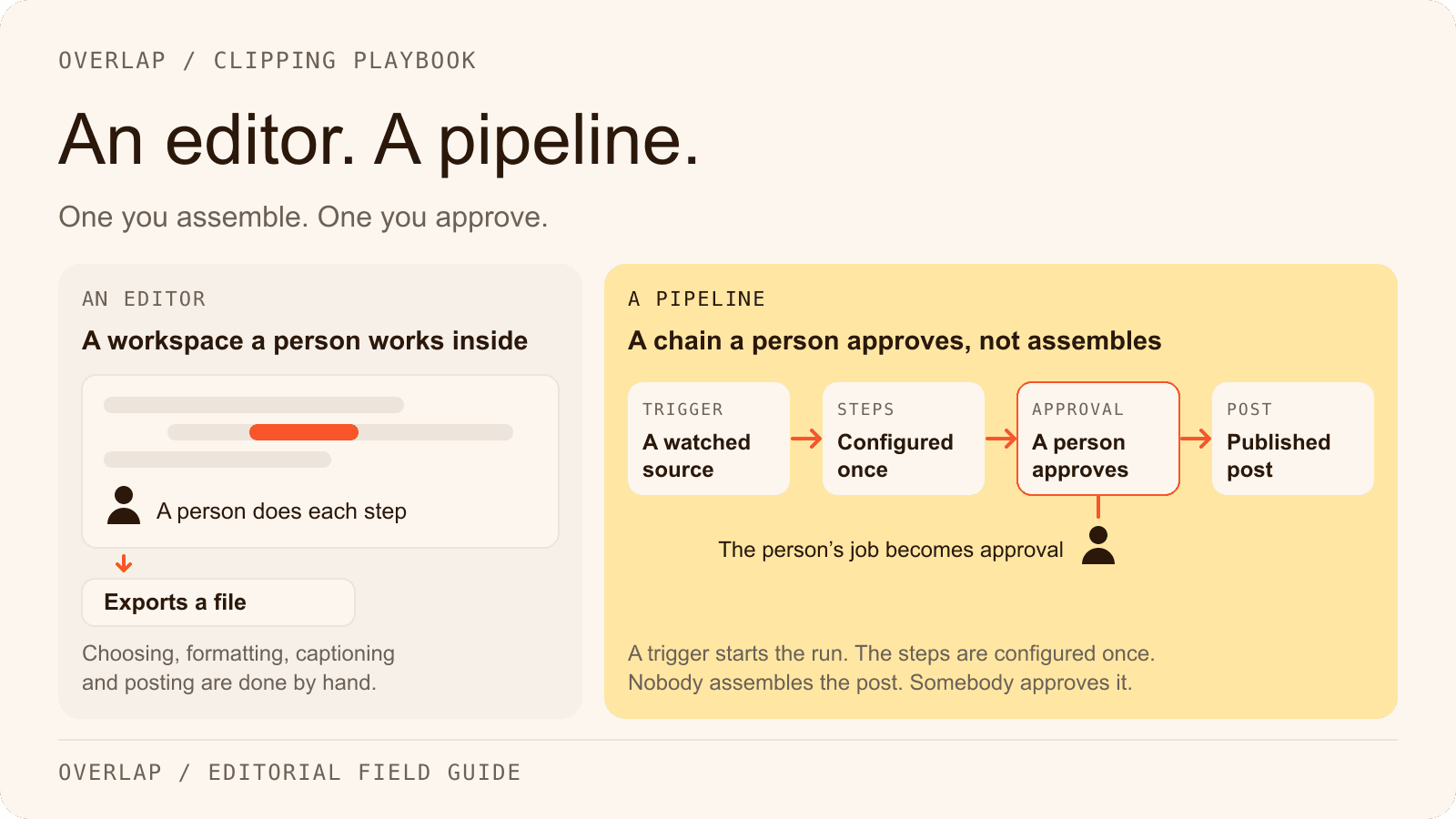
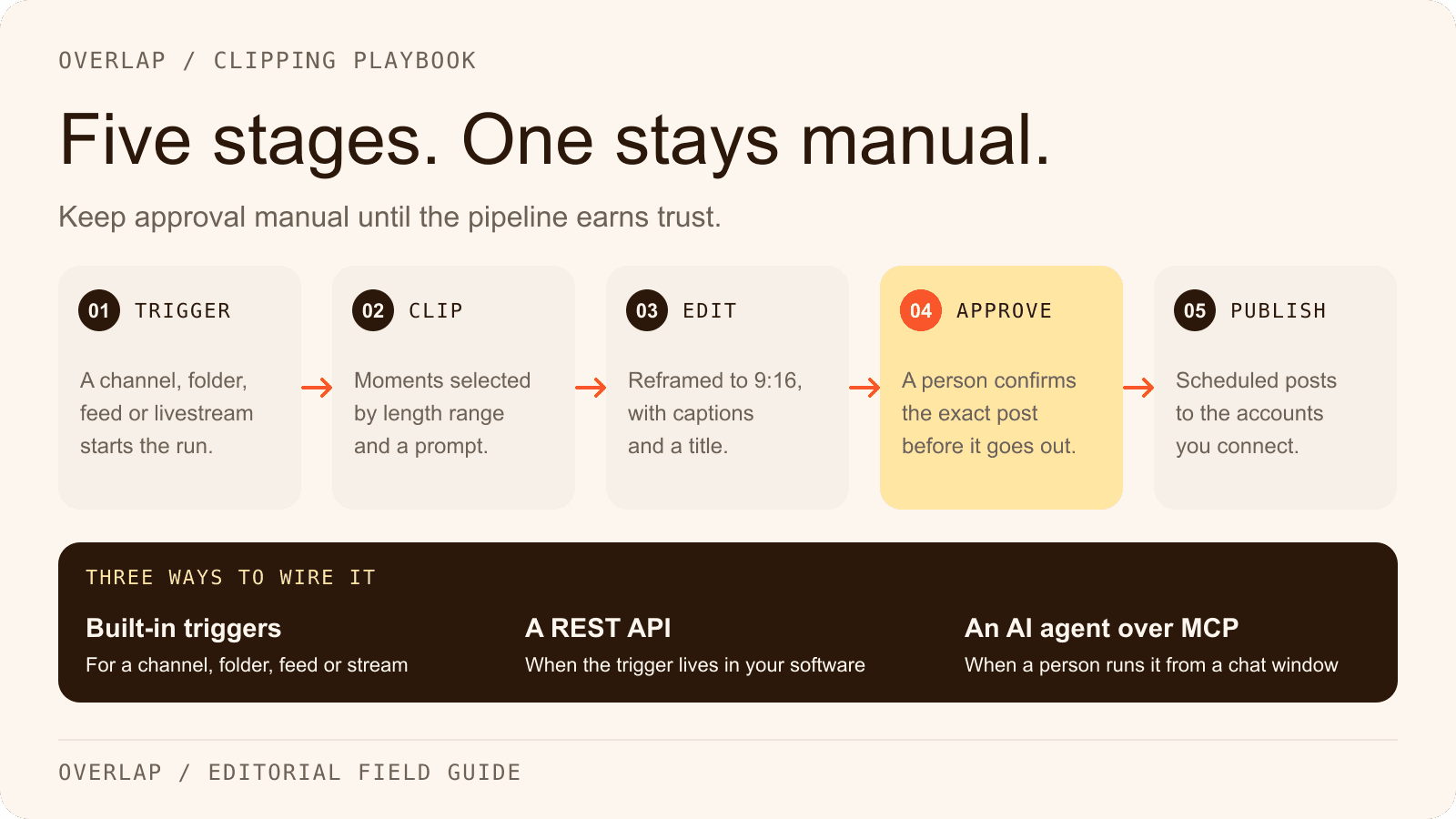
The clipping is a workflow, not an upload. In Overlap's documentation a workflow is a trigger, editing logic and an export step, and each step is a node. Triggers include a manual upload, a YouTube channel or playlist, a Dropbox or Frame.io folder, an RSS, Atom or podcast feed and an audio livestream URL, and the Livestreams feature ingests an RTMP push or a public HLS URL in chunks and runs a workflow on each chunk. A new episode in the feed starts the run; nobody pastes a link. Source: Overlap workflows documentation and Source: Overlap livestreams documentation.
The editing steps are nodes you chain. Find Clips selects moments with a Highlights, Montages or Even Clips strategy, a Conversational or Multimodal model, a prompt and a clip length from 10 to 600 seconds. Convert to Vertical reframes to 9:16 and follows the active speaker. Captions, titles, a watermark and an outro are set in the Style Video node; B-roll, music, filler and curse-word removal, smart zoom and an audiogram for audio-only sources are further nodes. The AI video clipper page walks through the set. Source: Overlap node overview.
Publishing reaches nine platforms with an approval step. The Post to Social node publishes through connected accounts on TikTok, Instagram, YouTube including Shorts, X, LinkedIn, Facebook, Threads, Snapchat and Bluesky, sets a posting cadence, can hold each post for approval in the Social Calendar, and refuses to double-book a time slot. Account owners connect their own handles by invitation, so a client never hands over a password. The integrations page lists every source and destination. Source: Overlap account linking documentation.
Automation is an API and an MCP server. A saved workflow can be triggered on a public video URL through the REST API and its results polled, and the MCP server lets an AI client such as Claude Desktop or Codex list and run workflows, edit transcripts and draft posts, with publishing gated behind explicit consent. There is no Zapier app and no webhook. The automation page covers both. Source: Overlap API trigger reference and Source: Overlap MCP overview.
What it costs. Overlap's platform is priced on a custom quote from its sales team; the pricing page explains what each of the two offers is billed on. Managed campaigns are the published number: a CPM agreed between $0.50 and $2.50, billed on the views actually delivered and capped at a monthly ceiling the customer sets. The clipping campaigns page has the calculator, and the Overlap vs OpusClip comparison puts the two side by side, row by row.
Vizard: twice the minutes, one fixed pipeline
Vizard is the closest like-for-like alternative: a self-serve clipper billed per minute of uploaded video. As checked on September 17, 2026, its pricing page lists Creator at $14.50 a month billed yearly ($174 a year), with $29 printed as the undiscounted monthly price, and Business at $19.50 billed yearly ($234 a year), $39 undiscounted, plus $5 a month per extra seat. Both start at 600 credits a month, and Vizard's help centre defines one credit as one minute of video processed, deducted once per project. The free plan has 60 credits, 720p watermarked export and three-day storage. Source: Vizard pricing and Source: Vizard help centre, how credits are used.
That is twice OpusClip's minutes at the same headline price, which is why Vizard appears in these searches. The trade is the workflow: one fixed pipeline from upload to clips to captions to an optional auto-schedule of up to ten clips a day, with no user-defined steps. Publishing covers TikTok, YouTube, Instagram, Facebook Pages, X and LinkedIn, with Free limited to TikTok, six accounts on Creator and twenty on Business. Sources are uploads and links from YouTube, Google Drive, Dropbox, Vimeo, Twitch and others; there is no RSS feed and no live capture. Paid plans get an API with a webhook, and an n8n template exists. Source: Vizard help centre, connecting social accounts and Source: Vizard API quickstart.
Descript: an editor first, with clipping inside it
Descript is a text-based video and audio editor with an AI co-editor called Underlord; clipping is one tool inside it rather than the product. Create Clips returns 1 to 20 clips of 10 seconds to 5 minutes, optionally in a 9:16 or 1:1 layout and steered by a topic prompt. No numeric virality score is published on any Descript page opened for this article. Source: Descript help centre, create clips.
Pricing, as checked on September 17, 2026, is per person per month: Hobbyist at $16 billed annually or $24 monthly, Creator at $24 or $35, Business at $50 or $65, and a custom Enterprise tier. Each plan carries two units, media minutes for what you upload or record and AI credits that every AI tool spends, including each Create Clips run. The free plan has 60 media minutes a month, 100 one-time credits and 720p watermarked export, and nothing rolls over. Source: Descript pricing and Source: Descript help centre, media minutes and AI credits.
The gap for a clipping team is distribution. Descript publishes directly to YouTube on owned channels, to its share pages, to Google Drive, and to podcast hosts and tools such as Wistia, HubSpot and Slack. It does not publish to TikTok, Instagram, LinkedIn, X or Facebook, and it has no scheduler. Its automation surface is broad: a REST API for paying users, callback webhooks, Zapier actions and searches without triggers, and an MCP server. Sources are uploads, Google Drive and Zoom cloud recordings; the older YouTube-URL import article now redirects to a Zoom-only page. Source: Descript integrations and Source: Descript help centre, Zapier.
Klap: billed per clip, four destinations
Klap meters the one thing the other five do not: clips generated. As checked on September 17, 2026, Basic is 100 clips a month for $29 monthly or $14 billed yearly, Pro 300 clips for $79 or $39, and Pro+ 1,000 clips for $189 or $94, under the headline “Only pay for clips you generate.” The free tier is one video with no card required, and Klap states that no plan adds a watermark. Its homepage FAQ still calls the $29 plan Pro while the pricing page calls it Basic. Source: Klap pricing and Source: Klap AI clip maker.
Publishing and scheduling go to TikTok, YouTube, Instagram and LinkedIn. Sources are a YouTube link, an upload of up to four hours and two gigabytes, or a pasted link from Vimeo, Twitch, Google Drive, Facebook, Dailymotion, Zoom, Loom or Riverside; RSS and Dropbox are not mentioned. Each clip carries a virality score from 0 to 1 with a written explanation. The API is billed per operation, at $0.44 to ingest a video, $0.32 per generated short and $0.48 per export, and completion is by polling; two marketing pages promise webhooks that the API reference does not document. There is no Zapier app and no MCP server on Klap's site. Source: Klap API pricing and Source: Klap API, generate shorts.
Submagic: a per-seat editor, with clipping as an add-on
Submagic's centre of gravity is captions and polish on clips that already exist. Long-form clipping, called Magic Clips, is an add-on that Submagic's help centre, updated June 16, 2026, lists at $19 a month for ten uploads; the pricing page shows no Magic Clips price. Plans are per member per month. As checked on September 17, 2026, Starter is $19 monthly or $12 billed yearly for 15 videos of up to two minutes, Pro $39 or $23 for 40 videos of up to five minutes, and Business $69 or $41 for 100 videos of up to 30 minutes. Publishing is not included on Starter. Free accounts can upload three short videos, and Submagic says downloads without a watermark come with a subscription. Source: Submagic pricing and Source: Submagic help centre, how much does it cost.
Publishing and scheduling cover TikTok, Instagram Reels and Stories, and YouTube Shorts, with LinkedIn, Facebook and X listed as coming soon on the scheduler page and already present in the API's publish endpoint. Sources are a YouTube URL, an upload or a public Google Drive link; Dropbox, Zoom, RSS and livestream ingestion are absent from the integrations page and the docs. The automation surface is the widest of the five: a REST API metered in minutes, webhooks, an MCP server, and Zapier, Make, n8n and Gumloop integrations. What Submagic lacks is a native multi-step workflow builder. Source: Submagic scheduler and Source: Submagic integrations.
The six tools side by side
Every cell was read from the vendor's own site on September 17, 2026; the sources are the links above. Prices are in US dollars, and “Entry paid tier” is the cheapest paid plan with the annual figure where one is published.
| Tool | What starts the clipping, and the unit you pay for | Publishes to | Sources beyond upload | Automation surface | Entry paid tier |
|---|---|---|---|---|---|
| Overlap | A trigger runs a workflow of nodes; or Overlap's team runs managed campaigns billed per delivered view | TikTok, Instagram, YouTube and Shorts, X, LinkedIn, Facebook, Threads, Snapchat, Bluesky | YouTube channel or playlist, Dropbox, Frame.io, RSS and podcast feeds, audio livestream URL, RTMP or HLS livestream | REST API, MCP server | Platform: custom quote; campaigns at a $0.50 to $2.50 CPM with a monthly ceiling |
| OpusClip | One upload or link, or a watched YouTube channel on paid tiers; credits per source minute | Starter: YouTube, TikTok, Instagram. Pro: adds LinkedIn, Facebook Pages, X (beta) | YouTube, Google Drive, Dropbox, Zoom, Vimeo, Twitch and other finished-video links; no RSS | API, MCP connector and Zapier on Pro and above | Starter $15 a month (monthly only); Pro $29 a month or $174 a year |
| Vizard | One upload, then a fixed chain to captions and auto-schedule; credits per minute | TikTok, YouTube, Instagram, Facebook Pages, X, LinkedIn (free: TikTok only) | YouTube, Google Drive, Dropbox, Vimeo, Twitch and other links; no RSS, no live capture | API with webhook on paid plans; n8n template | Creator $14.50 a month billed yearly ($174 a year); $29 undiscounted |
| Descript | Create Clips inside a text-based editor; media minutes plus AI credits, per person | YouTube (owned channels), share page, Google Drive, podcast hosts; not TikTok, Instagram, LinkedIn, X or Facebook | Google Drive, Zoom; no RSS | API, callback webhooks, Zapier actions, MCP server | Hobbyist $16 a month billed annually; $24 monthly |
| Klap | One upload or link per project; billed per clip generated | TikTok, YouTube, Instagram, LinkedIn | YouTube, Google Drive, Zoom, Vimeo, Twitch and other links; RSS and Dropbox not mentioned | API billed per operation; no Zapier app or MCP found | Basic $29 a month or $14 a month billed yearly |
| Submagic | A short-form editor per member; long-form clipping is the Magic Clips add-on | TikTok, Instagram, YouTube Shorts on Pro and above; LinkedIn, Facebook, X listed as coming soon | YouTube URL, public Google Drive link; no Dropbox, RSS or livestream | API, webhooks, MCP server, Zapier, Make, n8n | Starter $19 a member a month, or $12 billed yearly; Magic Clips add-on $19 a month |
Two cells deserve a caution. Klap's no-watermark statement is Klap's own, and a third-party review disagrees with it. Vizard's monthly toggle did not render during the check, so its $29 and $39 monthly figures are the struck-through base prices printed on the annual view.
How to choose by use case
A podcast
The question is what starts the run. If the show publishes through a feed, Overlap's RSS Feed trigger starts a workflow on each new episode, and an audio-only show can go through the Add Audiogram node rather than needing a camera. None of the other five lists a podcast feed as a source; OpusClip lists Apple Podcast among its import links, and Klap's podcast page points audio-only shows to an audiogram tool. If the episode is already edited in Descript, Create Clips avoids a second upload, but the clips then leave for a scheduler by hand. The limits of AI clipping for podcasters piece covers what no tool fixes.
A livestream
Overlap is the one tool of the six whose documentation describes ingesting a running broadcast, by RTMP push or public HLS URL, in chunks that each run through a workflow, plus an Audio Livestream trigger for radio-style streams. OpusClip's API page markets real-time clipping, but its help centre lists Twitch, Kick and other stream platforms as sources for finished recordings, and whether the web app ingests a running stream is not stated. Vizard and Klap take Twitch or YouTube links after the stream ends, which suits next-day highlights and nothing during the show. Descript's route is a partner handoff from Restream or Riverside.
A marketing team
A marketing team usually needs an approval step, a brand kit every clip obeys, and more than one connected account per platform. Overlap's Post to Social node can require approval before a post leaves the Social Calendar, and its brand kits hold logos, colours, fonts and voice for every workflow. Vizard puts its brand kit and shared workspace on Business, Submagic puts its brand kit on Pro and above, OpusClip allows one brand template on Starter and up to four on Pro, and Descript's Brand Studio is on Business. If the team already edits webinars and demos in Descript, staying there and handing clips to an existing scheduler may cost less than a second tool.
An agency
For an agency the unit of billing is most of the decision. Klap bills per clip and describes client workspaces with admin, editor and viewer roles. Submagic bills per member, with three publishing profiles per platform on Business. Vizard's Business plan connects twenty accounts and charges $5 a month per extra seat. OpusClip's Pro plan starts at six connections and two seats, growing by pack to four seats. Overlap gives an agency two ways in: run workflows for each client on the software, with each account owner connecting their own handles by invitation, or hand the operation to Overlap's managed campaigns. The clipping agency alternative page and the clipping agencies roundup cover the managed side.
Where Overlap fits, and where its documentation stops
Overlap's documentation establishes the workflow builder, the trigger nodes named above, the editing nodes, the nine publishing platforms with approval and cadence rules, a REST API that triggers a saved workflow and polls its results, and an MCP server. The managed campaign offer and its CPM band are described on overlap.ai, not in the docs.
The documentation does not establish several things a buyer coming from OpusClip might assume. It documents no Zapier app, no webhooks and no command-line tool, and its triggers do not include Zoom or a watched Google Drive folder; a public Google Drive file link is accepted by the API trigger only. The number of accounts that can be connected per platform is set by the plan. Verify those points against the docs or book a demo before promising them to a client, and treat every price above as the vendor's terms on the day they were checked, not as terms that will hold next quarter. Overlap's own platform is priced on a custom quote, so contact sales for that figure.
Frequently Asked Questions
Is there a free OpusClip alternative?
Yes. OpusClip, Vizard and Descript each offer a free tier with 60 minutes of source video a month and watermarked exports, Klap lets you process one video free, and Submagic lets you upload three short videos before subscribing. Scheduling is a paid feature on OpusClip, Vizard and Submagic, and Descript has no scheduler at all.
Which OpusClip alternative publishes to the most platforms?
Overlap documents nine: TikTok, Instagram, YouTube including Shorts, X, LinkedIn, Facebook, Threads, Snapchat and Bluesky. OpusClip and Vizard each reach six on their higher tiers, Klap four, and Submagic three today with three more listed as coming soon. Descript publishes video directly to YouTube and to hosting destinations such as Google Drive and podcast hosts, not to TikTok, Instagram, LinkedIn, X or Facebook.
Does OpusClip charge per minute or per clip?
OpusClip charges in credits, and one credit is one minute of the source video you import, with videos under a minute rounding up to one credit. Posting a clip to X costs one more credit per clip, and monthly credits expire after 60 days. Klap is the one tool in this comparison billed per clip generated, and Submagic counts videos per member rather than minutes.
Can I automate clipping from a podcast RSS feed?
With Overlap, yes: its RSS Feed trigger starts a workflow when a feed publishes a new item, and the documentation names podcast feeds from services such as Spotify and Anchor. Of the other five tools checked on September 17, 2026, none lists a podcast feed as a source of its own; OpusClip lists Apple Podcast among its import links.
Which of these tools has an approval step before publishing?
Overlap's Post to Social node has a Require approval option that holds each post in the Social Calendar until a person approves it, and the account owner can connect their own handle by invitation. The other five describe seats, roles or shared workspaces on their higher tiers; check whether a per-post approval gate exists in the plan you are evaluating before relying on one.
Does any OpusClip alternative run the clipping for you?
One does. Overlap's managed campaigns are run by Overlap's team on social accounts the customer owns and are billed on the views actually delivered, up to a monthly ceiling the customer sets. OpusClip, Vizard, Descript, Klap and Submagic sell software only; none of their sites describes a done-for-you service or per-view billing.
Start by naming who will run it
Decide who operates the clipping before comparing feature grids: a person on your team clicking through uploads, an automation that watches a feed, or a vendor's team. That answer removes most of the six. Then price the month of content you actually have in the unit each tool meters, whether source minutes, clips, seats or delivered views.
If your team will run it, start a workflow from a real feed or channel in Overlap and compare its output with the same episode in your current tool. If nobody on the team has the hours, read how to start a clipping campaign and the clipping campaigns page before buying a second seat anywhere.