On this page
- What are the five stages of an automated clipping pipeline?
- Option 1: No-code triggers that end in an approval queue
- A real Overlap workflow, node by node
- Option 2: Trigger the same workflow from your own code
- Option 3: Let an AI agent run it over MCP
- What to keep a human on
- Overlap has no Zapier, Make or webhooks today. Here is who does.
- Where Overlap fits
- Frequently Asked Questions
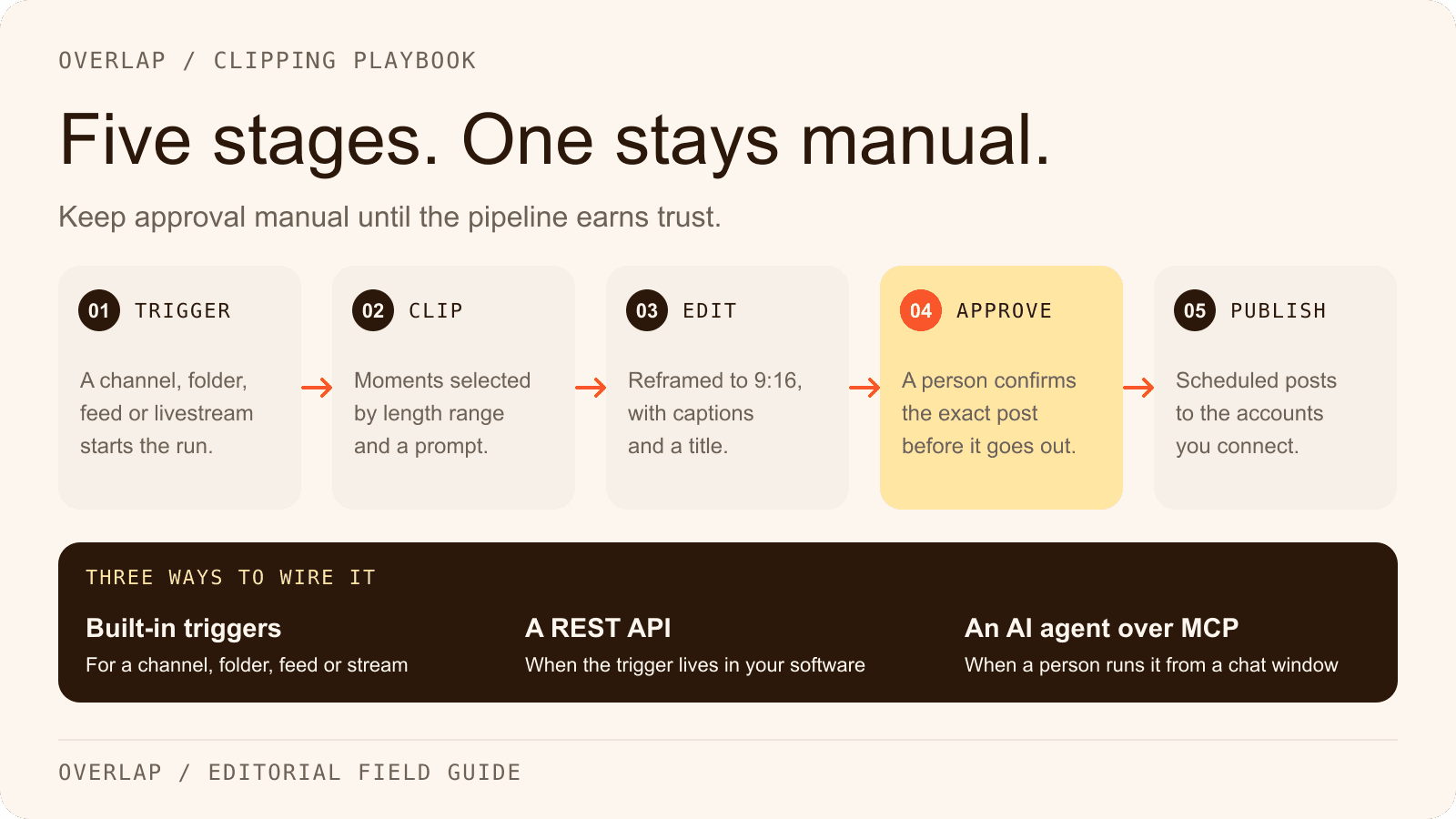
To automate video clipping end to end, connect five stages: a trigger that notices new source material, a clipping step that selects the moments, an editing step that reframes and captions them, an approval step where a person confirms the exact post, and a publishing step that posts on a schedule to accounts you own. There are three ways to wire those stages together. Use a platform's built-in triggers when the source is a YouTube channel, a Dropbox folder, a podcast feed or a livestream. Use a REST API when the trigger lives in your own software. Use an AI agent over MCP when a person wants to start runs and review results from a chat window. Whichever you choose, keep the approval stage manual until the pipeline has earned a longer leash.
The judgment this guide asks you to make is where the pipeline should stop and wait. Every stage can be automated. Not every stage should be, and the right answer depends on who owns the accounts, how many people can see a bad post before it comes down, and how quickly the source material goes stale.
This guide is published by Overlap, which offers one of the options discussed. The walkthrough uses Overlap's documented nodes and endpoints because those are the ones this site can verify. The table near the end covers five other tools, with the vendor page and the date each fact was checked. It is planning guidance, not a controlled test of provider results.
What are the five stages of an automated clipping pipeline?
Name the stages before you name the tools. A pipeline that skips a stage is not shorter. It has moved that stage to a person who did not know they owned it.

1. Trigger. Something tells the pipeline to start: a new video on a channel, a file landing in a folder, a new item in a podcast feed, a stream going live, a request from your own software, or a person pressing Run. The trigger decides how automatic the pipeline really is. A watched source starts the run on its own. A manual upload means someone still has to remember.
2. Clip. A selection step reads the transcript and the picture and returns candidate moments. Its inputs are the length range you allow, a prompt that describes a good clip, and the vocabulary the transcription should recognize. This is where an editorial brief becomes settings.
3. Edit. Each candidate is reframed for the destination, usually 9:16, and given captions, a title, a watermark or an end card. Editing steps are cheap to add and expensive to review. Add the ones a destination requires and leave the rest off until approval shows a gap.
4. Approve. A person sees the exact post about to go out, with its copy, cover, account and time, and either approves it or fixes it. This stage protects the accounts. It is also the stage that automation vendors most often describe as optional.
5. Publish. The approved clip posts to a connected account on a cadence, with a guard against double-booking a time slot, and reports its numbers back. Reporting belongs here rather than in a sixth stage. A pipeline with no analytics cannot tell you which of the four earlier stages to change.
Option 1: No-code triggers that end in an approval queue
The fastest pipeline to build is one where the platform watches the source and a person approves the output. In Overlap, a workflow is a chain of nodes: a trigger, editing nodes and an export. As checked on September 17, 2026, the documented trigger nodes are Manual Trigger, New YouTube Video, New Dropbox Video, RSS Feed and Audio Livestream. The docs also describe a Frame.io trigger and an RTMP or HLS livestream input that this site's node library does not list yet. Source: Overlap docs, Workflows.
Each trigger carries a filter so the pipeline does not run on the wrong material. New YouTube Video takes a channel URL or a playlist URL plus a minimum and maximum input length, which default to 3 and 120 minutes, so a 40-second teaser does not start a clipping run. New Dropbox Video watches one folder and fires only on new video files. RSS Feed accepts RSS 2.0 and Atom feeds, including podcast feeds from hosts such as Spotify or Anchor. Audio Livestream takes an HLS playlist or a live radio URL and can record on a schedule instead of continuously. The livestream input on the Media page ingests an RTMP push or a public HLS playlist in chunks of five minutes to an hour, and each chunk starts every workflow you have selected for it. Source: Overlap docs, Livestreams.
The export end of the chain is where approval lives. The Post to Social node has a setting called “Require approval from user.” With it on, a run produces posts that wait in the Social Calendar instead of publishing. A person opens the calendar, reads the exact post, edits the copy or swaps the cover if needed, and approves it. The same node carries a cadence rule, written as “Post up to 3 times every 1 days for ∞ days total” in the docs' own example, and a setting that refuses to schedule a post into a slot the account already has booked, even if the workflow runs several times in one day. Source: Overlap docs, Post to Social.
That is the whole no-code pipeline: a watched source, a saved workflow, an approval queue and a calendar. The automation overview lists every trigger and export the platform documents, and the integrations page lists the sources and the nine destinations.
A real Overlap workflow, node by node
The template Captioned Vertical Clips from a YouTube Channel is five nodes long and is the shortest chain that covers all five stages. The table lists each node in the template's order, with what you set and what it passes on, using only what the node documentation states.
| Node | Stage | What you set | What it hands on |
|---|---|---|---|
| New YouTube Video | Trigger | A channel or playlist URL; minimum and maximum input video length | The new qualifying video |
| Find Clips | Clip | Minimum and maximum clip length; a model such as Conversational; a prompt or a saved prompt; keywords for names and jargon | Candidate clips, each with a title |
| Convert to Vertical | Edit | Content-Aware Reframing with a filming style and split-view options, or Static Reframing with background blur, zoom level and vertical position | A 9:16 version of each clip |
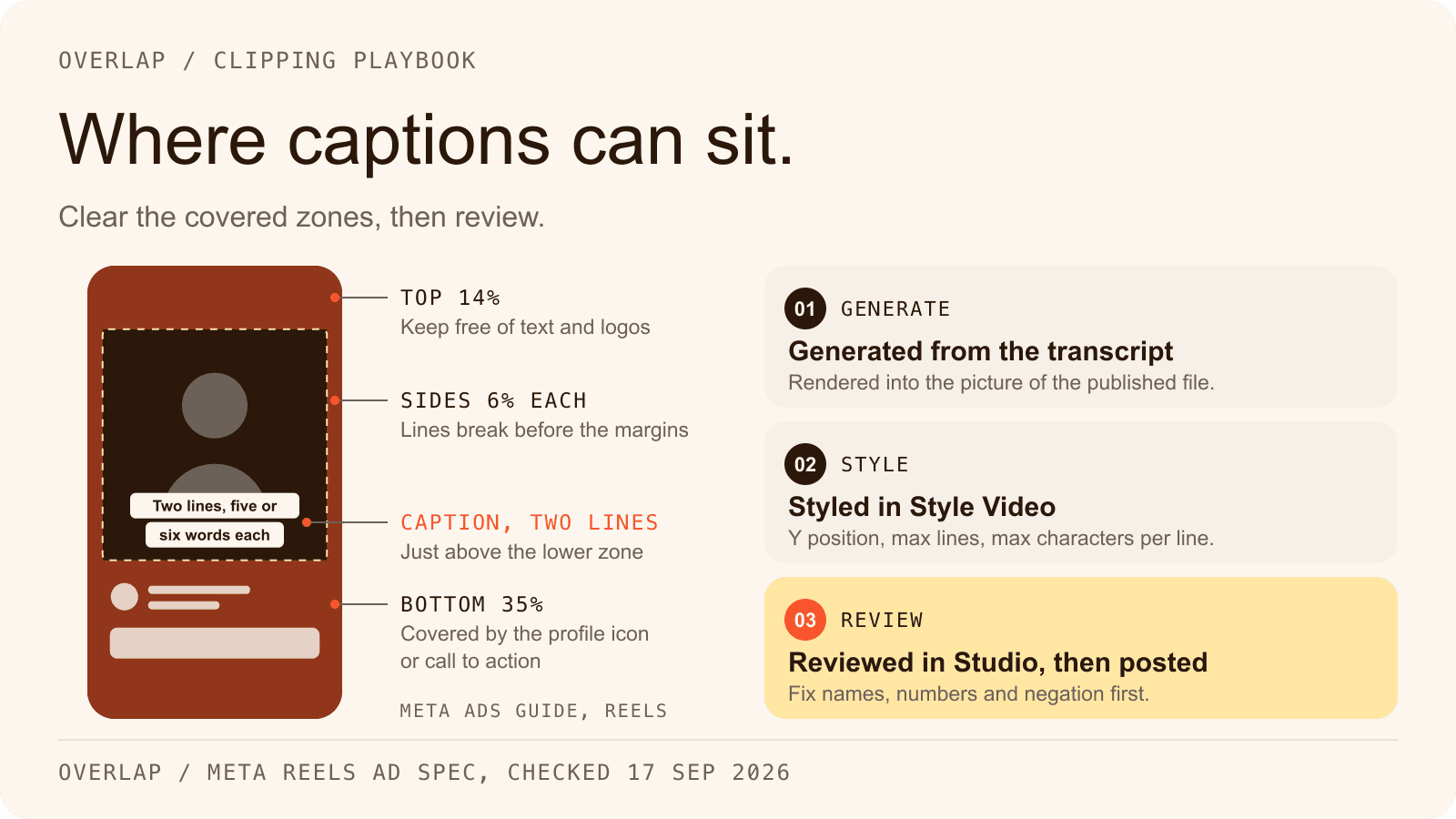
| Add Subtitles | Edit | Y position, size, max characters per line, max lines, per-speaker styling, a style preset | Captioned clips |
| Post to Social | Approve, publish | Platform, account, posting persona, cadence, Post Approval, Conflict Prevention | Posts waiting in the Social Calendar, then published |
Three details matter before the first run.
Find Clips is where the brief goes. The docs list three strategies. Highlights finds standalone moments and offers a model choice: Conversational for podcasts and interviews, Multimodal for sports and other footage where non-verbal context matters. Montages combine related moments, and Even Clips splits the whole source into continuous pieces near one target length. Clip duration can run from 10 to 600 seconds and defaults to 30 to 120. Write the prompt as an editorial brief rather than a request for “viral moments”; the clipping workflow guide walks through one. Source: Overlap docs, Find Clips.
An example brief for a weekly interview show, written for this guide rather than taken from a customer account:
Find complete answers to one listener question, including the reason the guest gives. Keep any qualification the guest adds. Skip introductions, sponsor reads and any moment that depends on a screen the viewer cannot see.
Captions now belong in Style Video. The docs mark the standalone Add Subtitles, Add Title Overlay, Add Watermark and Add Outro nodes as deprecated but supported: existing workflows keep running, and new ones should set those elements inside the Style Video node. The template above still lists Add Subtitles, so treat it as a working example rather than the current builder's default. Source: Overlap docs, Nodes overview.
Turn approval on before the first run, not after. Post Approval is a checkbox on the export node, and the template does not enable it for you. With it on, the first few runs become a review of what the brief actually produced, at no cost to the accounts.
Option 2: Trigger the same workflow from your own code
When the trigger lives in your own system, such as a CMS publishing an episode or a storage bucket receiving a file, the REST API starts a saved workflow on a public video URL. As checked on September 17, 2026, the base URL is https://api.joinoverlap.com, authentication is a bearer key generated from the workflow's trigger screen in the portal, and the three required fields are companyId, workflowId and url. Every other field is an optional override for that run only. This is the documented request shape:
curl -X POST "https://api.joinoverlap.com/trigger-template" \
  -H "Authorization: Bearer $OVERLAP_API_KEY" \
  -H "Content-Type: application/json" \
  -H "Overlap-Workflow-Channel: stable" \
  -d '{
    "companyId": "'"$OVERLAP_COMPANY_ID"'",
    "workflowId": "'"$OVERLAP_WORKFLOW_ID"'",
    "url": "https://example.com/source-video.mp4",
    "promptAdjustment": "Prioritize clips about product announcements."
  }'
The Overlap-Workflow-Channel header is optional; stable routes the run to the most recent stable major release of the workflow runtime. The response returns a triggerId with a pending status. Per-run overrides include orientation, minLengthTarget and maxLengthTarget, broll, subtitles, promptAdjustment, up to 150 transcription keywords, pinnedTimestamps for ranges that must become clips, and nodeConfigs for node-level settings. An override is ignored when the saved workflow has no matching node. A Google Drive file link works as the url if the file is public or shared with the service account the docs name. Source: Overlap docs, Trigger Template.
There is no callback. Poll GET /workflow-results/{triggerId} every 5 to 10 seconds until the status is Completed or Error; the in-progress values are Pending, Processing and Learning. A completed response lists clip objects with an id, a title, startTimestamp and endTimestamp, an aspectRatio, a renderedUrl preview, a thumbnailURL and a viralityScore. From there, POST /update-clip changes the title, captions or segments, and POST /render produces the finalized MP4. The docs give processing time as about 3 minutes per hour of input for horizontal clips and about 10 for vertical. Source: Overlap docs, Get Results.
Two boundaries to plan around. First, the API reference documents triggering, polling, clip edits, transcripts, rendering, and reads of published posts and their analytics. It does not document a publish call, and it does not say how an API-triggered run treats a Post to Social node in the saved workflow, so run one test and read the Social Calendar before you depend on either path. Second, API runs draw on the same processing-hour quota as the builder; a run past the quota returns INSUFFICIENT_HOURS. The pricing page explains what the software plans meter.
In this path the approval stage is yours to build. The simplest version is a review page that lists the returned clips sorted by viralityScore, plays each renderedUrl, and calls /render only for the ones a person picks.
Option 3: Let an AI agent run it over MCP
The third way is to hand the pipeline to an assistant. Overlap's MCP server is a remote Streamable HTTP endpoint at https://mcp.overlap.ai/mcp. It signs in with OAuth, needs no API key, and connects from Codex desktop or Claude Desktop through each app's MCP or connector settings. As checked on September 17, 2026, the docs group its tools into five areas: discovery, workflows and runs, clips and transcripts, the Social Calendar, and analytics. Source: Overlap docs, Connect an MCP client.
A run from a chat window goes through four tools in order. overlap_workflows_list returns the saved workflows. overlap_workflows_preflight freezes the chosen workflow's revision and, when the graph has external effects, returns an immutable preview. The assistant shows that preview and asks for written consent in the conversation. overlap_workflows_run then starts the run, and overlap_runs_get reports its progress. The run tool's input, from its published schema, looks like this:
{
  "workflow_id": "wf_from_overlap_workflows_list",
  "input": {
    "url": "https://example.com/source-video.mp4",
    "values": {}
  },
  "written_consent": "Yes, run Captioned Vertical Clips on this episode.",
  "confirmation_id": "from_preflight_when_required",
  "idempotency_key": "episode-142-run-1"
}
written_consent is required and must be the user's own words from the current conversation; a standalone model-generated value such as confirmed: true is not accepted. Confirmations are bound to the user, the organization, the workflow revision and the input, expire after ten minutes and can be used once. Retrying a completed request with the same idempotency key returns the original response rather than starting a second run. Source: Overlap docs, Confirmations and operations.
The beta draws its own line at the approval stage. Social nodes reached through MCP create approval-required drafts only, and publishing an immediate draft needs overlap_social_posts_authorize with fresh written consent, which is limited to organization admins by default. Future scheduled publishing is unavailable through MCP for now: a draft with a future time stays an unapproved planning item until someone publishes it from the Social Calendar, or sets scheduledAt to null and confirms an immediate post. Email export nodes are not available through MCP at all. Source: Overlap docs, MCP tools.
What to keep a human on
Keep a person on approval, and keep them there per account rather than per pipeline. The reasons are practical. A published post is visible before anyone reads the analytics. The accounts belong to a customer or a brand, not to the pipeline. And the cost of approval is one person reading a queue, where the cost of a wrong post is a public correction.
Overlap's approval queue is the Social Calendar. Approving a post whose scheduled time has already passed publishes it within a few minutes rather than instantly. Approved posts whose time has passed without a result are rechecked every 15 minutes for three days, and the docs state that nothing is ever published twice. Edits made in the calendar become part of the version that publishes, so the reviewer is looking at the real post rather than a preview of one. Source: Overlap docs, Social Calendar.
Two other places deserve a person for the first few runs. The Find Clips prompt is a brief, and a brief is judged by its output, so read the first ten clips against the source before trusting the selection. And the first run of any new trigger should be watched to confirm the filter caught what it should, such as a channel that also posts Shorts under the 3-minute floor.
Loosen approval when the queue has stopped changing anything. If a reviewer has approved forty posts in a row without an edit on one account, that account can move to automatic publishing while a newer account stays on review.
Overlap has no Zapier, Make or webhooks today. Here is who does.
Be clear about what the documentation does not offer. As checked on September 17, 2026, Overlap's docs describe no outbound webhook, no Zapier app, no Make app and no CLI. Completion is learned by polling, over the API or through overlap_runs_get. The watched-source triggers above are inbound; nothing in the platform calls your system when a run finishes. Source: Overlap docs index.
OpusClip does have those pieces. It announced an official Zapier integration on October 2, 2025, available on its Pro plan with up to 300 credits a month usable through Zapier, and its API reference documents signed webhooks for job lifecycle events with polling as the fallback. If your trigger is a Zap or your system needs a callback, that is a real difference today, and the OpusClip comparison sets it beside the rest. Source: OpusClip, Zapier announcement.
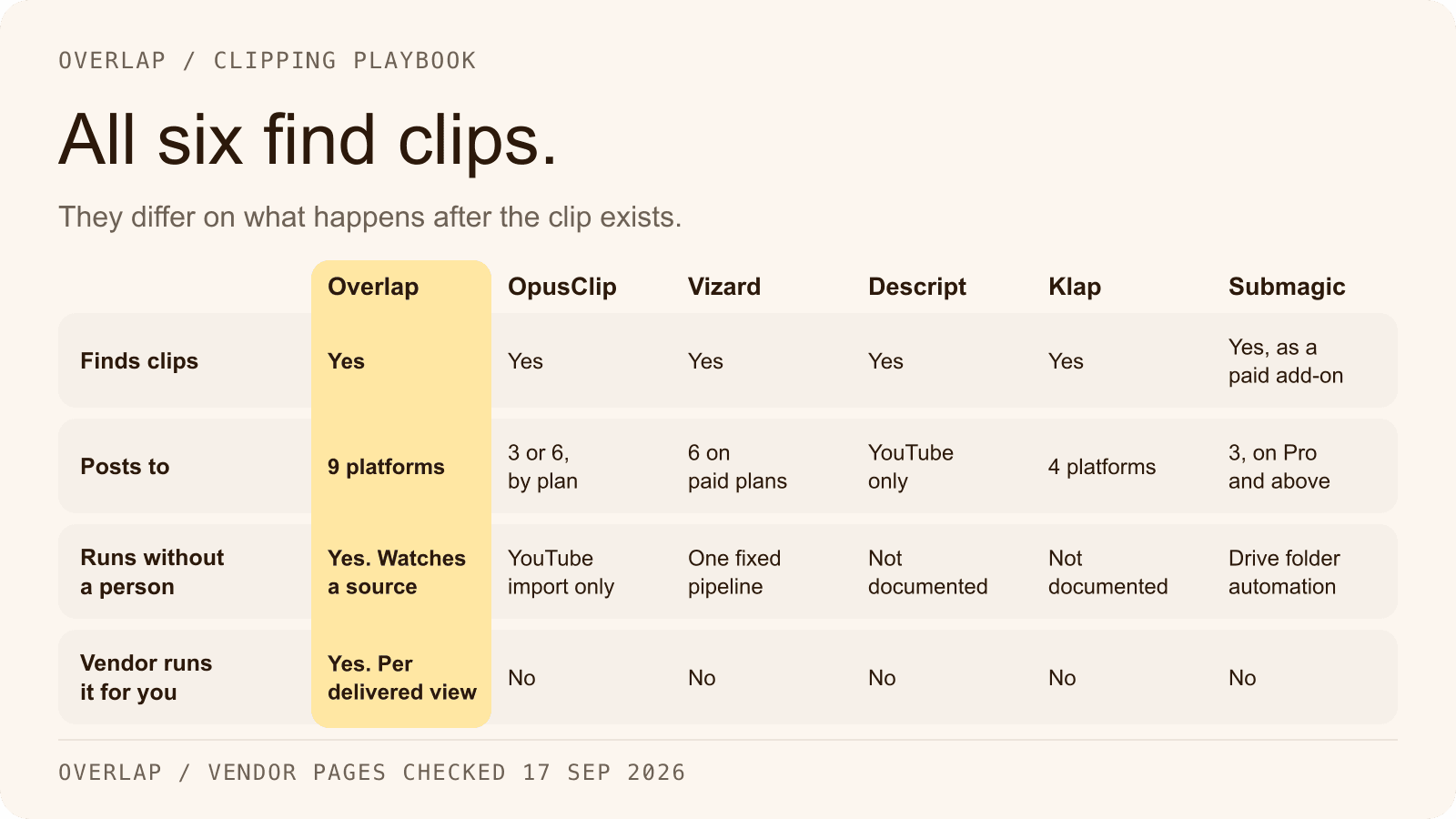
The table covers six automation surfaces across the tools that come up most often in this category. Every cell was checked on the vendor's own site on September 17, 2026, and the sources follow the table.
| Tool | REST API | Webhooks | Zapier | MCP server | RSS or podcast feed trigger | Livestream ingest |
|---|---|---|---|---|---|---|
| Overlap | Yes | No; poll every 5 to 10 seconds | No | Yes | Yes, the RSS Feed node | Yes; an audio livestream node and an RTMP or HLS input |
| OpusClip | Yes; limited on Pro, full on Business | Yes; signed, with polling as fallback | Yes; official, Pro plan | Yes; Pro and Business | No; Apple Podcast is listed as an import source | Partial; finished VODs from Twitch, Kick and others |
| Vizard | Yes; paid plans | Yes; a webhook URL set in the workspace | No, and no Make app; an n8n template is offered | No native server | No | Partial; Twitch and YouTube VODs, live video not supported |
| Descript | Yes; paying users, marketed as early access | Partial; a callback URL on async jobs, no event subscriptions | Yes; actions and searches only, no triggers | Yes | No native trigger | Partial; through partner apps such as Restream and Riverside |
| Klap | Yes; billed per operation | Claimed in marketing; the API docs document polling only | No | No evidence on the vendor site | Not mentioned | No live ingest; VOD URLs only |
| Submagic | Yes | Yes; a webhook URL per request | Yes per Submagic's integrations page, with Make and n8n | Yes | No | No |
Sources, each checked September 17, 2026:
- Overlap: Trigger Template, MCP overview, RSS Feed node, Livestreams.
- OpusClip: API page, API reference, webhooks post dated May 13, 2026, Zapier announcement, MCP page, supported sources, pricing.
- Vizard: API page, quickstart with the webhook method, rate limits, source types. The Zapier and Make directory pages for Vizard both returned 404.
- Descript: API page, API docs, Zapier, MCP, Edit in Descript partners.
- Klap: API tasks, API pricing, generate shorts guide, clipping tool page. The Zapier directory page for Klap returned 404.
- Submagic: API introduction, MCP server, integrations. Zapier's own Submagic page returned 404, so the Zapier cell rests on Submagic's page.
Where Overlap fits
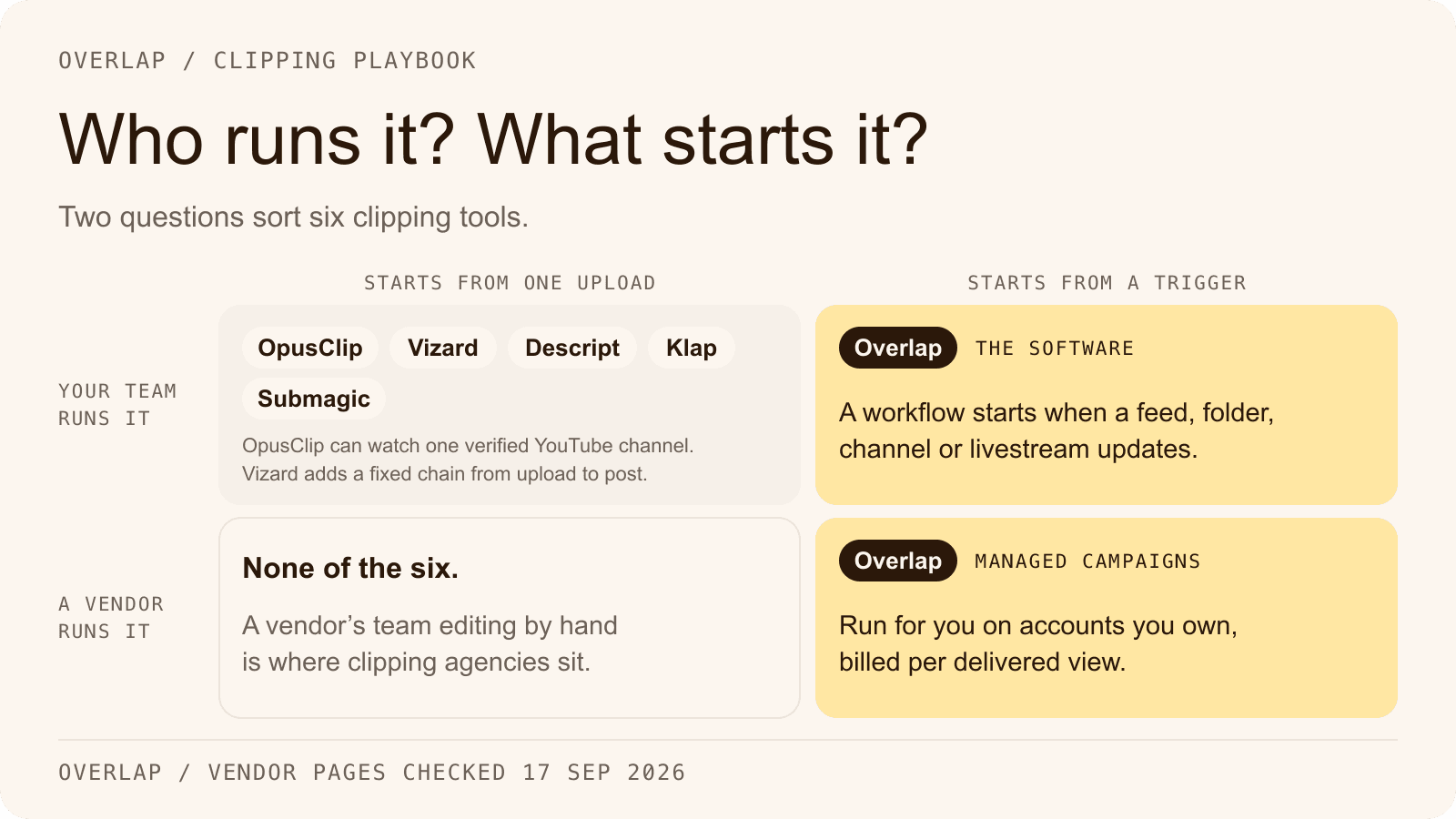
Overlap is an AI video clipping platform. Teams run it themselves, or Overlap's team runs managed clipping campaigns for them on accounts the customer owns, priced per delivered view. For the self-run pipeline in this guide, the documentation establishes the trigger nodes, the editing nodes, the Post to Social export with its approval setting, nine publishing destinations (TikTok, Instagram, YouTube including Shorts, X, LinkedIn, Facebook, Threads, Snapchat and Bluesky), the REST API and the MCP server. It does not establish a Zapier or Make app, outbound webhooks, a watched Google Drive folder, a Zoom source, or any software plan price. Treat anything outside that list as unconfirmed until a docs page says otherwise.
If the reason you want automation is that nobody on the team has time to run it, the managed option takes the pipeline off your side entirely: Overlap's team runs the clipping campaign on accounts you own, and you keep the approval step. If the reason is that clipping should happen inside a system you already operate, start with the self-serve clipper and the trigger you already have.
Start with one watched source and approval switched on. Wire the REST API or MCP only when a trigger truly lives outside the platform. The automation overview is the shortest map of the surfaces this guide covered. For what else a show can hand to automation once clipping runs itself, read seven podcast workflows worth automating, and if you have been tempted to stitch the pipeline together from separate tools, the n8n comparison counts what that costs.
Frequently Asked Questions
What is an automated video clipping pipeline?
An automated video clipping pipeline is a chain of five stages that runs without manual editing: a trigger that detects new source material, a clipping step that selects moments, an editing step that reframes and captions them, an approval step where a person confirms each post, and a publishing step that posts on a schedule and reports results.
Do I need to write code to automate video clipping?
No. A platform with watched-source triggers can start a run when a new video appears on a channel, in a folder or in a podcast feed, and end it in an approval queue with no code at all. Code is needed only when the trigger lives in your own system, in which case one request starts the same saved workflow.
Should the approval step be automated?
Not at first. Keep a person approving every post on an account until the queue stops producing edits, then move that account to automatic publishing while newer accounts stay on review. The cost of approval is one person reading a queue, and the cost of a wrong post is a public correction on an account you own.
Does Overlap have a Zapier app or webhooks?
Not as of September 17, 2026. Overlap's documentation describes no Zapier app, no Make app and no outbound webhook. A run started over the API is polled every 5 to 10 seconds until it completes, and an MCP run is followed with the runs tool. OpusClip does publish an official Zapier integration and signed webhooks, so choose by where your trigger lives.
How do I start an Overlap workflow from an AI assistant?
Connect Overlap's MCP server in Codex desktop or Claude Desktop, ask the assistant to list your workflows, and choose one. The assistant runs a preflight, shows you an immutable preview when the workflow has external effects, and starts the run only after you give written consent in the conversation. Social posts created this way wait as approval-required drafts.