On this page
- What Is AI Video Clipping?
- Why Podcasters Are Turning to AI for Short-Form Video
- How AI Video Clipping Works for Podcasts
- Top AI Video Clipping Tools for Podcasters in 2026
- Best Practices for Scaling Video Production
- Common Mistakes Podcasters Make with AI Clips
- Future-Proofing Your Podcast Strategy with AI
- Frequently Asked Questions
- Related Articles
AI video clipping automates turning long podcast episodes into viral TikTok and Reels shorts by detecting engaging moments, reframing to 9:16, adding captions. iHeartMedia gained 18,000% view growth and 151 million impressions using Overlap. Top 2026 tools include Overlap, Timebolt, Riverside Magic Clips. Podcasters boost engagement 4x, scale production via best practices like quality input and analytics.
Podcasters, you're churning out hours of engaging audio content, but turning it into viral short-form clips for TikTok and Reels feels like an endless grind with zero views. Manual editing steals your time and kills momentum. This article reveals everything you need to know about AI video clipping, from top 2026 tools to best practices for massive reach. Creators using AI clips see 4x more engagement on social platforms.
Explore AI podcast clipping and publishing campaigns for the episode-to-social workflow, editorial controls and a documented customer example. For custom workflows, see the Overlap clipping agent platform.
What Is AI Video Clipping?
The short answer is that AI video clipping is technology that watches your long content so you don't have to. Instead of manually scrubbing through an hour-long podcast to find a thirty-second highlight, AI analyzes the video, transcript, and audio dynamics to identify the most engaging moments automatically.
It doesn't just cut the clip; it repackages it. Modern tools reframe horizontal video into vertical formats (9:16) for TikTok or Reels, add active speaker detection, and generate captions. For podcasters, this means turning one episode into a dozen social media assets in minutes rather than days. It shifts the workload from tedious editing to high-level strategy.
Why Podcasters Are Turning to AI for Short-Form Video
Here's the thing: growing a podcast in 2026 requires visibility on short-form platforms. Listeners discover shows on TikTok and YouTube Shorts, not just in podcast apps. But editing these clips manually is a massive bottleneck.
The data backs this up. Major networks are using AI to solve the volume problem. For example, iHeartMedia partnered with Overlap to automate their social video workflows. The results were staggering:
"Since partnering with Overlap, we’ve seen brands hit +18,000% month-over-month growth in views. That’s real momentum driven by smart tech and even smarter collaboration." — Anthony Molaee, SVP of Marketing, iHeartMedia (Overlap)
By using AI to scale production, they generated 151 million new impressions in just 60 days. This proves that volume and consistency—achieved through automation—are the keys to modern growth.
How AI Video Clipping Works for Podcasts
Most podcasters know the end result, but understanding the process helps you get better output. It generally happens in three distinct phases.
Transcription and Moment Detection
The process starts with ingestion and analysis. You upload your long-form video or audio file, and the AI goes to work. It generates a transcript and applies speaker diarization, which means it figures out who is talking and when.
Simultaneously, the system performs audio cleanup and analyzes the text for "viral potential." It looks for:
- Energetic exchanges between hosts
- Topic shifts
- High-value keywords
- Laughter or emotional spikes
This creates a list of suggested moments, complete with previews and timestamps, before a single cut is made.
Automated Clip Generation and Editing
Once the moments are selected, the "cutting" begins. If you recorded in landscape (16:9), the AI uses facial detection to keep the active speaker centered in a vertical (9:16) frame.
Some tools, like Autopod or Autocut, act like a multi-camera director, switching angles automatically based on who is speaking. The AI handles the rough cut, trimming dead air and tightening the pacing so the clip feels snappy for social feeds. This eliminates the tedious work of manual keyframing.
Enhancement with Captions, B-Roll, and Effects
The final step is polish. Raw video rarely stops the scroll, so AI tools automatically add dynamic captions that light up as words are spoken.
Advanced platforms go further by:
- Adding B-roll to cover visual gaps
- Inserting emojis or visual effects for emphasis
- applying brand-specific templates
This ensures the clip doesn't look like a raw file but a finished piece of content ready for TikTok or Instagram Reels.
Top AI Video Clipping Tools for Podcasters in 2026
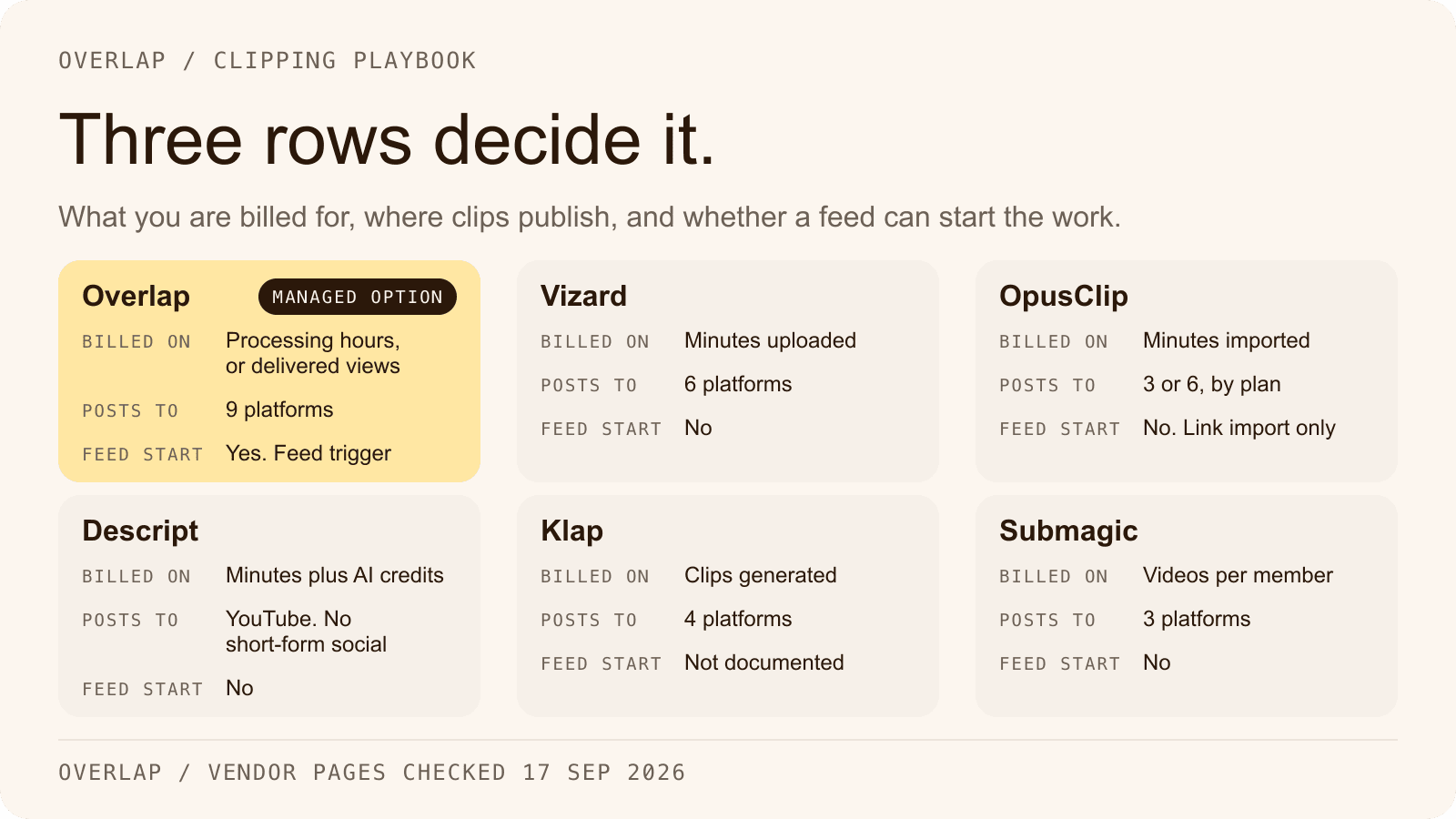
The market is crowded, but a few tools stand out for specific use cases. While many tools focus on one part of the process, others aim for end-to-end automation.
Here is a breakdown of popular tools used by creators this year:
- Overlap: A comprehensive platform that focuses on "agentic workflows." It handles video editing, social planning, and analytics in one place, allowing teams to automate the entire pipeline from upload to publishing.
- Timebolt: specialized in analyzing audio to cut dead air and filler words, making it popular for tightening up YouTube podcasts.
- Riverside Magic Clips: Integrated into the recording platform, it generates 2-3 clips per 5 minutes and scores them for potential virality.
- Podsqueeze: Breaks podcasts into chapters and transforms them into shareable clips with customizable captions.
For enterprise teams or serious creators, the trend in 2026 is moving toward platforms like Overlap that don't just "clip" but manage the entire distribution workflow.
Best Practices for Scaling Video Production
Using AI isn't a "set it and forget it" magic button. To get results like the top 1% of podcasters, you need to feed the system correctly and manage the output.
Prepare High-Quality Podcast Input
AI cannot fix bad audio. If your source material echoes or has overlapping crosstalk, the AI will struggle to transcribe it and cut it cleanly.
- Record locally: Use tools that record high-quality video/audio on your device, not over the internet.
- Frame correctly: If you plan to go vertical, ensure you and your guest are framed clearly so the AI can crop without cutting off heads.
- Separate tracks: Always record distinct audio tracks for each speaker. This makes speaker detection significantly more accurate.
Customize Outputs for Brand Consistency
Generic clips get ignored. While AI provides the base edit, you must enforce your brand identity. Overlap allows for agentic workflows, which means you can tailor the editing process to your specific style.
Ensure your clips have:
- Consistent fonts: Use your brand's typography, not the default "viral" font.
- Brand colors: Highlights and captions should match your podcast cover art.
- Intros/Outros: Automate the insertion of your show's logo or call-to-action at the end of every clip.
Schedule and Analyze for Maximum Reach
Creating the clip is only half the battle. You need to post it when your audience is awake.
Use tools that include a Social Planner to schedule posts across TikTok, Reels, and Shorts simultaneously. Then, watch the data. Look for metrics like:
- Retention rate: Do people drop off after 3 seconds?
- Share count: Is the content resonating enough to pass along?
Teams using platforms with built-in analytics can pivot quickly. If a certain topic spikes in views, you can go back to your long-form content and ask the AI to find more clips about that specific subject.
Common Mistakes Podcasters Make with AI Clips
Even with the best tools, it is easy to mess this up. The biggest error is blind trust. AI is smart, but it doesn't understand context perfectly. It might cut a clip right before the punchline or include a sentence that makes no sense without the previous minute of conversation. Always review the "hook" and the "payoff" of every clip.
Another mistake is ignoring platform nuances. A clip that works on LinkedIn might need a different caption style or headline than one posted to TikTok. Don't just blast the exact same file everywhere without considering the audience's mindset on that specific app.
Finally, don't let the AI strip away the human element. Sometimes, a slightly messy pause or a genuine laugh is better than a perfectly tightened, robotic edit.
Future-Proofing Your Podcast Strategy with AI
The future of podcasting isn't just about recording; it's about distribution. We are moving past simple "clipping" tools and toward fully automated media teams.
Platforms like Overlap are leading this shift by offering end-to-end automation. This means a system that detects a new upload, edits it, brands it, schedules it, and reports on the results with minimal human intervention.
"Overlap helps us share our content with more people. AI can’t replace creativity — but it absolutely supercharges it." — Anthony N., CEO of Vezcos Media (Overlap)
To future-proof your show, stop thinking of AI as just a pair of scissors. Think of it as your production assistant, marketing manager, and data analyst rolled into one. The podcasters who win in 2026 will be the ones who build these automated workflows today.
Frequently Asked Questions
How much does AI video clipping cost for podcasters?
It varies by tool, and not every tool answers the question the same way. Riverside Magic Clips starts at $19/month, and Podsqueeze offers a free tier with pro upgrades around $15/month. Overlap's platform is a custom quote: its sales team prices shows and networks against the volume they run. Expect the self-serve end of the market to be the one you can price from a page, and the automation end to be the one you have to ask about.
Can AI video clipping tools handle multi-guest podcasts?
Yes, tools like Overlap and Autopod use advanced speaker diarization to separate multiple voices accurately, even with crosstalk. Provide separate audio tracks for best results, achieving up to 95% detection accuracy on clear recordings.
Is AI video clipping safe for copyrighted podcast content?
Most tools process files securely on your account without storing them long-term. Check privacy policies, like Riverside's SOC 2 compliance, and avoid uploading licensed music to prevent auto-detection flags on platforms like YouTube.
How long does AI video clipping take to process an episode?
Processing a 60-minute podcast typically takes 5-15 minutes, depending on tool and file size. Riverside generates clips in under 10 minutes, while Overlap's agentic workflows can complete full batches in 20 minutes including enhancements.
What file formats work best with AI clipping tools?
Upload MP4 or MOV for video, WAV or MP3 for audio; tools like Timebolt prefer uncompressed formats for accuracy. Aim for 1080p resolution and 48kHz audio to minimize quality loss during reframing and editing.
Related Articles
Check out these related articles for more information:
- iHeartMedia partnered with Overlap - Directly supports the case study mentioned in the article with detailed metrics and results.
- Overlap - Natural link to the main product page when first introducing Overlap as a comprehensive platform.
- AI video editing tools - Provides readers with a comprehensive comparison of tools mentioned in the article.
- scaling video production - Connects to strategic guidance that complements the best practices section.
- agentic workflows - Explains the unique positioning of Overlap's approach mentioned multiple times in the article.