On this page
Instagram Trial Reels let you show a podcast clip to non-followers first, inspect its response and decide whether to share it more broadly. Use them to test a specific editorial question: can someone who does not know the show understand the opening and find a reason to keep watching?
The feature is established, not a new September launch. Meta introduced it in December 2024 and described broader availability in June 2025. This guide was updated September 10, 2026. Meta's rollout update
What happens when you publish a Trial Reel?
Meta says a trial is shown to non-followers first, with engagement insights available after roughly 24 hours. You can later share it with everyone, or enable automatic sharing based on performance during the first 72 hours. It is not a private screening: followers can still encounter it through sharing or other discovery surfaces. How Trial Reels work
For a podcast, the interesting difference is the starting audience. Regular listeners already know the host, recurring jokes and the names in the conversation. A new viewer may not. A clip that works beautifully in an episode can open with ten seconds of unexplained references when separated from it.
Make your first test about comprehension. Someone should be able to identify the problem before they are asked to care about the answer.
Test one decision at a time
Suppose a hypothetical business podcast has an interview about hiring a first manager. You could test a question-led opening against an opening that starts with the guest's concrete mistake. Keep the underlying explanation, caption treatment and approximate duration comparable.
Use actual lines from the recording. A stronger hook must not become a quote the guest never said.
Here are three separate tests worth running across different moments:
| Question | What to vary | What to keep steady |
|---|---|---|
| Does the viewer understand the problem? | The opening boundary or accurate context line | The main explanation and visual treatment |
| Does the explanation need this much setup? | A shorter edit versus an edit retaining more context | The central claim and intended audience |
| Is the idea useful enough to share? | A concrete example versus a broader observation from the episode | The account, measurement window and evaluation method |
The third test changes the content itself. It can inform the next selection brief, but it cannot tell you which individual sentence caused the response. Write down what a comparison can teach you before publishing it.
More views can produce a less useful result
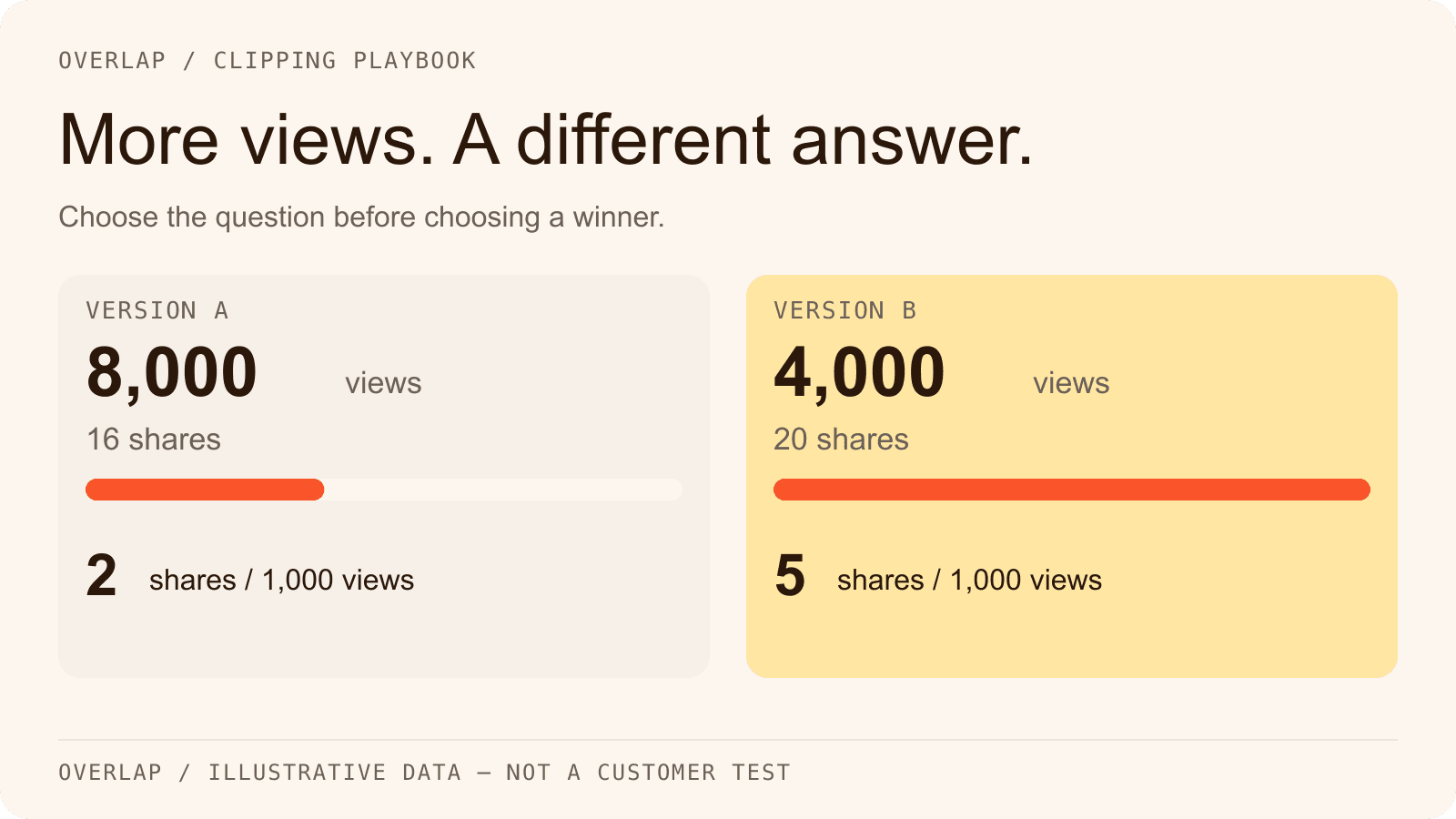
Consider this illustrative dataset, not an Overlap customer test:

| Measure | Version A | Version B |
|---|---|---|
| Views at the same post age | 8,000 | 4,000 |
| Shares | 16 | 20 |
| Shares per 1,000 views | 2 | 5 |
If the question is raw exposure, A leads. If you are studying whether the idea travels between people, B deserves another look: it produced more shares from fewer views.
Neither result tells you which version produced more loyal listeners or revenue. Read the comments for evidence of understanding. If your account exposes relevant retention or follow metrics, record them too. Do not invent a missing measure or turn an aggregate account change into a precise attribution claim.
Shares per thousand views is a descriptive ratio: shares divided by views, multiplied by 1,000. Views are not necessarily unique people, so the ratio is not a probability that a person will share. Small counts also move easily. Two extra shares on a tiny sample should not rewrite the show's editorial strategy.
Run a small test across several episodes
Pick a handful of source moments from more than one recording. Give each pair a simple ID, such as episode-14-opening-A and episode-14-opening-B. Record the exact source boundaries so the team can reconstruct what changed.
Publish through the same account, use comparable posting slots and alternate which treatment goes first. Keep this at a normal editorial cadence; flooding the account with near-identical variations introduces another variable and a poor viewing experience.
Record results at the same post ages. A 24-hour-old post and a week-old post have had different opportunities to accumulate views. If you choose a 72-hour evaluation checkpoint, make it your own consistent checkpoint, not a claim that all trials stop or finish learning at that hour.
Trial Reels are not a randomized A/B testing system under your control. Different people may see each post, and distribution can change between publishing times. Alternating order and repeating the comparison makes the observations more useful; it does not prove causation.
The Trial Reels test log includes the fields to copy into your team's tracker.
Decide what to share before you see the winning number
Choose a rule that fits the purpose of the show. For an educational podcast, a sensible rule might require a clear explanation, no misleading edit and a useful audience response across several comparable posts. Raw reach alone may be enough for a different campaign, but make that choice explicit.
Use three outcomes:
- Share: The clip is accurate, understandable and supports the editorial goal.
- Revise: The idea is promising, but viewers are missing context or the edit is difficult to follow.
- Retest or leave alone: The sample is too small or the result is inconsistent. There is no obligation to declare a winner.
If you want a person to make that decision, check the automatic-sharing setting before starting. Otherwise, publication can expand before your planned review. Meta's sharing controls
Avoid deleting a weak trial purely to make the report look better. The failed opening may be the most useful thing you learned, and removing it can make the next review impossible to reconstruct.
Prepare the variants in Overlap
Use Find Clips to locate candidate moments for a stated audience. Then inspect the boundaries in Studio, apply vertical framing and add subtitles. Keep the common visual treatment consistent so an opening test does not quietly become a font, crop and pacing test as well.
Write a specific brief, such as: find an example of a hiring decision with a clear consequence; preserve the sentence explaining when the advice would not apply. That gives the editor something concrete to judge.
For publishing, verify that the destination account and posting method support a trial. You can export the approved variant and enable Trial in Instagram's publishing flow. If using a scheduler, confirm that it will create a Trial Reel rather than an ordinary Reel; a scheduled Instagram post is not automatically a trial. The available control in the destination account is the practical check.
Overlap's publishing node provides scheduling and approval controls for the broader operation. Keep the experiment's IDs and observations in the shared test log, then feed repeated findings back into the next selection brief. If concrete stories consistently outperform general advice for your audience, ask for more stories in the next batch.
See a real finished export in the Overlap clipping walkthrough. For a recurring production and distribution service, explore podcast clipping campaigns.
Frequently Asked Questions
Are Trial Reels hidden from every follower?
No. Trial Reels start with non-follower distribution, but they are not private. A follower can still encounter a shared trial or find it through other discovery surfaces.
Is a Trial Reel comparison a controlled A/B test?
No. You do not control randomized audience assignment. Use comparable conditions and repeated observations to guide editorial decisions, while treating the results as directional evidence.
What should I do if neither variant gets enough response?
Record the result as inconclusive. Review whether the opening makes sense, choose another suitable moment and repeat at the normal publishing cadence. Low exposure is not evidence that one treatment is better.