On this page
Your team records a two-hour podcast. Maybe it's a weekly show, a client webinar, or a live broadcast. The content is good. The ideas are sharp. But turning that recording into a library of platform-ready short clips takes hours of manual work: scrubbing timelines, trimming segments, resizing for vertical, adding captions, exporting, and uploading everywhere separately.
Most teams either hire editors to keep up, or they fall behind on distribution entirely. Neither is a real solution.
This is the distribution bottleneck. You have more long-form content than you have capacity to repurpose. And the gap keeps widening.
Clipping agents fix this. Not by speeding up your manual workflow, but by replacing it entirely with an automated pipeline that runs from raw video to published clip without anyone sitting in an editing timeline.
Here's exactly how they work, and what you can build with them.
See how the Overlap AI clipping platform connects source videos, editing and publishing, including a documented customer workflow. For implementation details, follow the clipping agent setup guide.
What Is a Clipping Agent?
A clipping agent is an automated series of steps that takes your raw video from upload to finished, ready-to-publish content without manual intervention.
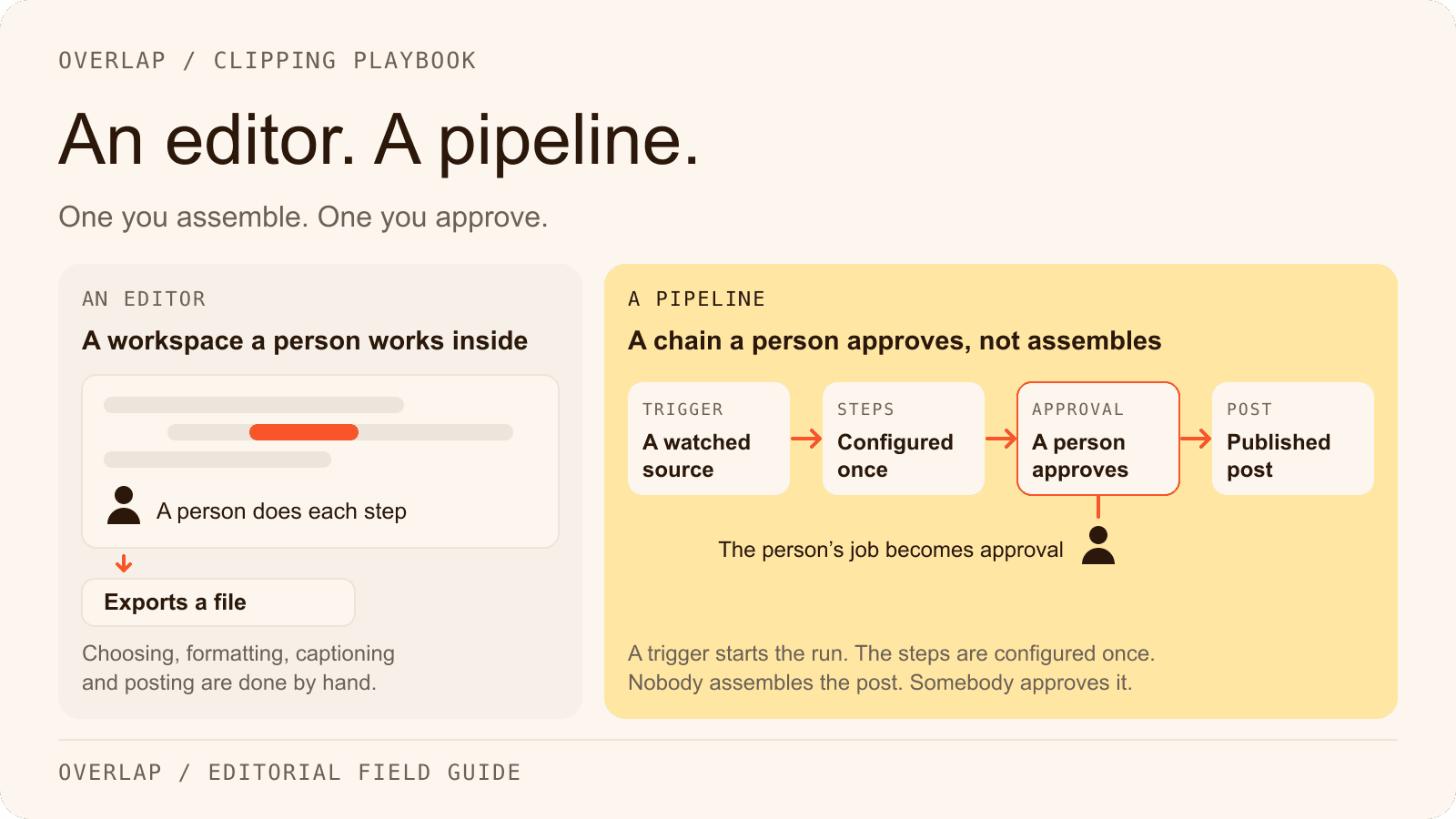
Think of it as a production pipeline you define once and run forever. You set the rules: which moments to clip, how to format them, what branding to apply, where to publish. The agent handles execution every time a new video comes in.
In Overlap, clipping agents coordinate everything from AI-powered clip detection and editing, to adding subtitles, overlays, and branding. The result lands in your library automatically, formatted for whatever platforms you're targeting.
The key distinction: a clipping agent isn't a button you press on a single video. It's a system that processes every video the same way, consistently, at scale.
This matters enormously for agencies and media teams. If you're managing five shows, ten clients, or a daily broadcast, you can't afford to rebuild the workflow from scratch every time. A clipping agent makes your production process a repeatable asset, not a repeatable task.
How a Clipping Agent Is Built: Branches and Nodes
Every clipping agent in Overlap is made up of two building blocks: nodes and branches.
Nodes: The Individual Steps
A node is a single action in your pipeline. Each one handles one specific task:
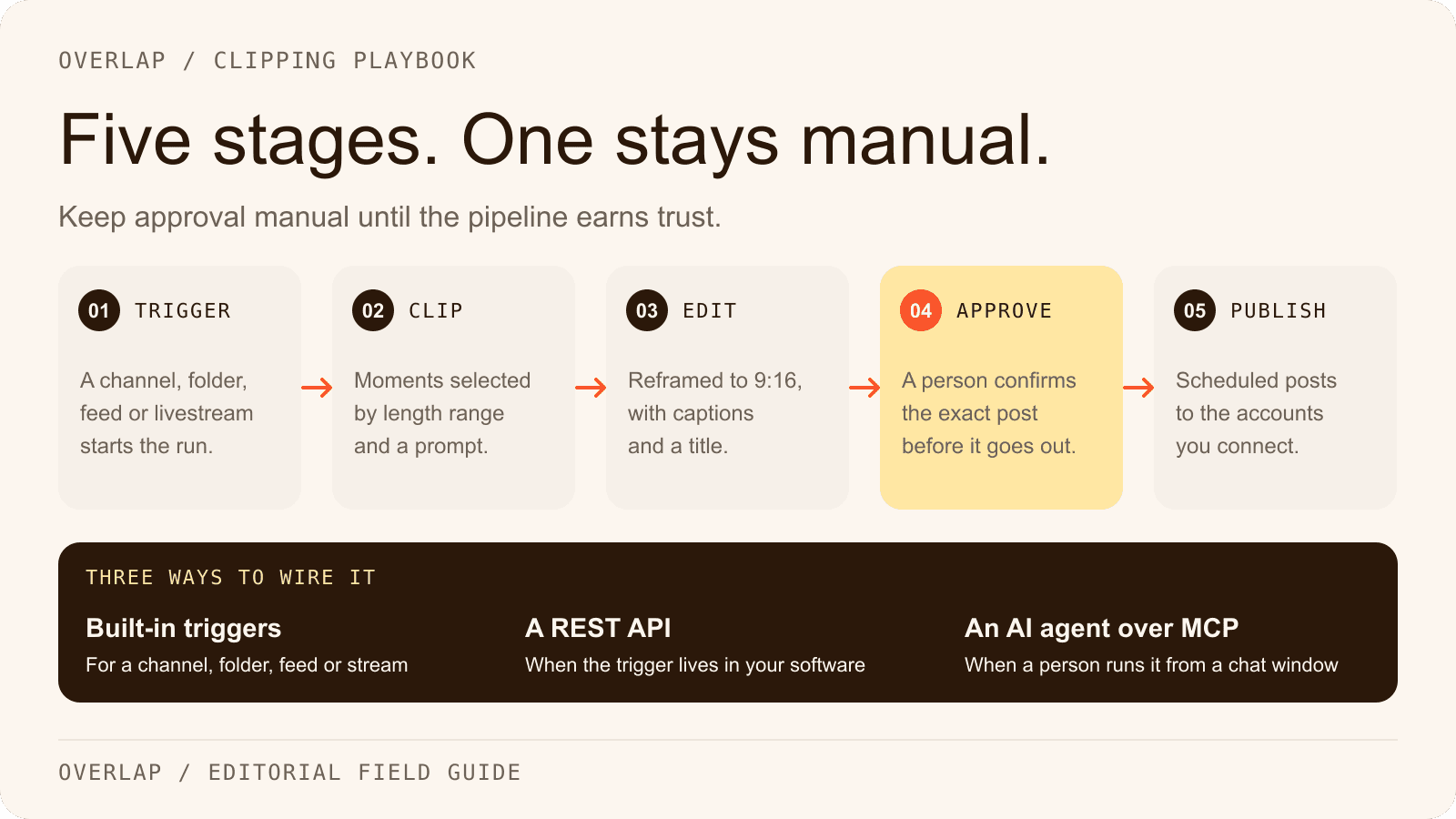
- Trigger node - watches for a new video (from a YouTube upload, a URL drop, or a file upload) and starts the agent automatically
- Clip node - uses AI to detect and extract the best moments from your long-form content
- Subtitles node - generates and burns in captions, styled to your brand
- Smart Zoom node - reframes horizontal footage to vertical for Reels, Shorts, and TikTok
- Overlay node - applies logos, lower thirds, or branded graphics
- Publish node - sends the finished clip directly to your connected social accounts
You connect nodes in sequence to define the logic of your pipeline. The output of one node feeds into the next.
Branches: Running Multiple Outputs at Once
A branch is where your pipeline splits and runs parallel tasks simultaneously. This is where clipping agents get genuinely powerful for teams managing multiple formats or platforms.
Here's a real example from the Overlap docs: a clipping agent triggered by a new YouTube upload runs two branches at the same time. Branch one produces horizontal clips with subtitles for YouTube. Branch two produces vertical clips with Smart Zoom for Reels and Shorts. One video in, two format-ready outputs out, zero manual work.
Any node with no outgoing connection is treated as the end of that branch. The finished clip is automatically saved to your library and ready to use, share, or publish.
Clipping Agent Workflows You Can Build Today
The real value of a clipping agent isn't the definition. It's the range of pipelines you can assemble from the same set of building blocks. Here are eight workflows that media teams and agencies are building to scale video editing and distribution.
| Workflow | Trigger | What It Does | Best For |
|---|---|---|---|
| Podcast to Multi-Platform Clips | New episode upload | AI clips top moments, adds subtitles, exports vertical for Reels/TikTok and horizontal for YouTube | Podcast networks, solo creators |
| Livestream Highlight Reel | Stream recording upload | Detects high-energy moments, trims to 60-90s clips, applies branded overlays | Sports, gaming, live events |
| Broadcast Repurposing | Daily broadcast file | Clips segments by topic, captions each one, queues for scheduled social posting | News media, broadcast teams |
| Client Show Pipeline | YouTube channel trigger | Auto-clips new episodes per client brand settings, delivers to separate libraries | Video agencies, production studios |
| Webinar to Short-Form | Webinar recording URL | Extracts key insights and talking points, formats as vertical clips with text overlays | B2B brands, SaaS companies |
| Interview Clip Factory | Manual URL drop | Pulls best quotes and exchanges, generates multiple clip variants per interview | PR teams, media companies |
| Multi-Language Distribution | Any video upload | Clips content, generates captions in multiple languages, publishes to regional accounts | Global brands, international media |
| Social Scheduling Pipeline | New video upload | Clips, formats, and schedules posts across TikTok, Reels, and Shorts with platform-optimized captions | Creator teams, social media managers |
Each of these is a single clipping agent. You build it once, activate it, and it runs automatically on every new video that matches the trigger. According to industry data, teams using AI video tools report a 30% increase in content output and AI-driven editing cuts post-production time by up to 52%. Those numbers make sense when your pipeline isn't starting from scratch every episode.
How to Trigger and Activate Your Clipping Agent
Once you've built your clipping agent, you have two ways to run it.
Save and Activate (Automatic)
Saving with activation turns on the trigger node. From that point, your clipping agent fires automatically whenever its conditions are met. A new YouTube video goes live, a file lands in your connected storage, a URL is submitted. The pipeline starts without anyone pressing a button.
This is the mode you want for recurring shows, client channels, or any content that follows a predictable cadence.
Launch Manually
When you click into a clipping agent, you land in the Launcher UI. Drop in a URL or upload a file directly, then hit Launch to run the agent on demand. This is useful for one-off videos, testing a new pipeline configuration, or processing a backlog of older content.
One thing to keep in mind: the number of clipping agents you can have activated simultaneously depends on the plan your account is scoped to. Overlap does not publish that cap — it is set with your team when the account is quoted — so if you are planning several distinct pipelines running in parallel, agree the number before you build them.
Why This Changes How Teams Operate
The shift from manual clipping to agentic workflows isn't just about saving time. It changes what's actually possible for your team.
When clipping is manual, your output is capped by your editors' hours. When clipping is automated, your output scales with your content volume. A team that publishes one podcast a week can go from producing two or three clips per episode to producing fifteen or twenty, across every platform, without adding headcount.
For agencies, this is especially significant. Each client gets a dedicated clipping agent, configured to their brand standards. New episode comes in, the agent runs, clips land in the client's library. You're not rebuilding the workflow for every show. You're running the same reliable system across every account.
The broader point: 94.5% of creators are already using AI to help produce content, according to Influencer Marketing Factory research. The teams pulling ahead aren't just using AI to edit faster. They're using it to build systems that run without them.
Ready to Build Your First Clipping Agent?
If you're managing multiple shows, clients, or channels and still relying on manual clipping, you're leaving a lot of distribution capacity on the table.
Clipping agents let you define your production standards once and enforce them automatically across every video, every platform, every time. The workflow table above is a starting point. Most teams end up building several agents, each tuned to a specific show format, client, or distribution goal.
If you want to see what a team-scale clipping pipeline looks like in practice, book a demo with our team. We'll walk through your specific content setup and show you exactly how to configure the agents that fit your workflow.