On this page
Struggling to turn long-form videos into viral short clips for TikTok, Reels, and Shorts without wasting hours on manual edits? Creators and teams often lose 10-20 hours per video to repetitive tasks that stall growth. This article breaks down Overlap's Agentic Workflow, how it automates end-to-end from upload to posting, and stacks it against competitors like OpusClip and Descript. Y Combinator-backed Overlap delivers the scale media pros in San Francisco demand.
What Is Overlap’s Agentic Workflow?
Most video tools function like a smarter pair of scissors. You still have to hold them, guide them, and decide where to cut. Overlap’s agentic workflow is different. It functions more like a digital production assistant than a passive tool. Instead of just waiting for your clicks, it uses autonomous agents to execute complex tasks on your behalf.
Here is the core difference: standard AI waits for a prompt to do one thing. An agentic workflow takes a goal—like "turn this podcast into five TikToks"—and figures out the steps to get there. It chains together different actions, makes decisions based on content quality, and handles the boring logic of file management without you watching over its shoulder.
How Overlap’s Agentic Workflow Works
The system operates on a logic-based framework. It does not just look at a video file as a block of pixels. It sees data, context, and potential. When you feed a video into Overlap, you are not just opening a file; you are triggering a sequence of events.
The workflow follows a linear but intelligent path:
- Input: The system receives raw footage.
- Processing: Agents analyze content for hooks and relevance.
- Action: Specific tasks are executed based on pre-set rules.
Key Components: Nodes, Triggers, and Branches
The architecture relies on a few specific building blocks that make the automation possible.
- Triggers: These are the starting pistols. A trigger might be a new file upload or a specific calendar date.
- Nodes: These represent individual actions. This is where RPA (Robotic Process Automation) and NLP (Natural Language Processing) happen.
- Branches: These are the decision points. The workflow splits based on criteria, allowing AI agents to treat a funny clip different from a serious one.
Building and Running a Custom Workflow
You do not need to be a coder to set this up. The interface uses a visual builder where you map out what you want to happen. You start by defining your source, usually a video file or a folder.
From there, you drag and drop actions. You might tell the system to identify speakers, apply specific brand templates, or filter out silence. Once you hit "run," the workflow orchestration takes over, moving the data through your custom pipeline automatically.
The End-to-End Process from Video Upload to Social Post
This is where the magic happens in practice. A typical workflow looks like this:
- You upload a 60-minute interview.
- The AI analyzes the transcript and identifies viral moments.
- It crops the video to 9:16 vertical format.
- It adds captions and your logo.
- Finally, it schedules the output for TikTok and YouTube Shorts.
The system handles the entire journey, moving from raw storage to public feed without manual hand-offs.
Key Benefits for Creators and Teams
For most creators, the biggest bottleneck is not creativity. It is the repetitive administrative work that surrounds video production. Agentic workflows attack this problem directly by handing off the grunt work to software that can think for itself.
"The goal is reduced manual intervention and human oversight requirements, allowing teams to focus on strategy."
The impact is measurable:
- Increased efficiency through autonomous task execution.
- Improved accuracy in decision-making, ensuring brand guidelines are met every time.
- Faster problem-solving because the system processes multiple steps in parallel.
This allows a small media team to output the volume of a massive agency. You stop spending hours on file exports and start spending time on better ideas.
Overlap’s Agentic Workflow vs. Competitors
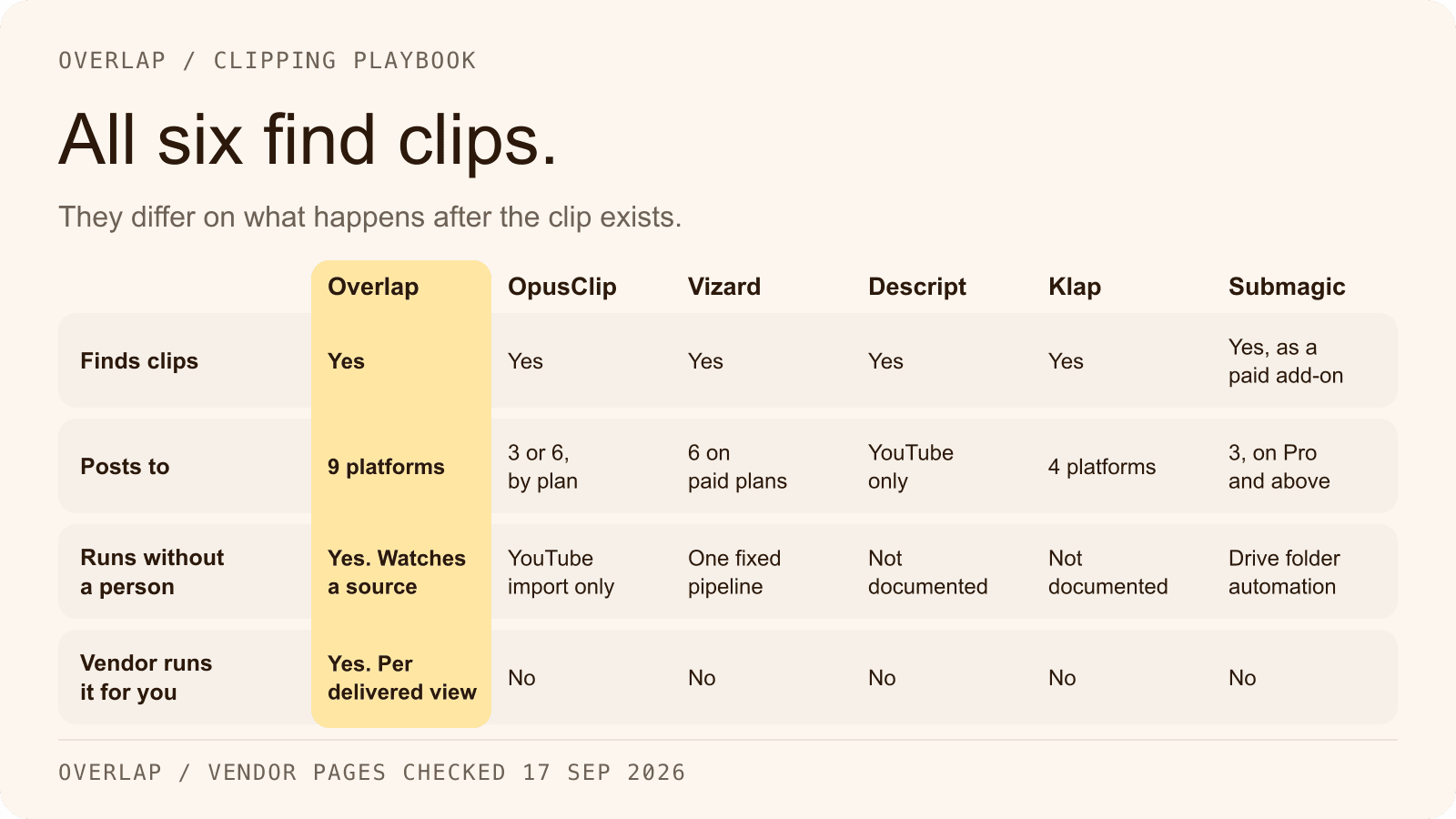
The market is crowded with AI video tools. However, most of them are "point solutions." They solve one specific problem really well, like captioning or cutting silence. Overlap takes a broader view by focusing on the entire production chain.
While other tools help you edit faster, Overlap aims to remove the editing step entirely for certain formats. It is the difference between a tool that helps you write an email and a system that writes, addresses, and sends it for you.
Versus OpusClip: Automation and Multimodal AI
OpusClip is fantastic at finding highlights. It uses AI to identify hooks and gives you a virality score. However, it is largely a clip-generation tool. You feed it video, it gives you clips, and then you usually have to take over.
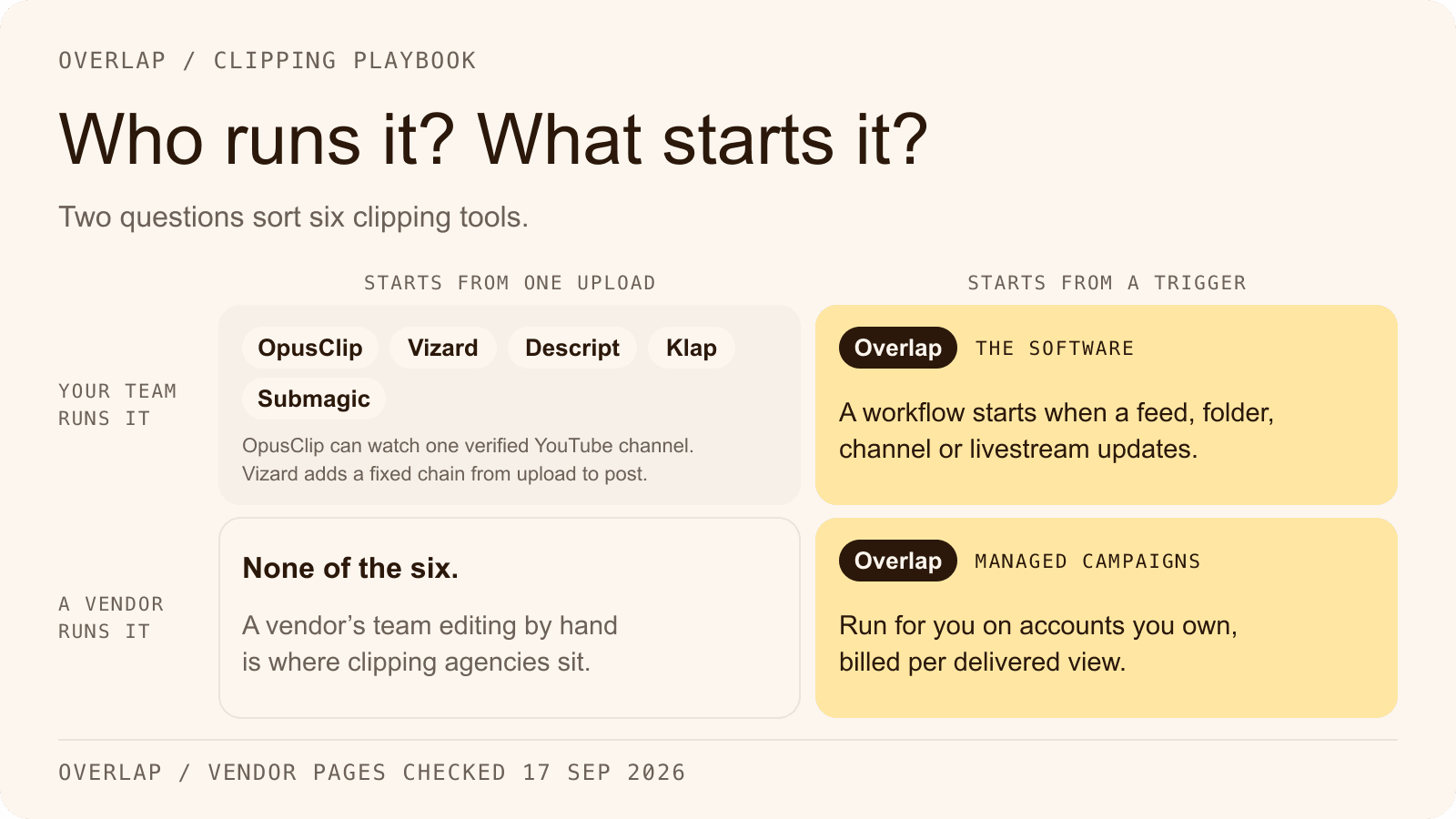
Overlap goes further with multimodal AI. It does not just generate the clip; it can handle the downstream actions. While Opus is great for "give me 10 clips," Overlap is built for "manage my entire short-form pipeline."
Versus Descript, VEED, and Vizard: Full End-to-End Capabilities
Tools like Descript and VEED are powerful editors. They replaced the timeline with text-based editing, which was a huge shift. But they are still editors. You sit in front of them and make choices.
Overlap differs by focusing on autonomous workflows.
- Descript/VEED: You are the pilot, the AI is the co-pilot.
- Overlap: You are the air traffic controller; the agents fly the planes.
For teams needing to scale volume without scaling headcount, this distinction is critical.
Best Practices for Maximizing Agentic Workflows
To get the most out of this technology, you cannot just set it and forget it immediately. You need to treat the AI agents like new employees. They need clear instructions and a bit of supervision before they can run the department.
Strategic implementation matters:
- Conduct pilot projects in controlled sandbox environments to validate performance.
- Scale and deploy incrementally, checking results before automating 100% of your output.
- Monitor and optimize performance continuously to ensure the AI stays on brand.
Crafting Powerful AI Prompts
The quality of your output depends entirely on the quality of your instructions. If you tell the agent to "make it funny," you might get results you hate.
Be specific. Instead of vague requests, use precise constraints. Tell the workflow to "select clips between 30 and 60 seconds that feature the guest speaker and contain high-energy keywords." The more data and context you provide to the NLP layer, the better the agents can execute your vision.
Optimizing Branches and Integrations
Don't overcomplicate your first workflow. It is tempting to build a massive web of logic, but that makes it hard to troubleshoot. Start with a simple linear path: Input to Clip to Caption.
Once that works, add branches. Maybe you want clips under 30 seconds to go to Instagram Stories, while longer ones go to Reels. Use integrations and APIs to connect these outputs directly to your social planning tools. Test each branch individually to ensure the logic holds up.
Common Mistakes to Avoid
When teams adopt agentic workflows, they often swing too far in the other direction. They assume the AI is magic.
Watch out for these traps:
- Zero Human Review: Never let an agent publish directly to a live feed without a final human check, especially early on. AI can miss context or misinterpret sarcasm.
- Ignoring Analytics: If a specific workflow isn't generating views, change it. Don't let a bad process run on autopilot.
- Complexity Creep: Building workflows so complex that no one on the team understands how to fix them if they break.
Getting Started and Next Steps
The best way to understand an agentic workflow is to build one. You do not need to overhaul your entire production process overnight. Start with a single recurring content format, like a weekly podcast or webinar.
Set up a simple workflow in Overlap to handle the initial rough cut and captioning. Measure how much time that saves you. Once you trust the autonomous task execution, you can start adding more complex triggers and branches. The future of editing isn't about moving faster; it's about moving smarter.
Frequently Asked Questions
What pricing plans does Overlap offer for agentic workflows?
Overlap prices each team on a custom quote rather than a set of named tiers. Contact sales, walk through the workflows you actually want running, and the team will quote against that.
Can Overlap’s agentic workflow integrate with tools like Zapier or Google Drive?
Yes, Overlap supports native integrations with Zapier, Google Drive, Dropbox, and social platforms like TikTok and YouTube. Use APIs for custom connections to streamline file inputs and outputs.
How secure is data in Overlap’s agentic workflows?
Your media is stored and processed in the US on encrypted infrastructure, access is scoped to your workspace, and Overlap never uses your content to train public models. Anything more specific than that — a security review, a data processing agreement, a particular retention requirement — is worth raising with the Overlap team directly rather than assuming it from a feature list.
What file formats and lengths does Overlap support in workflows?
Overlap handles MP4, MOV, AVI up to 4 hours long, with 4K resolution support. It auto-converts formats during processing for compatibility across social platforms.
How do I try Overlap’s agentic workflow features?
Book a demo. Overlap publishes no trial terms to sign up against — you set up a time with the team, walk through the platform, and see what a workflow does with your kind of content before there is any commercial conversation.
Related Articles
Check out these related articles for more information:
- How Overlap's Agentic Workflow Works - Direct topical match explaining Overlap's core differentiator mentioned throughout the article.
- visual builder - Product overview page provides detailed context for the workflow building interface mentioned in the article.
- AI video tools - Comprehensive comparison resource that supports the competitive analysis section discussing various tools.
- scale volume without scaling headcount - Real-world case study demonstrating the efficiency benefits and team scaling concepts discussed in the article.
- multimodal AI Agents - Homepage provides foundational context for the multimodal AI capabilities highlighted in competitor comparisons.