On this page
- What Is Agentic Video Editing?
- Why Agentic Providers Are Revolutionizing Content Creation
- How Agentic Video Editing Works
- Key Benefits for Creators and Media Teams
- Top Agentic Video Editing Providers
- Choosing the Right Agentic Provider
- Getting Started with Agentic Tools
- Best Practices for Agentic Video Editing
- Common Mistakes to Avoid
- The Future of Agentic Video Editing
- Frequently Asked Questions
- Related Articles
Agentic video editing automates turning long-form videos into viral shorts using AI agents that analyze semantics, cut clips, add captions, and apply branding. Top providers include Overlap.ai for social scale and Goldcast for webinars. Creators cut 15+ hour edits to minutes, achieving 18,000% view growth. Y Combinator-backed tools 10x output while ensuring consistency.
Tired of wasting hours manually clipping long-form videos into viral TikTok or Reels content? Creators burn through 15+ hours weekly on edits that kill momentum and scalability. This complete guide uncovers top agentic video editing providers like Overlap.ai, revealing how they automate workflows to 10x your output with zero compromise on quality.
What Is Agentic Video Editing?
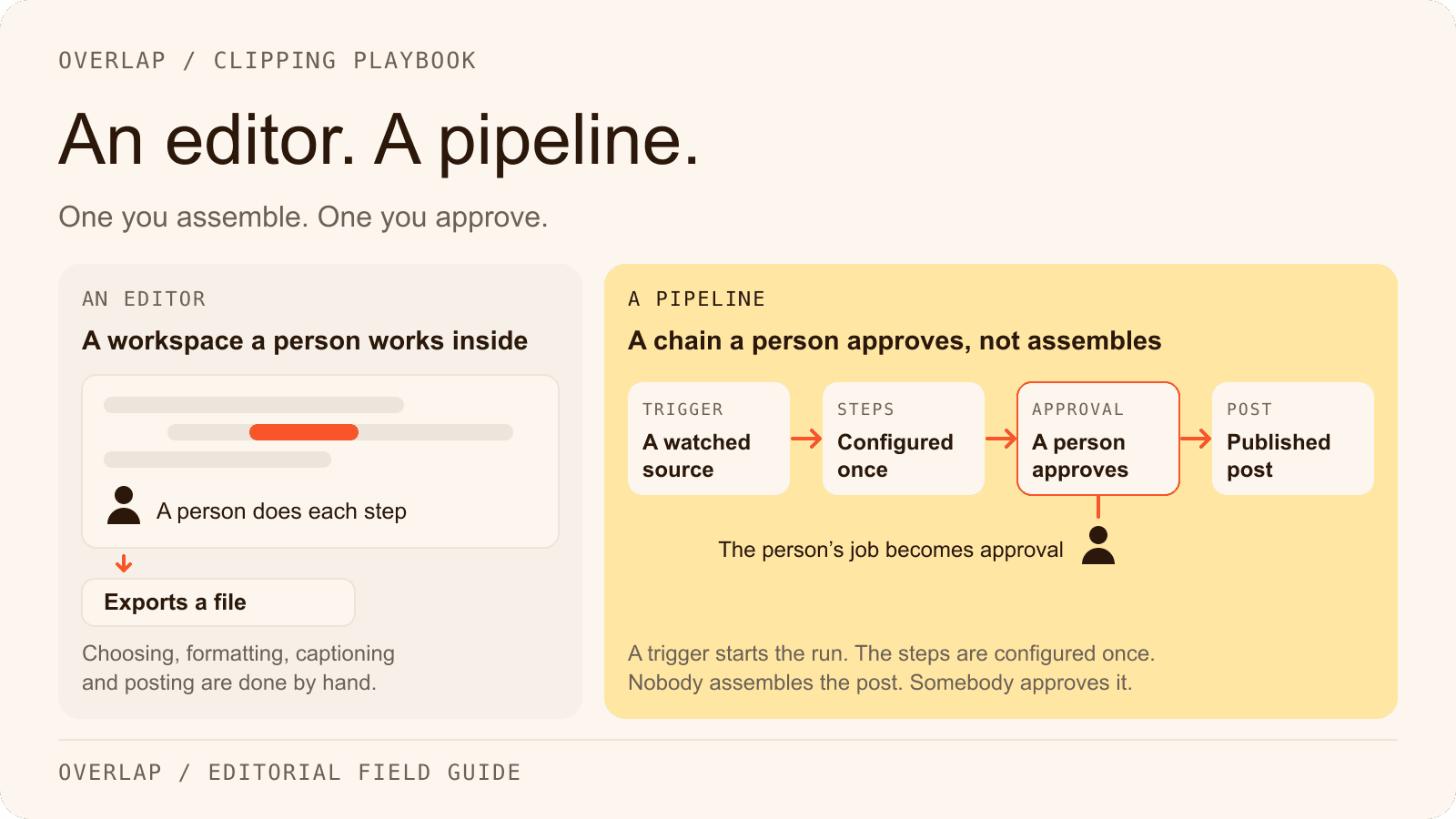
Agentic video editing is a shift from manual timeline work to outcome-based automation. Instead of cutting clips frame by frame, you interact with an AI agent that understands video semantics. You give it a goal—like "create three viral shorts from this hour-long podcast"—and the agent handles the execution.
It functions like a creative partner rather than just a tool. These systems use multimodal models to watch your video, listen to the audio, and understand the context. They identify the most engaging moments, crop the footage for vertical screens, and apply branding automatically.
"Agentic Video Editor is a chat-based assistant that turns raw recordings into polished, short-form clips. Describe what you want... and the editor applies captions, trims, B-roll, music, and on-brand styling." - Goldcast Knowledge Base (Goldcast)
Why Agentic Providers Are Revolutionizing Content Creation
The traditional editing workflow is a massive bottleneck. Creators and media teams often sit on terabytes of valuable long-form content because they lack the manpower to repurpose it. Agentic providers solve this by decoupling output from hours worked.
By automating the tedious parts of production, teams can publish significantly more content without increasing headcount. This volume is critical for growth on platforms like TikTok and YouTube Shorts. The results are measurable and often dramatic. For example, some media partners have seen +18,000% month-over-month growth in views after switching to agentic workflows (Overlap.ai).
How Agentic Video Editing Works
The process combines several AI disciplines into a single pipeline. It starts with natural language processing to understand the spoken content, followed by computer vision to track faces and action. The system doesn't just "hear" keywords; it understands narrative structure.
Here is the general flow:
- Ingestion: You upload raw long-form video.
- Analysis: The AI scans for hooks, emotional highs, and story arcs.
- Assembly: It cuts the video, reframes shots, and adds captions.
Core AI Agents and Vision Models
Modern agents are built on advanced multimodal models. These aren't simple script-readers; they analyze visual context and audio cues simultaneously. This allows the software to understand sarcasm, excitement, or dramatic pauses that older tools missed.
Leading platforms are pushing boundaries here. For instance, Overlap is now integrated with ChatGPT‑5, making it the first AI video clipping agent built on this advanced model (Overlap Blog). This integration allows for a deeper grasp of content tone and intent.
The End-to-End Editing Workflow
In practice, the workflow is incredibly streamlined. You drop a video file into the dashboard, and the agent takes over. It assesses pacing and phrasing to find the best clips.
Within minutes, you receive fully formatted assets. The agent handles:
- Smart Reframing: Keeping the speaker centered in 9:16 vertical format.
- Captioning: Generating accurate subtitles with brand fonts.
- B-Roll: Inserting relevant stock footage if the speaker is off-camera or the visual is static.
Key Benefits for Creators and Media Teams
The primary advantage is scale. Media teams can transform a single webinar or podcast into dozens of social assets in the time it usually takes to edit one. This consistency helps brands stay relevant in fast-moving algorithmic feeds.
Beyond speed, there is the benefit of consistency. Agents don't get tired or make sloppy cuts after a long day. They apply your brand guidelines—fonts, colors, logos—perfectly every time. This reliability allows marketing leaders to focus on strategy rather than quality control.
"Since partnering with Overlap, we’ve seen brands hit +18,000% month-over-month growth in views. That’s real momentum driven by smart tech and even smarter collaboration." - Anthony Molaee, SVP of Marketing, iHeartMedia (Overlap.ai)
Top Agentic Video Editing Providers
The market has split into specialized tools. Some focus on general creators, while others target enterprise media teams or webinar repurposing.
Key Players in 2026:
- Overlap.ai: Best for high-volume, autonomous social clipping.
- Goldcast: Best for B2B event and webinar marketers.
- Mosaic: Focused on complex node-based workflows.
Overlap.ai: Multimodal Agents for Scaled Clipping
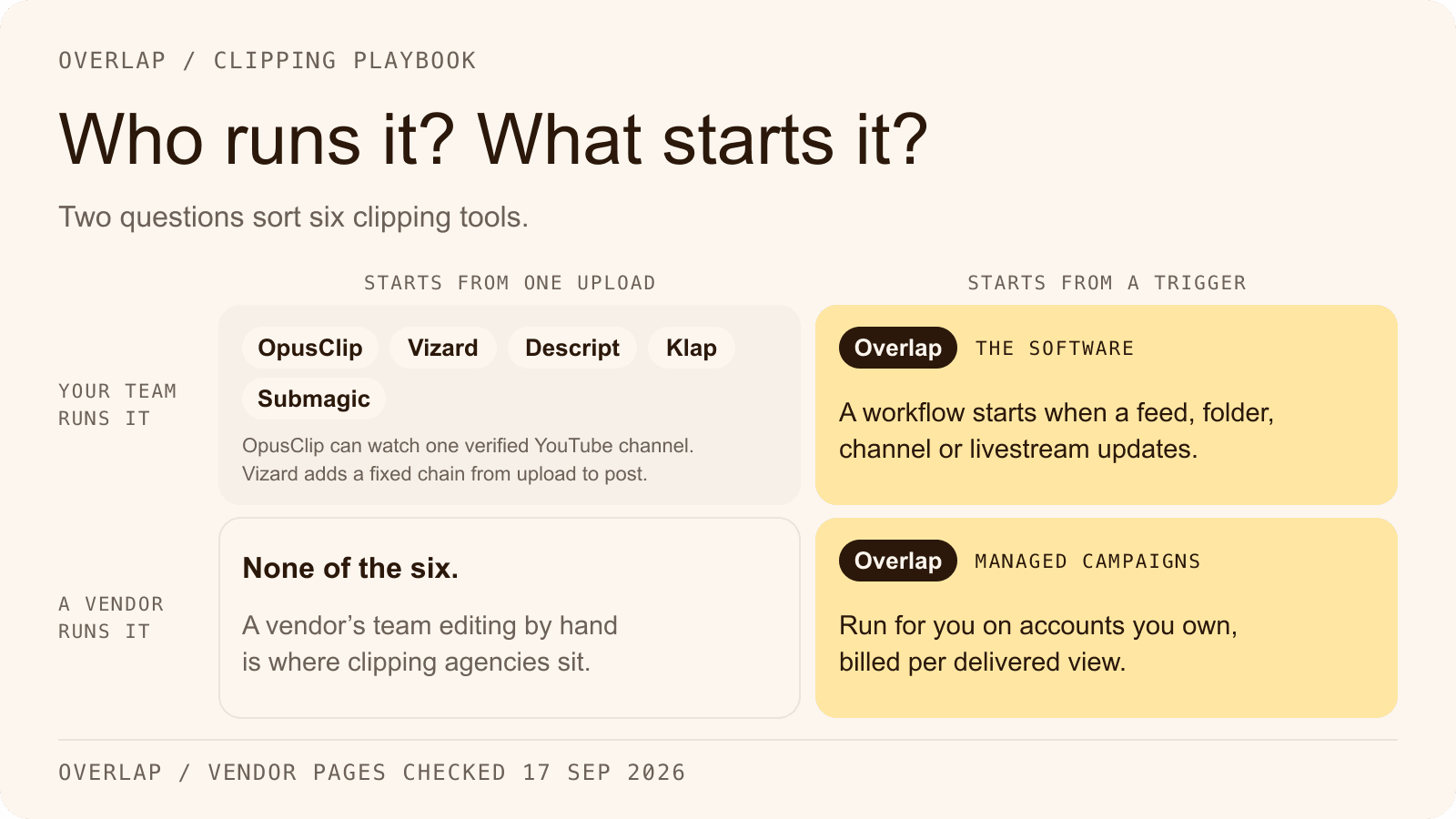
Overlap stands out by using agentic workflows to handle the entire production chain. It is designed for teams that need to dominate social feeds without hiring an army of editors. The platform uses multimodal agents to autonomously find the best clips and edit them with high precision.
Backed by Y Combinator, Overlap focuses on "set it and forget it" capabilities. It integrates deeply with huge media libraries, as seen with their work for major broadcasters.
Goldcast: Brand-Aligned Webinar Automation
Goldcast creates tools specifically for B2B marketers who need to squeeze value out of virtual events. Their "Content Lab" features an agentic editor that uses "recipes" to standardize output.
Goldcast Features:
- Royalty-free assets: Auto-inserts music and B-roll from Pexels and Pixabay.
- Call-out captions: Highlights key phrases automatically.
- Brand consistency: Locks in corporate colors for all generated clips.
Mosaic and Emerging Players
Mosaic and similar tools represent the experimental edge of the market. These platforms often allow for more granular control, letting users build node-based workflows for specific adaptation tasks.
While powerful, they can have a steeper learning curve than dedicated clipping agents. Venture capital firms have noted that platforms like Overlap and Mosaic are leading the charge in this new "agentic" category (a16z).
Choosing the Right Agentic Provider
Selecting a tool depends on your volume and goals. If you are a solo creator, you might prioritize ease of use. If you are a media company, you need robust API access and bulk processing.
Decision Matrix:
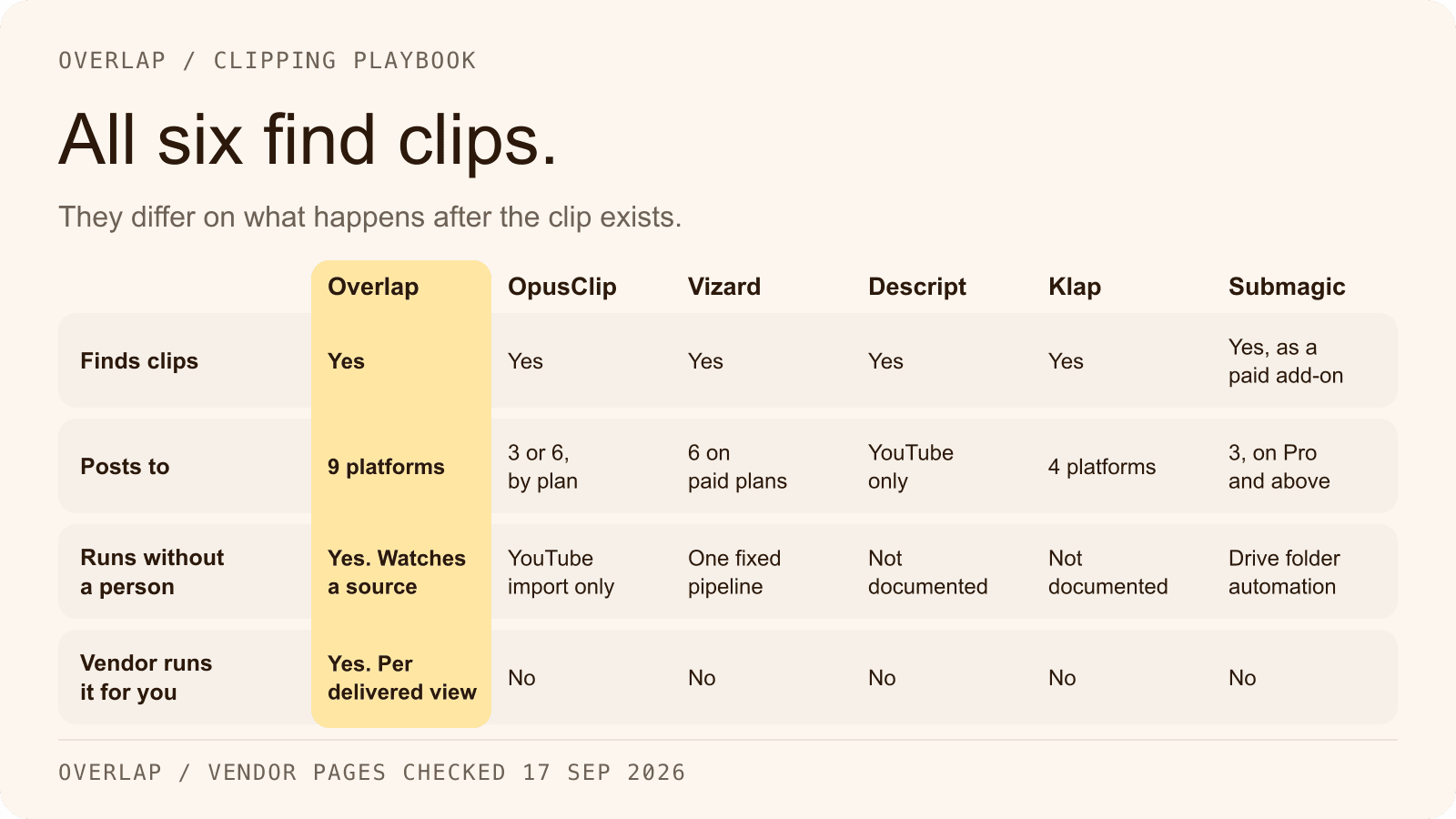
| Feature | Overlap | Goldcast |
|---|---|---|
| Primary Use | Social Growth & Scale | Webinar Repurposing |
| Automation Level | High (Autonomous Agents) | Moderate (Recipes) |
| Best For | Media Teams / Creators | B2B Marketers |
Essential Features and Integrations
Look for "multimodal" capabilities. A tool that only reads transcripts will miss visual jokes or non-verbal cues. You also need strong search features to find specific moments in your backlog.
Must-have capabilities:
- AI Clipping: Autonomous selection of viral-worthy moments.
- Content Generation: Turning video transcripts into blog posts or summaries.
- Video Search: Tagging and indexing your library for easy retrieval.
Pricing, Scalability, and Use Cases
Pricing models vary. Some charge by the minute of uploaded video, while others offer flat monthly subscriptions. For enterprise teams, scalability is the dealbreaker. You need a platform that can ingest hundreds of hours of footage without crashing.
Teams using these tools often automate the entire pipeline. As noted in industry analysis, some teams now "automate ingestion, editing, and posting, with some posting dozens of times daily across platforms" (Overlap).
Getting Started with Agentic Tools
Starting is usually as simple as uploading a file. However, the quality of your output depends on how you set up the system. Most platforms have a "Content Lab" or dashboard where you manage your media.
Basic Setup Steps:
- Navigate to your dashboard (e.g., Content Lab).
- Open a video and select "AI Edits."
- Review the "Quick Actions" or suggestions the agent provides.
Preparing High-Quality Input Footage
AI cannot fix bad audio. Ensure your source video has clear speech and decent lighting. The cleaner the input, the better the agent can understand the context.
If you are recording specifically for AI editing, leave small pauses between topics. This helps the agent detect scene changes. Also, try to keep speakers in the center of the frame to make vertical cropping easier.
Crafting Prompts and Setting Workflows
With advanced agents, you can guide the edit with natural language. Instead of just clicking buttons, you tell the system what you need. For example, "Find the three funniest moments and add dynamic captions."
Because tools like Overlap understand tone and story pacing, your prompts can be qualitative. You can ask for "high-energy highlights" or "somber reflective moments," and the multimodal model will discern the difference.
Iterating for Polished Outputs
Even the best AI needs a human check. Most interfaces provide an "Edit" button to tweak the results. You might need to adjust a caption that was transcribed incorrectly or shift a cut point by a few frames.
Refinement Tools:
- Combine: Link words to appear on screen simultaneously for better readability.
- Keyword Highlight: Select specific words to pop with a different color.
- Remove: Delete segments or captions that don't add value.
Best Practices for Agentic Video Editing
To get the most out of these tools, treat them as a first pass, not the final word. Let the agent do the heavy lifting of sorting and rough cutting, then spend your time on the final polish.
Top Tips for Success:
- Trust the Scene Detection: Let the AI find the natural breaks in conversation.
- Standardize Branding: Set your fonts and colors once so every clip looks uniform.
- Check Accessibility: Always review auto-generated subtitles to ensure they are readable and accurate for viewers watching without sound.
Common Mistakes to Avoid
The biggest error is assuming the AI is perfect. Always watch the final clip before publishing. Sometimes an agent might cut a sentence too early, cutting off the punchline.
Another mistake is ignoring the "recipes" or presets. These are often tuned by experts to perform well on specific platforms like TikTok or LinkedIn. Don't reinvent the wheel—use the presets that match your target platform. Finally, don't overload the video with too many effects just because they are available; clean and clear usually wins.
The Future of Agentic Video Editing
We are moving toward a world where editing is almost entirely invisible. The software will not just edit but also predict what content will perform best based on real-time data.
As multimodal models improve, agents will become proactive producers. They won't just wait for your command; they will suggest content strategies based on your library. The consensus among investors and tech leaders is clear: "It’s time for agentic video editing" to take center stage in the creator economy.
Frequently Asked Questions
What is the pricing for top agentic video editing providers like Overlap.ai and Goldcast?
The two providers answer this differently. Goldcast uses tiered subscriptions from $99/month with per-minute upload fees around $0.50-$2.00, depending on volume. Overlap.ai prices each account on a custom quote from its sales team, so a like-for-like comparison means bringing your own volume to the conversation rather than reading two numbers off two pages.
How do agentic video editors handle different languages or accents?
Most providers like Overlap and Goldcast support 20+ languages with 95%+ transcription accuracy for clear audio. They use multimodal models trained on diverse accents, but recommend high-quality input for non-English content to avoid errors.
Can agentic tools integrate with social media platforms for auto-posting?
Yes, Overlap.ai and Goldcast integrate with TikTok, YouTube Shorts, Instagram, and LinkedIn via APIs. They enable scheduled posting of edited clips directly, with analytics tracking, saving teams up to 80% of distribution time.
What are the system requirements for using agentic video editing software?
These web-based tools require a modern browser like Chrome, stable internet (50 Mbps+ upload), and no specific hardware beyond standard laptops. Processing happens in the cloud, handling up to 4K footage without local GPU needs.
How accurate are agentic editors at detecting emotional tones in videos?
Advanced models like those in Overlap.ai achieve 85-92% accuracy in identifying excitement, sarcasm, or pauses via multimodal analysis of audio pitch, facial expressions, and speech patterns, outperforming transcript-only tools.
Related Articles
Check out these related articles for more information:
- Overlap is now integrated with ChatGPT‑5 - Direct link to the specific announcement mentioned in the article about Overlap's ChatGPT-5 integration.
- +18,000% month-over-month growth in views - Links to the detailed case study that provides evidence for the dramatic growth claims made in the article.
- 10 best AI-powered video editing tools - Provides readers with a comprehensive comparison of AI video editing tools to complement this provider-focused guide.
- multimodal AI Agents - Links to Overlap's homepage where readers can learn more about the leading platform discussed extensively in the article.
- product overview - Gives readers detailed product information about Overlap's capabilities mentioned throughout the guide.