On this page
To clip GTA 6, start from footage you have a right to post — your own gameplay or stream, or a creator's VOD you have permission to cut — then trim it to a vertical moment, caption it, keep story spoilers and in-game radio out of it, and publish it on an account you control. A clipping campaign adds a payment: a streamer or brand funds a budget, clippers post approved clips, and the campaign pays on counted views. The decision that matters most is the one people skip: whose account the clips live on, because that account is what remains once the launch spike is over.
Checked November 18, 2026. Rockstar dated Grand Theft Auto VI for November 19, 2026, on PlayStation 5 and Xbox Series X|S, with no PC date announced. Rockstar has not published a GTA VI-specific video policy; its general policy on posting copyrighted Rockstar Games material, last updated January 10, 2025, is the one that applies. Read it in full before you post anything for money, and re-check it after launch.
This guide is published by Overlap, which runs clipping campaigns on accounts its customers own. Campaign and payout details for other platforms are summarized from their public pages, linked where they appear.
What GTA 6 footage can you clip?
Gameplay footage is Take-Two's copyrighted material, whoever pressed the buttons. Rockstar's policy permits fans to post it for non-commercial use, which it defines as not making money through the game footage you post and not using the material to promote a product or service. Take-Two reserves the right to have its material taken down at any time.
Two consequences follow, and neither is a legal opinion:
- Monetized GTA content is tolerated, not licensed. Streamers and YouTubers have earned around Rockstar games for years, but the policy itself grants no monetization right. Any income from GTA VI footage rests on Take-Two continuing to allow it.
- A brand-funded campaign built on raw gameplay is a promotion. Paying clippers to post GTA VI footage in order to promote a product is the use the policy's definition names. If the campaign is commercial, get advice on rights before you fund it.
The defensible starting point is footage where the added value is yours: a streamer's reactions and commentary, a podcast discussing the game, a creator's challenge run. The game is still on screen, but what the audience follows is a person.
| Source | Whose work the audience is watching | What to confirm before posting for money |
|---|---|---|
| Your own stream or gameplay with commentary | Yours, over Take-Two's game | Rockstar's policy, platform monetization rules, music in the footage |
| A streamer's VOD, clipped with permission | The streamer's | The streamer's written permission, the campaign brief, Rockstar's policy |
| Rockstar trailers or cutscenes on their own | Rockstar's | Treat as outside the policy for paid work; isolated cinematics are a common takedown target |
| Another creator's clip, reposted | Someone else's | Permission from that creator — and platform originality rules, which usually exclude it from monetization |
What gets GTA clips taken down?
Coverage of Rockstar's enforcement points to the same categories every launch: leaked or pre-release footage, story spoilers and endings, compilations of cutscenes with the gameplay removed, in-game TV or performances shown on their own, and anything promoting cheats or mod menus. A cutscene inside a longer playthrough or a narrated Let's Play is treated differently from the cutscene uploaded alone.
In-game radio is a separate problem from the footage. The licensed tracks on GTA's stations belong to labels, and a clip carrying one can be claimed through YouTube's Content ID or muted on other platforms even when the footage itself is within Rockstar's policy. Turn the radio off when recording anything you intend to clip, or cut it out in the edit.
How do you clip GTA 6 gameplay?
The workflow is the same whether you clip one stream or run a campaign across thirty accounts.
- Record a clean source. Stream to Twitch or YouTube and keep the VOD, use a capture card, or use the console's own capture — both PS5 and Xbox Series X|S can save recent gameplay. Record at the highest quality you can store; a vertical crop throws away most of a 16:9 frame.
- Turn the radio off. Do it before recording, not in the edit.
- Find the moment, not the mission. A clip that works is one beat a stranger understands without context: a chase that ends badly, a reaction, a glitch, a line of commentary. Story beats are both a spoiler risk and the content Rockstar most often removes.
- Cut to vertical. 9:16 for TikTok, Reels and Shorts. Crop to the action, and keep the streamer's face cam in frame if the reaction is the point.
- Caption it. Most short-form video is watched without sound at first. Burned-in captions on the commentary are the difference between a reaction and a silent car crash.
- Open on the payoff. The first second decides whether a scroll stops. Start on the crash, not the drive to it.
- Title without spoilers. "I did not expect that" is a hook; the name of a story character's fate is a takedown and an angry comment section.
- Log what you posted. Source VOD, timestamp, destination account, post URL. A campaign will ask for it, and so will a rights dispute.
Doing this by hand is fine for a few clips a day. Launch week is not a few clips a day — a streamer playing GTA VI for eight hours produces more usable moments than one editor can cut. Overlap's Find Clips node picks candidate moments from a long recording against a prompt you write (for example: reactions and chases only; skip story cutscenes), and downstream nodes handle the vertical crop, subtitles, and publishing with approvals through Post to Social.
How do you start a GTA 6 clip account?
Decide whose account it is first, because the other steps depend on it.
- A streamer's or creator's own clip channel. The clips are of you, the audience is yours, and a follower gained during the launch is a follower of your stream.
- A brand's channel. A gaming peripheral, energy drink or media outlet posting GTA VI moments from streamers it works with. The rights question above applies most sharply here.
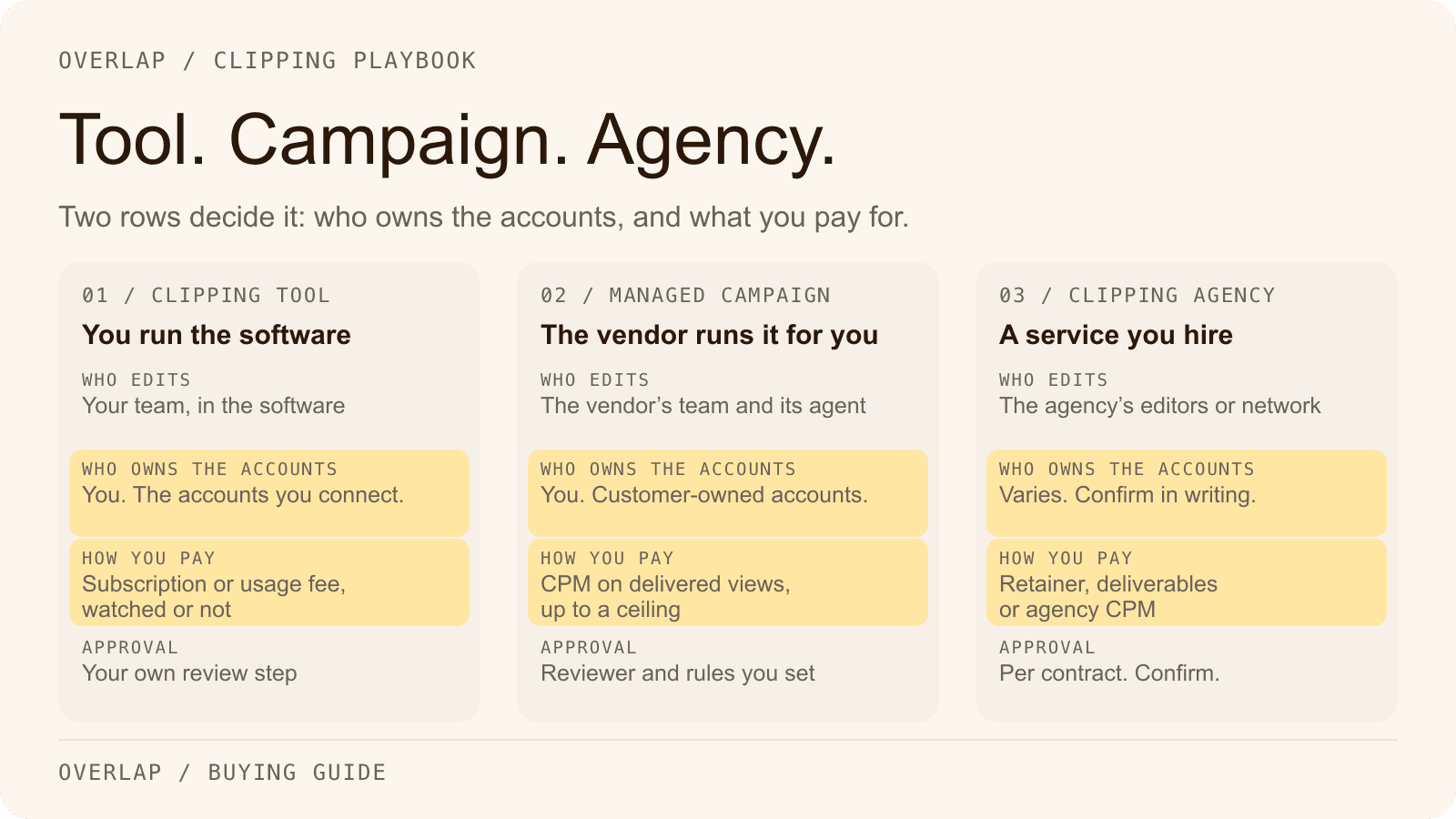
- An independent clip page. A clipper's account that posts other creators' moments, often to earn from clipping campaigns. The account belongs to the clipper, and its value depends on the creators it clips.
Then set the account up so it can grow and survive:
- Pick a handle that does not look official. "Grand Theft Auto", "GTA" and "Rockstar" are trademarks. A handle or avatar that reads as Rockstar's own invites impersonation reports. Name the account after the person or the angle — [streamer] clips, [outlet] plays GTA — not after the game alone.
- Say what it is in the bio. Whose clips, how often, and a link to the full stream. If it is a fan page, say so.
- Choose two platforms, not five. TikTok and YouTube Shorts are the usual pair for gaming clips; add Instagram Reels or X once the first two are running. Each platform you add multiplies the review and posting work.
- Post on a schedule you can keep after launch week. A burst of fifty clips in November followed by nothing in January teaches the platform that the account is finished.
- Read each platform's originality rules before counting on monetization. YouTube's reused content policy can keep a channel out of the Partner Program when it mainly reposts other people's material without meaningful commentary or editing. X's rewards program excludes minimally modified reposts — see our guide to whether clipping accounts can still earn on X.
How do GTA 6 clipping campaigns work?
A clipping campaign pays clippers to distribute someone else's content. On marketplaces such as Content Rewards — which uses Whop for payments — the campaign owner funds a budget and sets a reward per 1,000 views, a minimum payout before a clip is eligible, and a maximum payout per video, so a single viral clip cannot spend the whole budget. Whop's Content Rewards documentation describes those controls.
From the clipper's side it runs like this:
- Join the campaign. Some are open to any verified account; others take applications.
- Connect the account you post from inside the campaign platform itself.
- Read the brief. Approved source, required tags or mentions, banned content, and the platforms that count.
- Post the clip, then submit its link.
- Wait for review. The campaign team approves or rejects the clip; only approved clips earn.
- Get paid on counted views, after the platform's hold and fees.
Creator fees, payout holds and the Pool campaign type are covered in our Content Rewards payment-model guide, with the current terms linked.
Be careful with GTA 6 campaign boards. A number of sites list "GTA 6 clipping campaigns" with rates and join links. Several are unaffiliated with the platform they link to, and as of mid-November some said no funded GTA VI campaign was open yet while others advertised one. Treat any rate you see outside the campaign page itself as an advertisement, and confirm the budget, rate and rules inside the platform before you post.
How do you fill a GTA 6 clipping campaign?
If you are the streamer or brand funding the campaign, "filling" it means getting enough approvable clips posted inside the window — and the bottleneck is almost never the number of clippers who join.
Write a brief a clipper can follow without asking. Name the approved source (your VODs, with links), and say what is out: story spoilers, isolated cutscenes, radio music, other creators' footage. Give the handle or tag every clip must carry. A vague brief fills the review queue with clips you have to reject, and a clipper who gets rejected twice stops submitting.
Size the budget with the arithmetic, not the headline. As a hypothetical, a $5,000 budget at $1.00 per 1,000 counted views pays for at most 5 million counted views, before platform fees. A $500 per-video cap means one clip can take no more than a tenth of it. Those two numbers decide whether the campaign rewards many decent clips or a few lucky ones. This is an illustration of the formula, not a forecast or a market rate.
Staff the review queue for launch week. Attention on GTA VI is likely to be highest in the days after release, which is also when submissions arrive fastest. Clips that sit unreviewed for days miss the moment they were cut for. Name the reviewer and the response time before you open the campaign.
Keep the source flowing. Clippers can only cut what you have streamed. A campaign that opens on launch day with one VOD fills slowly; one with a VOD a day fills on its own.
The broader version of this checklist is in How to Start a Clipping Campaign, and the campaign planning kit has a brief you can copy.
Who keeps the audience after a GTA 6 clipping campaign?
A marketplace campaign buys reach on other people's accounts. When it ends, the views happened, but the followers those clips earned belong to whoever owns each clip page. For a one-off promotion that can be exactly what you wanted. For a streamer, it means paying to grow thirty accounts that are not yours, at the one moment in a game's life when attention is cheapest to capture.
GTA VI's launch is a spike that will not repeat. The asset that outlasts it is the account that captured it.
| Marketplace campaign | Campaign on accounts you own | |
|---|---|---|
| Who posts | Participating clippers | Your accounts |
| Who keeps the followers | Each clipper | You |
| Who keeps the posts and data | Each clipper | You |
| Who controls what gets posted | Clippers, within your brief and review | You, through approval rules |
| Best for | Wide distribution for a single moment | An audience that is still yours next year |
Overlap's clipping campaigns take the second column. Overlap selects, edits, formats and publishes clips under your rules on social accounts you own, with approval workflows and reporting, and you keep the accounts, the followers, the posts and the performance data. For a streamer going into GTA VI, that means launch-week clips land on your own clip channel instead of thirty other people's — see Overlap for streamers.
The two models are not exclusive. A streamer can run clips on their own accounts all year and fund a short marketplace campaign around launch week for extra reach. Report the two separately: views from a clipper's page are not followers gained on yours.
GTA 6 clipping checklist
- Read Rockstar's policy, and decide whether your use is commercial.
- Record with the in-game radio off.
- Clip moments, not story missions; title without spoilers.
- Name the account after a person or angle, not after the game.
- Pick two platforms and a cadence you can keep in January.
- For a campaign: approved sources, banned content, tags, CPM, per-video cap, reviewer, and review time — all in the brief.
- Confirm any campaign's terms inside the platform, not on a listing site.
- Decide who owns the accounts before you spend on reach.
Frequently Asked Questions
Can you make money clipping GTA 6?
People do earn from GTA clips, through platform monetization, clipping campaigns and editing work for streamers. Rockstar's video policy only permits non-commercial use of its footage, so monetized GTA content is tolerated rather than licensed, and Take-Two can have material removed at any time.
Is it legal to post GTA 6 clips?
Rockstar's policy allows fans to post gameplay footage for non-commercial use. It does not cover using the footage to make money or to promote a product or service, and Take-Two reserves the right to have its copyrighted material taken down. For a commercial campaign, get advice on rights before funding it.
Will GTA 6's in-game radio get my clip claimed?
It can. The radio stations play licensed music owned by record labels, and a clip carrying one of those tracks can be claimed by YouTube's Content ID or muted on other platforms. Turn the radio off when recording footage you plan to clip.
What is a GTA 6 clipping campaign?
A GTA 6 clipping campaign is a budget a streamer or brand funds to pay clippers for posting approved GTA VI clips. On marketplaces such as Content Rewards, the owner sets a rate per 1,000 views, a minimum payout and a per-video cap, and approved clips are paid on counted views.
How do you start a GTA 6 clip account?
Decide whose account it is, choose a handle that does not look like Rockstar's own, state in the bio whose clips it posts, start on two platforms, and post on a schedule you can keep after launch week. Check each platform's originality rules before counting on monetization.
Who owns the followers from a clipping campaign?
Whoever owns the account the clip was posted on. In a marketplace campaign that is each participating clipper. In an Overlap campaign the clips publish to accounts the customer owns, and the customer keeps the accounts, followers, posts and performance data.