On this page
The best way to make podcast clips in 2026 is a workflow that runs the same way every episode, not a favourite tool. Decide what a clip has to contain, connect the show's feed once, write the selection and formatting rules once, keep one review step, and post on a cadence the accounts can absorb. A clipping tool performs one or more of those steps. The sequence is what makes the output dependable when the next episode lands and nobody has time to start from scratch.
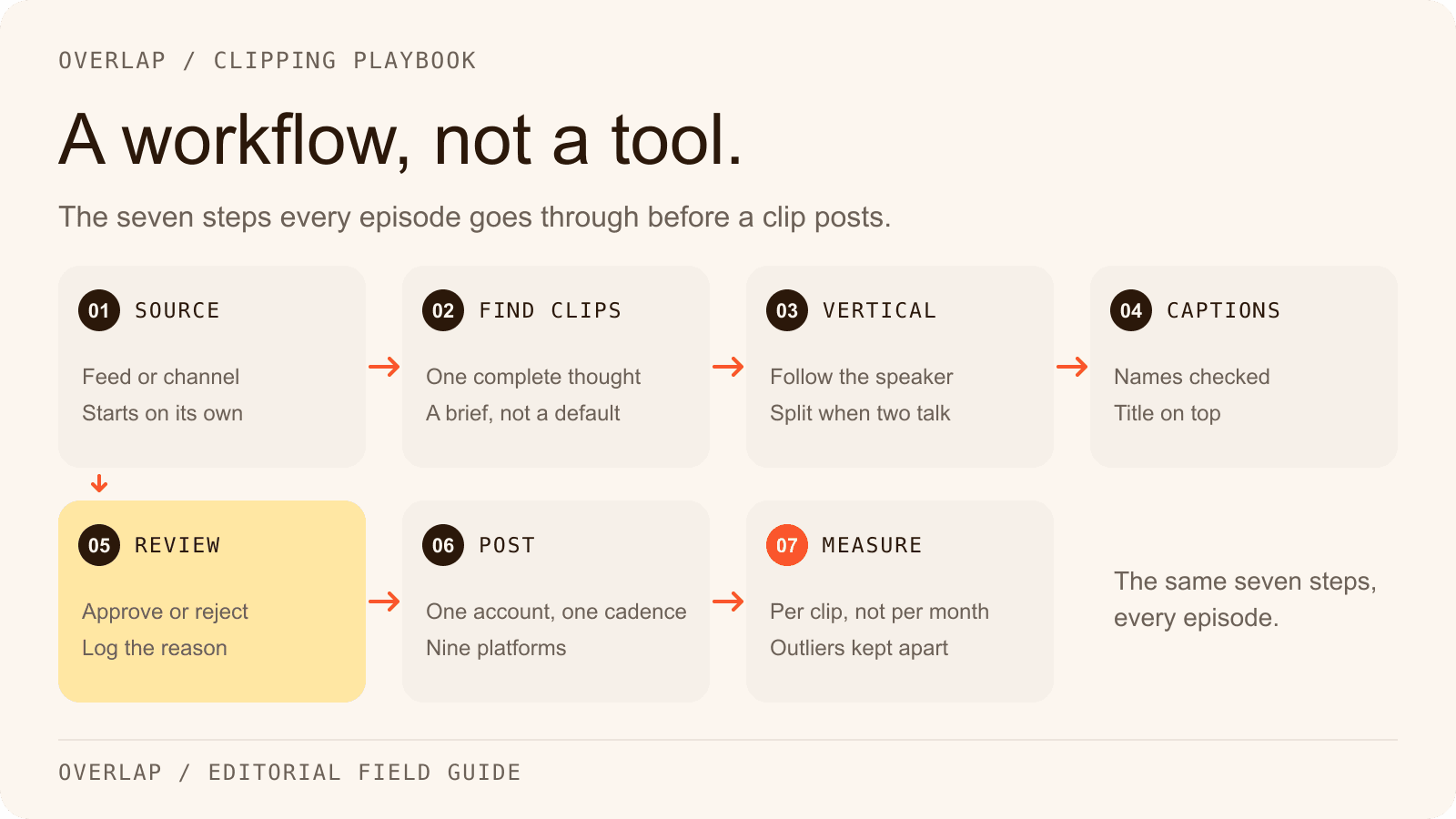
The judgment a podcast team has to make is where the hours should go. Every clip needs the same seven decisions, whether a producer makes them in a timeline, a self-serve clipper makes them one upload at a time, or an automated workflow makes them on every new episode. This guide sets out those decisions, then compares three ways of running them.
This guide is published by Overlap, which offers two of the three options discussed: a self-serve clipping platform and managed clipping campaigns. The advice below is planning guidance, not a controlled comparison of provider results.
Why podcast clips are worth a workflow now
The audience for a podcast is increasingly a video audience. On February 26, 2025, YouTube reported more than 1 billion monthly active viewers of podcast content on its platform. Source: YouTube Official Blog.
Edison Research's The Podcast Consumer 2026, published June 4, 2026, found that 82% of weekly podcast consumers now watch video, against 78% who listen to audio only. In 2023 the same study had 89% listening to audio only and 73% watching video. The study measures consumption of podcasts, not of short clips cut from them, so it does not establish that a clip audience becomes an episode audience. Source: Edison Research at SSRS.
Spotify said on May 21, 2026 that more than 500 million users have streamed a video podcast on its platform, up nearly 50% year over year. Source: Spotify Newsroom.
A show that records video already has the raw material for short-form distribution every week. The question is what each episode should cost a producer.
What makes a podcast clip work?
A podcast clip works when it delivers one complete thought, earns attention in its first seconds, reads with the sound off, fills a vertical frame, and has somewhere to send the viewer. Those five properties are the specification. Every tool choice below is judged against them.
One complete thought. A clip starts where a stranger can understand the question and ends after the answer lands. A punchline with no setup, or a setup cut before the payoff, is the most common failure in podcast clips, and no caption style fixes it. Keep the sentence that qualifies the claim: a guest who said this worked in one market did not say it always works.
A hook in the first seconds. Instagram's creator guidance, as checked on September 17, 2026, says the first 3 seconds of a reel should be engaging so that viewers do not move on. TikTok's creative guidance for advertisers says to prioritise the hook in the first 6 seconds. Both are platform advice about keeping a viewer, not proof that any particular opening will. Source: Instagram for Creators FAQ; Source: TikTok for Business creative best practices.
Captions that are correct. Many feeds play muted, so the captions carry the argument. They also introduce a new failure: a transcription error in a name, a number or a negation changes the meaning. Captions are a review item, not a checkbox.
A vertical frame that follows the speaker. The same TikTok guidance recommends a 9:16 orientation, and Facebook's Reels best practices say vertical 9:16 content helps make reels immersive. A two-person conversation reframed badly leaves the wrong person centred while the other one talks. Source: Facebook for Creators, Reels best practices.
A destination plan. Decide before the clip is cut where it will post, on which account, and what the caption should send the viewer to: the episode, the show page, or nothing at all.
Two negative rules come from the platforms. Instagram's ranking explanation, published May 31, 2023, says the feed is less likely to recommend watermarked, low-resolution or already-posted reels. YouTube treats vertical or square uploads of three minutes or less as Shorts, so a longer clip competes in a different feed from the one it was cut for. Source: Instagram Ranking Explained; Source: YouTube Help on Shorts length.
The workflow, step by step
The sequence below is written as an Overlap workflow because that is the product whose documentation this article can check. The steps are the same in any setup.

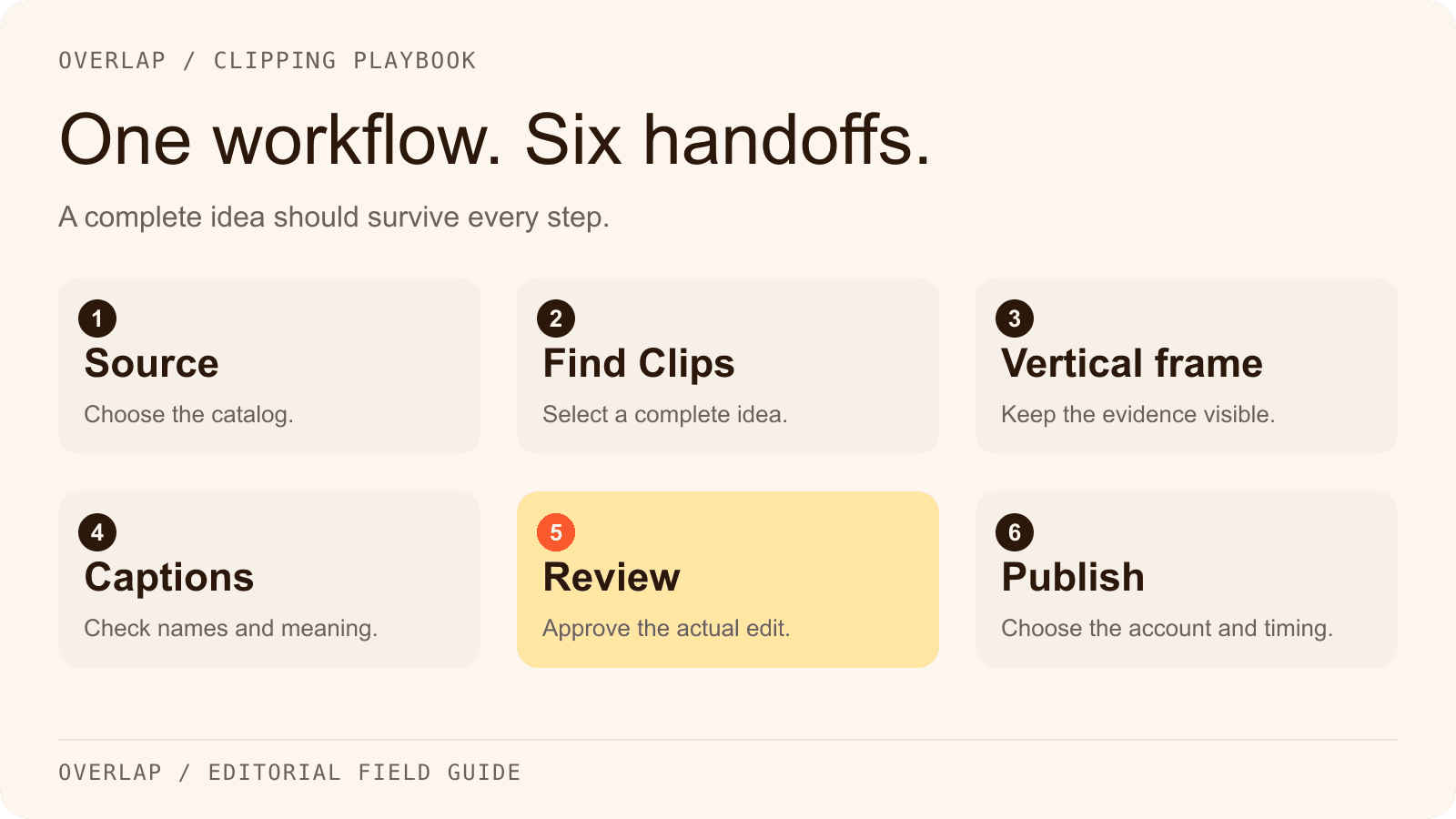
1. Connect the source once
Pick the feed the episode already goes to. Overlap's RSS Feed node watches a podcast, RSS or Atom feed and starts the workflow when a new item appears. Its New YouTube Video node watches a channel or playlist and can ignore uploads that are shorter or longer than the show's episodes.
Write down the exclusions at the same time: sponsor reads, cold-open music, housekeeping, any segment a guest asked to keep off social. Every downstream step inherits them.
2. Tell Find Clips what a complete thought sounds like
The Find Clips node takes a minimum and maximum clip length, a model, a prompt and a list of keywords. Overlap's node documentation describes a Conversational model for podcasts and interviews and a Multimodal model for sports and other moments the picture carries; a talk show wants the first one. Start with a range of roughly 30 to 75 seconds for a conversational show and widen it only when the ideas genuinely need longer.
The prompt is the editorial brief. Name the listener, say what a useful moment looks like, and list what to leave out. An original example for a hypothetical show about running a small restaurant group:
Audience: operators running two to ten locations.
Find moments where the guest explains one decision, what they tried before it and what changed afterwards. Prefer a specific number or example over general advice.
Start where a new viewer can follow the question. Keep any sentence that limits the claim. Do not join separate statements into one the guest did not make.
Exclude sponsor reads, introductions, scheduling talk and anything that depends on a chart the viewer cannot see. End after the explanation lands.
Put names, brands and jargon in the keywords field so the transcript spells them correctly, and keep the selection rules in the prompt. Overlap's prompting guide covers how to separate the audience, the context, the goal and the constraints.
3. Convert to vertical for the footage you actually have
The Convert to Vertical node offers content-aware reframing, which follows the active speaker and can split the frame when two people are talking, and static reframing with a fixed crop, background blur and a vertical position. Choose the filming style that matches the recording, in-person studio or online with overlays, and check one two-speaker exchange before trusting the setting on a whole episode.
4. Add captions and a title, then treat both as review items
Captions are generated from the transcript, with documented controls for position, size, characters per line, line count, a style preset and separate styling per speaker (Add Subtitles); Overlap's current documentation groups caption, title, watermark and end-card styling in a Style Video step for new workflows. A title overlay can be generated from a prompt, with a social default sized for TikTok and Instagram (Add Title Overlay). Set the recurring look once in the workflow and fix a single wrong name in Studio rather than changing the recipe.
5. Review before anything posts
Turn on Post Approval in the publishing step so every clip waits in the Social Calendar until a person approves it. There the reviewer can edit the caption copy, revise the clip, replace the cover, change the time or switch the account. In Studio, read the transcript beside the video: watch once muted to check the argument, and once with sound to check the cut.
Reject with a reason the next prompt can use: a note that the clip needs the preceding question improves the brief, and a note that it is not great does not.
6. Post to Social on a cadence the account can absorb
The Post to Social node publishes to a chosen account on any of the nine platforms Overlap supports: TikTok, Instagram, YouTube including Shorts, X, LinkedIn, Facebook, Threads, Snapchat and Bluesky. A posting persona drafts the caption in a consistent voice, the cadence control sets how many posts go out per day and for how long, and conflict prevention stops two posts landing in the same slot.
Cadence is where new clip accounts go wrong. Overlap's documentation, as checked on September 17, 2026, suggests starting a new account at one post a day or one every other day, then scaling toward two to four TikToks, one to two Reels and one to two Shorts a day once distribution is steady. Spread posts across the week: an account that jumps from nothing to a large batch overnight can see slower distribution while the platform decides whether it is trustworthy. Source: Overlap docs, posting FAQ.
7. Read the numbers per clip, not per month
Overlap reports views, likes, comments and shares for each post. Compare clips from the same episode against each other and against the show's running median, and keep the outliers separate: one clip at a hundred times the average says something about that moment, not about the workflow.
Three ways to run the same workflow
The seven steps do not change. What changes is who performs each one, and whether it has to be started by hand.
Manually, in an editor. A producer opens the episode in a video editor, finds the moment, cuts it, reframes it, captions it and exports it, then posts each file by hand. Descript, a text-based video and audio editor, is the common example: its Create Clips tool can propose 1 to 20 clips of 10 seconds to 5 minutes, and as checked on September 17, 2026 its integrations page lists publishing to YouTube and to a share page but not to TikTok, Instagram, LinkedIn, X or Facebook, with no post scheduler documented in its help centre. The editor's strength is control over every frame. The cost is that every clip is a session. Source: Descript homepage; Source: Descript help, Create clips; Source: Descript integrations. The Overlap and Descript comparison has the full table.
A self-serve clipper, one upload at a time. A clipping tool takes a link or a file and returns a set of candidate clips with captions and a vertical crop. OpusClip's homepage headline is “1 long video, 10 viral clips.” As checked on September 17, 2026, its pricing page lists a social media scheduler from the Pro plan and automatic video import from a verified YouTube channel from the Starter plan, and its supported-sources article lists Apple Podcast, YouTube, Google Drive, Dropbox and Zoom among its sources, with no RSS feed in the list. The work that remains is starting each episode, reviewing the set and managing the posting rhythm. Source: OpusClip homepage; Source: OpusClip pricing; Source: OpusClip supported sources. See the Overlap and OpusClip comparison. Overlap's own AI video clipper covers the same single-upload job.
An automated workflow, or a managed campaign. The seven steps are saved as a workflow that the feed triggers, so the producer's job shrinks to the review queue and the occasional prompt change. That is what the automation page describes. For a team that does not want to run the workflow at all, Overlap's managed clipping campaigns run the same pipeline on accounts the show owns, with Overlap handling clip selection, editing, approval, publishing and reporting, priced on delivered views.
| Question | Manually in an editor | Self-serve clipper | Automated workflow or managed campaign |
|---|---|---|---|
| Who picks the moments | The producer, by listening | The tool proposes and the producer chooses | The saved brief proposes and a reviewer approves, or the campaign team does |
| Who frames and captions | The producer, per clip | The tool, per upload | The workflow, per episode |
| Who posts | The producer, per platform | The producer, or a scheduler where the plan includes one | The workflow on its cadence, after approval |
| What has to be started by hand | Everything | Each episode | Nothing; the feed starts it |
| Time per episode | Grows with every clip cut | Grows with every episode uploaded and reviewed | Review time only once the brief is stable; approvals only under a managed campaign |
| Best fit | A few hand-made clips a month | A show that clips some episodes | A show that wants every episode clipped, every week |
The time row is deliberately qualitative. No minutes are printed because the honest figure depends on the episode, the brief and the reviewer, and an invented number would be quoted as a benchmark.
For a sense of scale, one documented Overlap deployment is worth reading. The How I Write case study reports 3.1 million views in six months from a podcast posting 17 clips a day on an automated workflow. That is one customer's reported result, not the expected outcome of the recipe above.
Common mistakes, and the step that fixes each
- Cutting to the punchline. The clip opens on a laugh with no question in sight. Fix the brief in step 2 so every clip starts where a stranger can follow.
- Trusting the default prompt. Asking for the most viral moments tells the model nothing about the listener. Write the audience and the exclusions.
- Shipping a wrong name in the captions. Put names and jargon in the keywords field, and read the captions in review.
- Posting a watermarked or cross-posted file. Instagram's ranking guidance says it is less likely to recommend either. Export a clean file per platform and post each one natively.
- Dumping a batch on a new account. Twenty clips on day one is a distribution risk, not a launch. Use the cadence control.
- No destination. The caption says nothing about the show. Decide per clip whether it should send the viewer to the episode, and write that line into the persona.
- Measuring the month, not the clip. A monthly view total hides which moments worked. Keep per-clip numbers beside the source timestamp.
How to tell whether the workflow is working
Count four things separately: candidates the brief produced, clips a reviewer accepted, posts that went out, and responses that were useful. The acceptance rate is the health of the brief. Review time per accepted clip is the cost. Views per clip against the running median is the audience signal.
Keep the observations honest about what they cannot show. A view is attention. A profile visit is interest. A click to the episode is a handoff. A listen is what the show actually wanted, and it usually lives in a different analytics system. Do not convert one into another with an assumed rate.
Copy the podcast clip review log to record the proposed edit, the source timestamp, the decision and the approved file for each clip. After four or five episodes the log shows which kind of moment the brief keeps missing, which is the only input a better prompt needs.
Where Overlap fits
Overlap is an AI video clipping platform. Teams run it themselves, or Overlap's team runs managed clipping campaigns for them on accounts the customer owns, priced per delivered view.
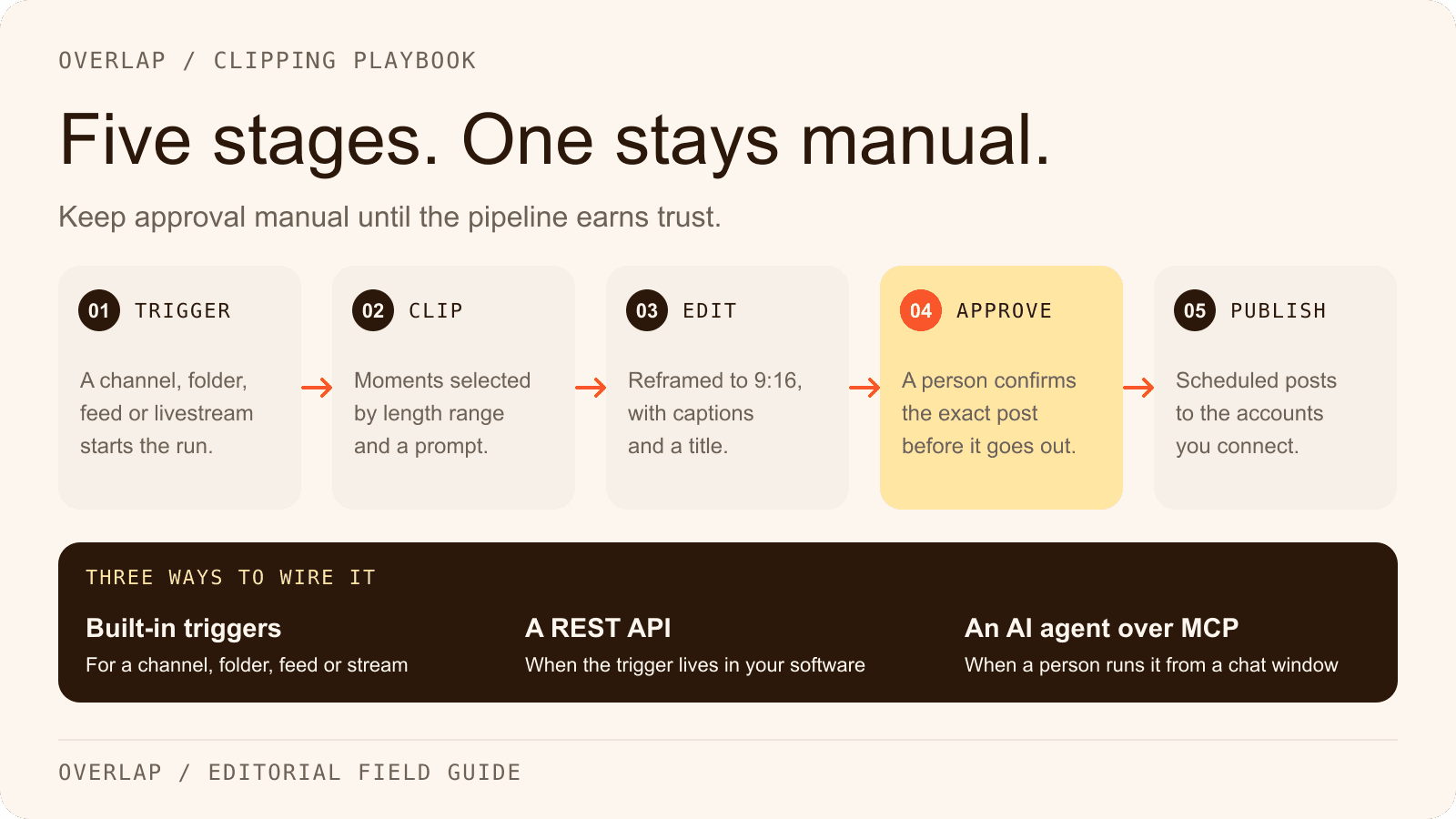
What the documentation establishes: a workflow is a trigger, a chain of editing nodes and an export; the documented sources are a manual upload, a YouTube channel or playlist, a Dropbox folder, an RSS, Atom or podcast feed, an audio livestream URL, RTMP or HLS livestreams and Frame.io; and clips can be edited in Studio, held for approval in the Social Calendar and posted to the nine platforms named above. The integrations page lists the sources and destinations, and the pricing page explains how each option is billed. Managed campaigns are priced on delivered views at a CPM agreed between $0.50 and $2.50, up to a monthly ceiling the customer sets.
What it does not establish: the documentation does not describe a Zoom source, a watched Google Drive folder, a Zapier app or outbound webhooks. Automation runs inside the workflow, through the REST API, or through the MCP server. Check any step your team depends on against the docs before promising it to a host or a client.
For an audio-only show, the Add Audiogram node renders a waveform video in place of a clip, and the RSS audiogram workflows start from a podcast feed for exactly that case.
Start with one episode you know well. Build the brief, run the seven steps with approval on, and keep the review log beside the results before deciding whether the next episode runs on its own. To see the same pipeline built step by step with a finished clip to judge it against, read From Podcast to Published Clips, or open the AI video clipper and try the single-upload version first.
Frequently Asked Questions
What is the best way to make podcast clips?
The best way is a repeatable workflow: a connected feed, a written selection brief, vertical framing, captions, a review step and a posting cadence. A clipping tool performs one or more of those steps; the workflow is what keeps the output consistent from one episode to the next.
How long should a podcast clip be?
Long enough to hold one complete thought and no longer. For a conversational show that usually lands between 30 and 90 seconds. YouTube treats vertical uploads of three minutes or less as Shorts, and Instagram recommends videos of three minutes or less for reaching people who do not follow you yet.
Do I need video to make podcast clips?
No. An audio-only show can publish audiograms, which pair the audio with a waveform, captions and a cover image in a vertical or horizontal frame. Overlap's Add Audiogram node and its RSS-triggered workflows are built for that case, though video clips have more to work with on the short-form feeds.
Should podcast clips post automatically?
Only after the brief has been reviewed across several episodes and the team has decided that, for this source and this destination, the review step can be skipped. A new show, a sensitive topic or an unfamiliar guest is a reason to keep approval on. Overlap holds clips for approval in its Social Calendar when that setting is enabled.
How many clips should a podcast post per day?
Fewer than the platform limit and more than zero. Overlap's documentation suggests a new account start at one post a day or one every other day, then move toward two to four TikToks, one to two Reels and one to two Shorts a day once posts are being distributed normally. Consistency inside one topic matters more than volume.
Can Overlap make podcast clips from an RSS feed?
Yes. The RSS Feed node watches a podcast, RSS or Atom feed and starts the workflow when a new episode appears, so the clips are cut without anyone uploading a file. A YouTube channel or playlist works the same way for shows that publish video.